




この記事のポイント
- The Android version of the “Gboard” app now supports system-wide font size synchronization.
- With this integration, the keyboard can automatically match the “font size” set in your Android system settings.
- Simply open the “Font size” setting within the Gboard app and tap the “Use default size” button.
The Android version of Google’s keyboard service, “Gboard,” now supports system-wide synchronization for its “font size” setting.
While the Android Gboard app has long allowed users to change the keyboard’s font size, this new integration means it can now automatically match the “font size” configured in your Android system settings. Specifically, you just need to open the “Font size” setting from within the Gboard app and tap the “Use default size” button.
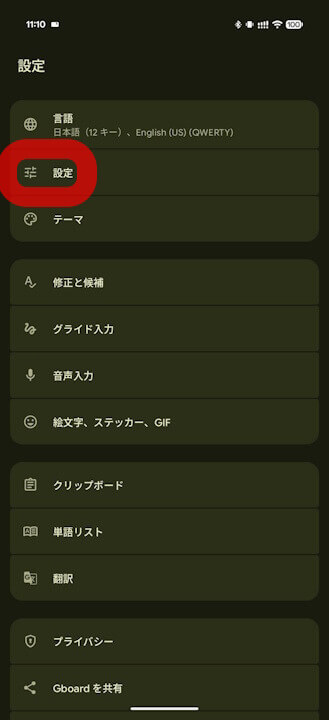
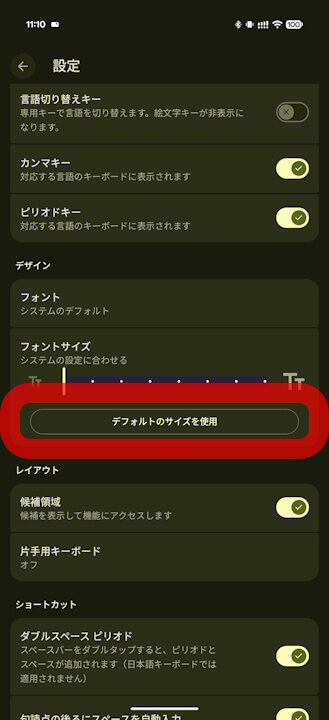
Additionally, it has been confirmed through “App Teardown” that the “Use default size” system synchronization feature for Gboard was implemented starting from app version v17.2.2.
<string name="_0_resource_name_obfuscated_res_0x7f1403e6">Keyboard Font size follows the system setting.</string>
<string name="_0_resource_name_obfuscated_res_0x7f1403e7">Emoji size follows system setting.</string>
<string name="_0_resource_name_obfuscated_res_0x7f1403e8">Keyboard font size follows system setting.</string>
<string name="_0_resource_name_obfuscated_res_0x7f1403e9">Emoji and keyboard font size follows system setting.</string>
<string name="_0_resource_name_obfuscated_res_0x7f1403ea">Keyboard font size updated</string>
<string name="_0_resource_name_obfuscated_res_0x7f1403eb">Emoji size updated</string>
<string name="_0_resource_name_obfuscated_res_0x7f1403ec">Keyboard font size updated</string>
<string name="_0_resource_name_obfuscated_res_0x7f1403ed">Emoji and keyboard font size updated</string>
<string name="_0_resource_name_obfuscated_res_0x7f1403e4">キーボードのフォントサイズはシステムの設定に従います。</string>
<string name="_0_resource_name_obfuscated_res_0x7f1403e5">絵文字のサイズはシステムの設定に従います。</string>
<string name="_0_resource_name_obfuscated_res_0x7f1403e6">キーボードのフォントサイズはシステムの設定に従います。</string>
<string name="_0_resource_name_obfuscated_res_0x7f1403e7">絵文字とキーボードのフォントサイズはシステムの設定に従います。</string>
<string name="_0_resource_name_obfuscated_res_0x7f1403e8">キーボードのフォントサイズを変更しました</string>
<string name="_0_resource_name_obfuscated_res_0x7f1403e9">絵文字のサイズを変更しました</string>
<string name="_0_resource_name_obfuscated_res_0x7f1403ea">キーボードのフォントサイズを変更しました</string>
<string name="_0_resource_name_obfuscated_res_0x7f1403eb">絵文字とキーボードのフォントサイズを変更しました</string>“Gboard” App Link
