




この記事のポイント
- App version v9.0 update was rolled out for the stock Android “Clock” app on Thursday, July 23, 2026.
- The “Volume buttons” setting for alarms now allows users to assign the “Snooze” temporary stop function.
- Joining the previous options of “Change volume,” “Dismiss,” and “Do nothing,” “Snooze” is now newly added, giving users 4 patterns to choose from.
On Thursday, July 23, 2026, app version v9.0 began rolling out for the stock Android “Clock” app, primarily used on Google Pixel devices and other Android devices.
With this v9.0 update for the Android “Clock” app, it is now possible to assign the temporary stop function “Snooze” to the “Volume buttons” setting when using “Alarm.”
<string name="timer_reset_metric_style">{timer_count, plural, =1{Reset} =2{Reset both timers} other{Reset all # timers}}</string>
<string name="timer_stop_metric_style">{timer_count, plural, =1{Stop} =2{Stop both timers} other{Stop all # timers}}</string>
<string name="timer_reset_metric_style">{timer_count,plural, =1{リセット}=2{両方のタイマーをリセット}other{# 個のタイマーをリセット}}</string>
<string name="timer_stop_metric_style">{timer_count,plural, =1{停止}=2{両方のタイマーを停止}other{# 個のタイマーを停止}}</string>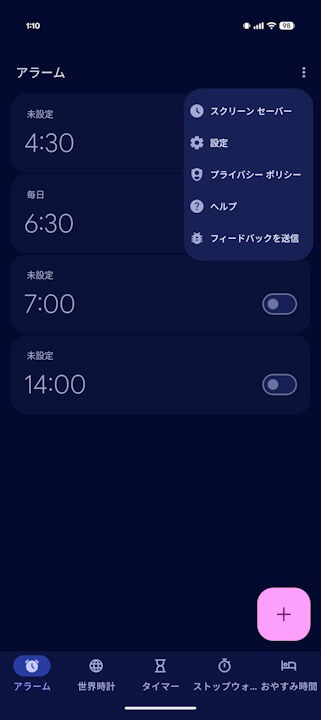
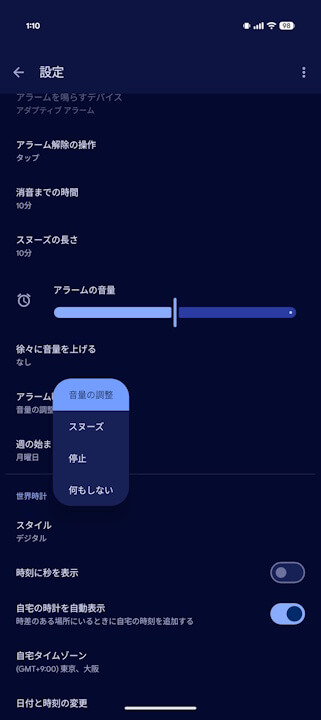
Previously, the “Volume buttons” alarm setting allowed users to assign any function from among three choices: “Change volume,” “Dismiss,” and “Do nothing.” Starting with v9.0, “Snooze” has been newly added, allowing users to choose from 4 patterns.
“Clock” App Link
