




- In late July 2026, the “Appearance” feature in the Android version of the “Chrome” app finally started rolling out widely.
- A feature that allows users to customize the background design of the “New Tab” page to their preference.
- Rolling out gradually starting with app version v150.
About three and a half months ago in mid-April 2026, the design customization feature for the “New Tab” page, “Appearance” (Customize homepage), began rolling out in the Android version of Google’s browser service, “Chrome.”
However, it was initially rolled out to only a very small number of Android devices, and the “Appearance” feature subsequently disappeared for a time. Now, in late July 2026, the “Appearance” feature in the Android version of the “Chrome” app has finally begun its wider rollout.
The “Appearance” feature in the Android “Chrome” app lets you customize the background design of the “New Tab” page to your liking. While this has long been available on the desktop version of “Chrome” as well as the iOS version of the “Chrome” app, it is finally making its way to the Android version.


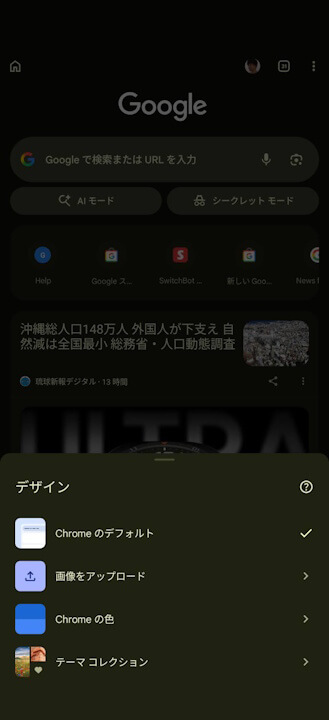
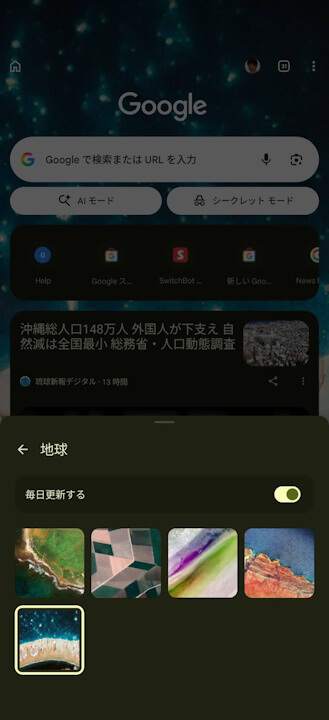
The “Appearance” feature in the Android “Chrome” app can be accessed by tapping the “︙” (menu) icon on the “New Tab” page, then selecting “Edit new tab page” followed by “Appearance.”
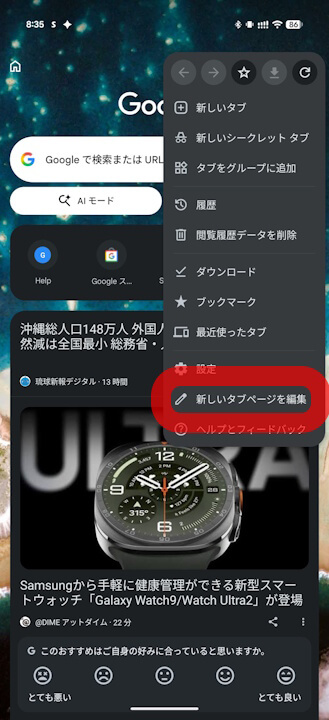
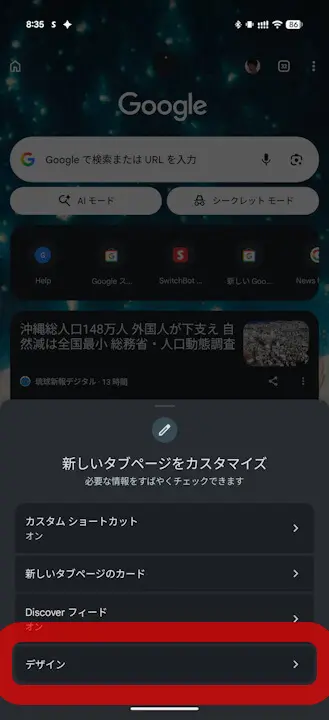
Please note that the “Appearance” feature in the Android version of the “Chrome” app is rolling out gradually starting with app version v150.
“Chrome” App Link
