



- Settings appear to be on the way for backing up photos and videos from Android devices to the Google cloud without needing “Google Photos.”
- Analysis of the app files from the Android “Google Play services” app version v26.42 update revealed that new resource code has been added to Android’s backup settings regarding a new option to back up photos and videos to the Google cloud, “Google One Cloud.”
- First-party gallery apps from Android manufacturers will be able to mimic the behavior of “Google Photos” without actually requiring the “Google Photos” app.
Android is an OS developed by Google.
Because of this, the standard procedure has been to back up captured photos and saved videos to Google’s online photo library service, “Google Photos.” However, depending on Android devices featuring custom UIs made by third-party manufacturers, proprietary gallery apps are sometimes pre-installed, making the “Google Photos” app redundant as a gallery.
That being said, the cloud backup feature of “Google Photos” is quite impressive because it allows photos and videos to be shared seamlessly across devices logged into the same Google account. Due to this, many Android users likely use their manufacturer’s proprietary gallery app while also keeping backups turned on in “Google Photos.”
In fact, unless a manufacturer-specific cloud backup system is in place, photo and video backups on Android typically rely on “Google Photos.” However, it appears that settings are finally on the way to back up photos and videos from Android devices directly to the Google cloud without needing “Google Photos.”
We are reporting on these details through our original app file analysis content, “App Analysis,” on our site “Jetstream.”
「アプリ解析」
当サイトの「アプリ解析」カテゴリで公開している記事では、最新 Android アプリを逆コンパイルして独自に解析し、今後実装される可能性のある新機能や変更点などをお届けします。正式リリース前の新機能や変更となるため開発段階の未確定な情報も含まれますが、Android アプリの今後のアップデート動向をいち早くキャッチできる、ほかにはない当サイトオリジナルコンテンツです。
当サイトオリジナルの「アプリ解析」コンテンツを見逃さないよう、ぜひ Google の「優先ソース」に当サイト「Jetstream 」を登録してください。

An analysis of the app files from the Android “Google Play services” app version v26.42 update, which rolled out around Wednesday, October 21, 2026, confirmed that new resource code regarding settings to back up photos and videos to the Google cloud, “Google One Cloud,” has been added to Android’s backup settings. This means that a backup setting for “Google One Cloud”—separate from “Google Photos”—will be added directly within Android’s backup settings.
Furthermore, when “Google One Cloud” backup is selected, the Android device’s gallery app becomes the primary app for viewing photos and videos. In other words, the Android manufacturer’s proprietary gallery app will mimic the behavior of “Google Photos” without requiring the “Google Photos” app itself.
Screen UI concepts for the “Google One Cloud” backup settings, based on this newly discovered resource code, have also come to light.
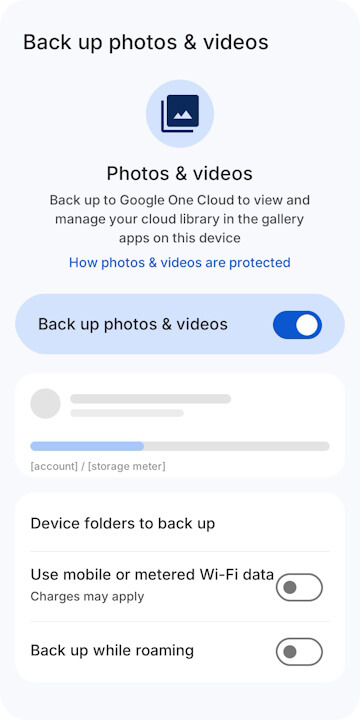
<string name="backup_settings_os_media_title">Back up photos & videos</string>
<string name="backup_settings_os_media_intro_title">Photos & videos</string>
<string name="backup_settings_os_media_intro_description">Back up to Google One Cloud to view and manage your cloud library in the gallery apps on this device</string>
<string name="backup_settings_os_media_intro_learn_more">How photos & videos are protected</string>
<string name="backup_settings_os_media_folders_title">Device folders to back up</string>
<string name="backup_settings_os_media_roaming_title">Back up while roaming</string><PreferenceScreen xmlns:android="http://schemas.android.com/apk/res/android">
<com.android.settingslib.widget.IntroPreference android:icon="@drawable/gs_photo_library_vd_theme_48" android:title="@string/backup_settings_os_media_intro_title" android:key="@string/backup_settings_os_media_preference_key_intro" android:summary="@string/backup_settings_os_media_intro_description"/>
<com.android.settingslib.widget.MainSwitchPreference android:title="@string/backup_settings_os_media_title" android:key="@string/backup_settings_os_media_preference_key_toggle_main"/>
<PreferenceCategory>
<com.google.android.gms.backup.settings.devicedata.profilepreference.ProfilePreference android:key="@string/backup_settings_os_media_preference_key_profile"/>
<com.google.android.gms.backup.settings.devicedata.storagemeter.StorageMeterPreference android:key="@string/backup_settings_os_media_preference_key_storage_meter"/>
</PreferenceCategory>
<PreferenceCategory>
<Preference android:title="@string/backup_settings_os_media_folders_title" android:key="@string/backup_settings_os_media_preference_key_folders"/>
<SwitchPreferenceCompat android:persistent="false" android:title="@string/backup_settings_common_toggle_mobile_data" android:key="@string/backup_settings_os_media_preference_key_metered_data" android:summary="@string/backup_charges_may_apply"/>
<SwitchPreferenceCompat android:persistent="false" android:title="@string/backup_settings_os_media_roaming_title" android:key="@string/backup_settings_os_media_preference_key_roaming"/>
</PreferenceCategory>
</PreferenceScreen>While the “Google One Cloud” backup settings for photos and videos identified here are expected to target Android devices other than Google Pixel devices, specific target models have not yet been disclosed. The official rollout of the “Google One Cloud” backup settings has also not yet been confirmed.
Google Play Services App Link
