


- Android Auto version of the “Google Maps” app has quietly rolled out traffic light icons.
- Traffic lights are now displayed ahead along your travel direction on the map view even when car navigation is not in use.
- Not all traffic lights on the map are shown; only those positioned along your direction of travel appear.
Following the rollout of the “Speedometer” feature in late September 2026, the “Google Maps” app for Google’s car operating system, Android Auto, has now quietly begun rolling out traffic light displays as well.
The traffic light display feature in the Android Auto version of “Google Maps” shows traffic lights positioned along your direction of travel on the map view when car navigation is not actively in use. Rather than displaying every single traffic light located on the map, it specifically shows only the ones situated ahead in your traveling direction.
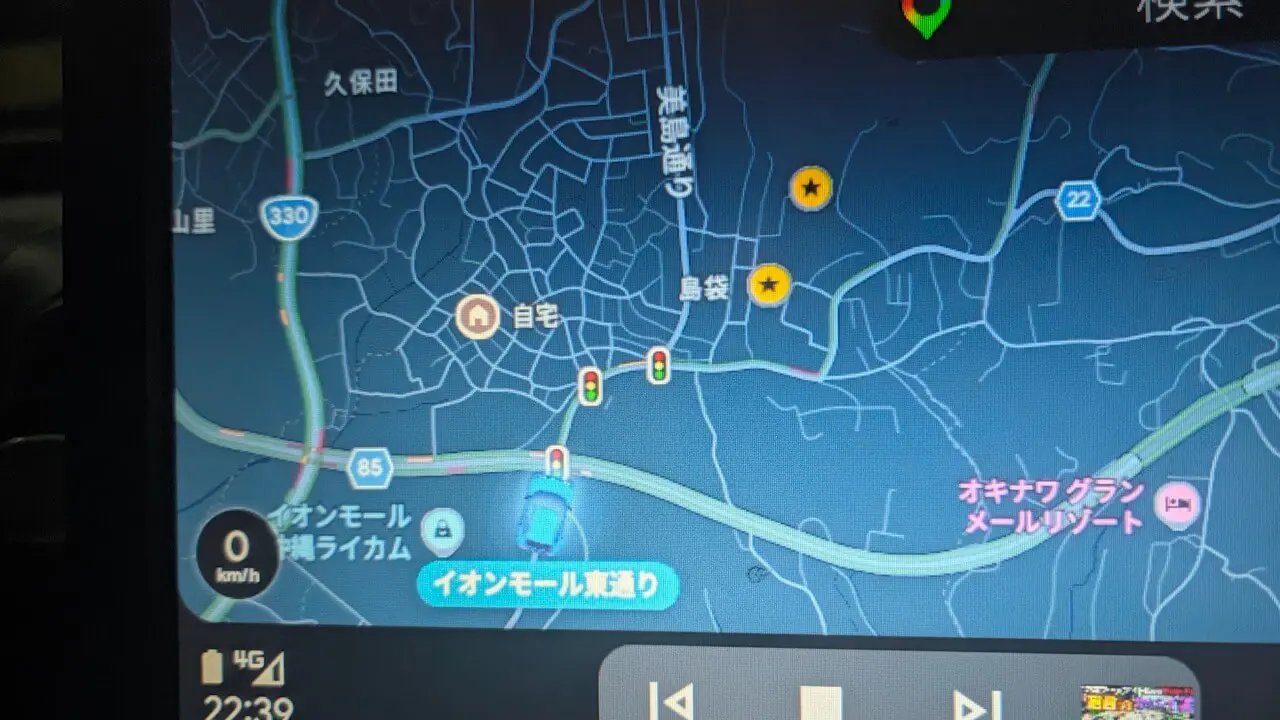
There is no specific ON / OFF toggle for the traffic light display in the Android Auto “Google Maps” app. While it shouldn’t cause any inconvenience, it appears automatically and by default.
App Links
“Android Auto”

“Google Maps”