





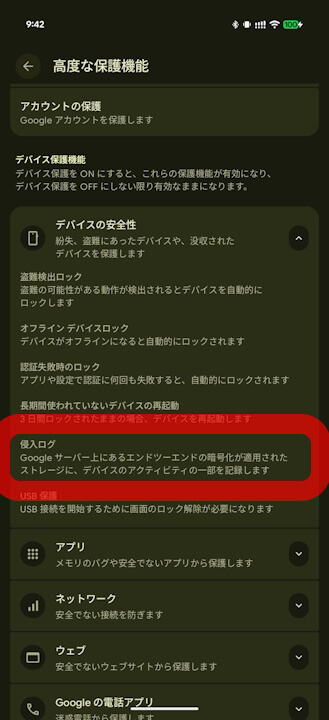
- The “Intrusion Log” feature, part of the “Device Safety” section in Android 16’s “Advanced Protection” for Android devices and Google accounts, began a full-scale rollout around May 2026.
- The “Intrusion Log” is an access logging feature that allows users to review “when and what happened” if security issues, such as device hijacking or unauthorized access, are suspected.
- Its most notable feature is that access logs cannot be deleted manually, preventing malicious third parties from destroying evidence.
The “Intrusion Log” feature, a new addition to the “Device Safety” section of the Advanced Protection program for Android devices and Google accounts—introduced as a key capability of Android 16—began its full-scale rollout around May 2026.
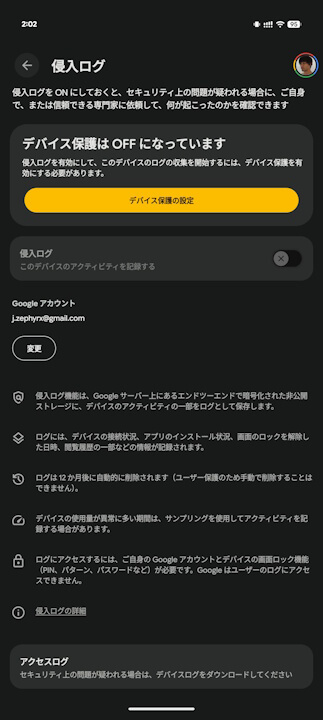
The “Intrusion Log” is an access logging feature designed to help users track “when and what happened” in the event of suspected security incidents, such as device hijacking or unauthorized access. Data including network connection status, app installations, screen lock unlock timestamps, and browsing history are recorded in the “Access Log” and stored for 12 months.
While the recording of the “Access Log” begins automatically once “Advanced Protection (Device Protection)” is enabled, its most significant feature is that these logs cannot be manually deleted, which prevents malicious third parties from covering their tracks. Please note that “Intrusion Log” is an integrated part of “Advanced Protection” and does not have an individual toggle switch; if “Advanced Protection” is not enabled, the “Intrusion Log” will not function.
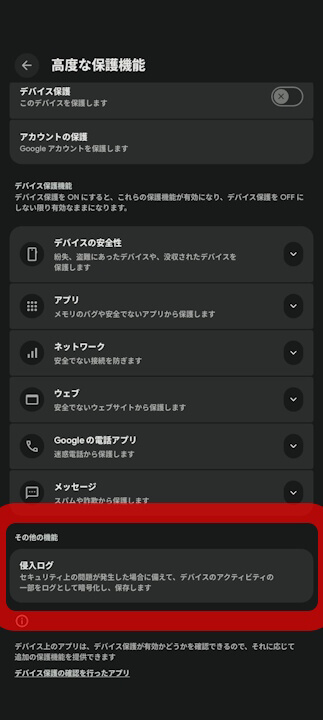
Once “Advanced Protection” is enabled, you can download your “Access Logs” via the “Intrusion Log” settings page found in the “Other Features” section.
Incidentally, while the “Intrusion Log” for “Advanced Protection” was spotted during an initial rollout in January 2026, it was inexplicably removed shortly thereafter. It has since reappeared around May 2026 and is now seeing a full-scale deployment.
“Google Play Services” App Link
