


- In late November 2026, as Google had announced, an update to the “Gemini” privacy setting “Gemini History” was rolled out.
- On the updated “Gemini History” settings page, in addition to the option to turn “History” on or off and set the automatic deletion period, a new section titled “Help train generative AI models” has been added.
- Two options—“Chat content” and “Audio, Gemini Live videos, and screen sharing”—are provided as checkboxes, allowing users to individually enable or disable the use of each type of content for training.
As Google previously announced on Wednesday, November 18, 2026, as a major update to the “Gemini” app privacy settings, the updated “Gemini Apps Activity” privacy settings began rolling out in late November 2026.
On the updated Gemini Apps Activity settings page, along with the options to turn “Activity” on or off and set an auto-delete period, a new “Help train generative AI models” section has been added. Within this section, two items—”Chat content” and “Audio, Gemini Live video, and screen sharing”—are provided in a checkbox format, allowing users to individually toggle the training use for each feature on or off.

 jetstream.blog
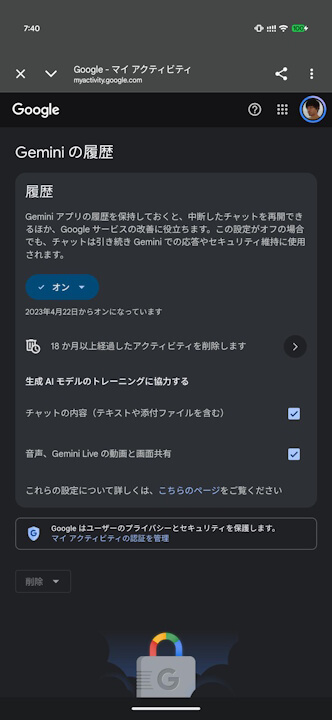
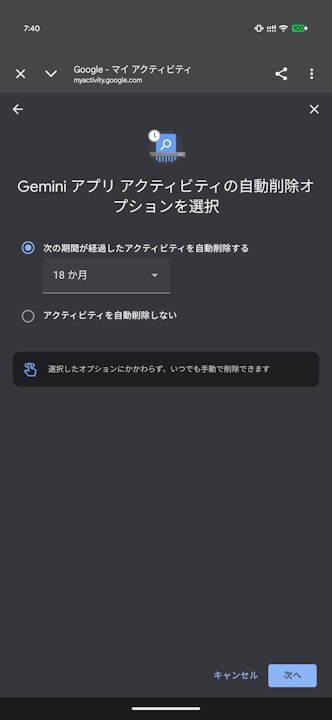
In short, the updated Gemini Apps Activity settings page now gives users finer control over their activity history for “Gemini” and “Gemini Live.” While there is no strict necessity to change your settings, feel free to check out the Gemini Apps Activity settings page if you are interested.
Source: Google