


- Google Photos is reportedly implementing a new feature that suggests switching to a different Google Account for backups when backing up stops due to full storage.
- An analysis of the app files from the Android version of the “Google Photos” app v8.1.0.1016919706 update, released on Friday, November 13, 2026, confirmed the addition of resource code for a dialog that suggests switching the backup destination to another Google Account when backups stop due to insufficient storage space.
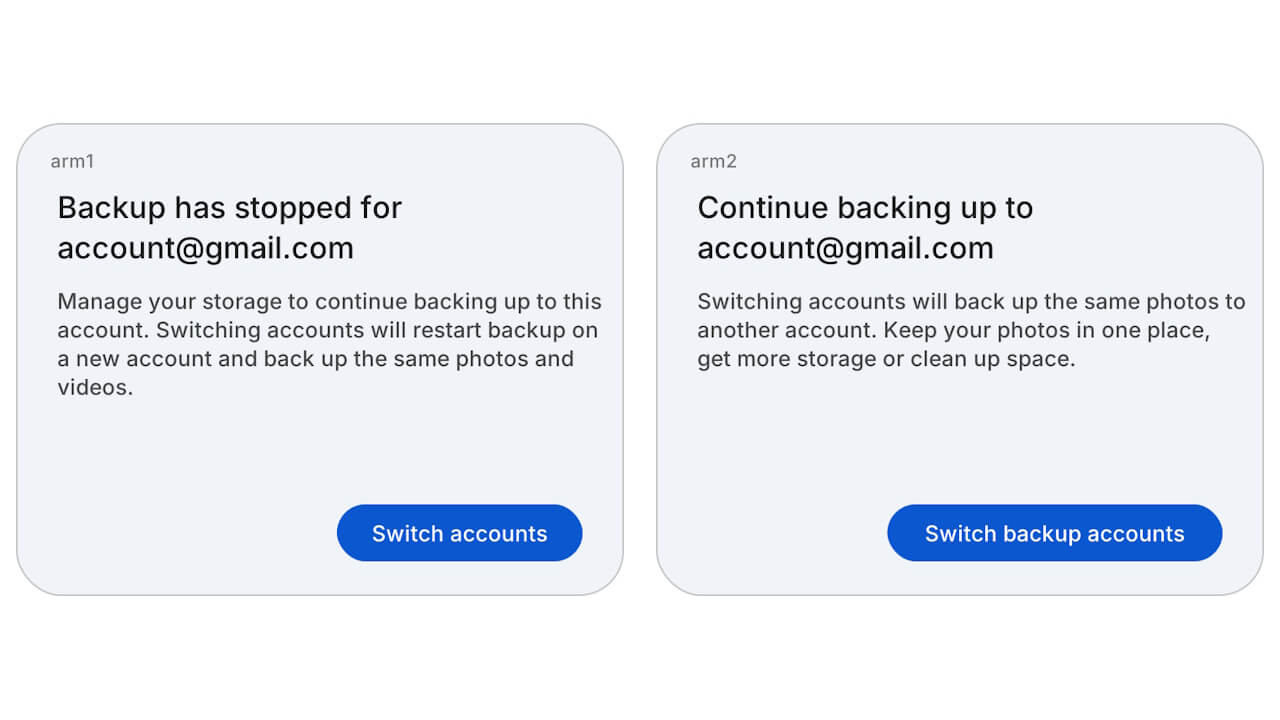
- Two patterns of dialog wording have been prepared.
It appears that the online photo library service “Google Photos” is getting a new feature that suggests switching to a different Google Account for backups when the backup process stops due to insufficient storage space.
We bring you the details through our original app file analysis report content, “App Analysis,” here on “Jetstream.”
「アプリ解析」
当サイトの「アプリ解析」カテゴリで公開している記事では、最新 Android アプリを逆コンパイルして独自に解析し、今後実装される可能性のある新機能や変更点などをお届けします。正式リリース前の新機能や変更となるため開発段階の未確定な情報も含まれますが、Android アプリの今後のアップデート動向をいち早くキャッチできる、ほかにはない当サイトオリジナルコンテンツです。
当サイトオリジナルの「アプリ解析」コンテンツを見逃さないよう、ぜひ Google の「優先ソース」に当サイト「Jetstream 」を登録してください。

As a result of analyzing the app files from the Android version of the “Google Photos” app v8.1.0.1016919706 update, released on Friday, November 13, 2026, we confirmed that resource code has been added regarding a dialog that suggests switching the backup destination to another Google Account when backups halt due to a lack of Google Account storage. Please note that the actual rollout of this account-switching suggestion has not yet been confirmed.
<string name="photos_backup_settings_oos_switch_arm1_title">Backup has stopped for %1$s</string>
<string name="photos_backup_settings_oos_switch_arm1_body">Manage your storage to continue backing up to this account. Switching accounts will restart backup on a new account and back up the same photos and videos.</string>
<string name="photos_backup_settings_oos_switch_arm1_continue_button">Switch accounts</string>
<string name="photos_backup_settings_oos_switch_arm2_title">Continue backing up to %1$s</string>
<string name="photos_backup_settings_oos_switch_arm2_body">Switching accounts will back up the same photos to another account. Keep your photos in one place, get more storage or clean up space.</string>
<string name="photos_backup_settings_oos_switch_arm2_continue_button">Switch backup accounts</string>
Two variations of the dialog wording have been prepared. The first pattern leads by informing the user that backup has stopped with “Backup has stopped for %1$s” and suggests switching to a different account via the “Switch accounts” button. The second pattern leads by stating that backing up can continue with another account using “Continue backing up to %1$s”, and suggests the switch via the “Switch backup accounts” button. The “%1$s” is expected to be replaced by the account name.
Both patterns explain that switching to a different account will restart the backup of the same photos and videos on the new account. This is likely a test to compare the two patterns and determine which wording is more effective and easier to understand.
Until now, when backups stopped due to full storage in “Google Photos,” the focus was mainly on prompts to manage storage or get more space, such as “Manage storage.” While users could manually change the backup account through the settings, there was no direct pathway to switch accounts straight from the low-storage notification.
Going forward, an option to switch to a different Google Account will be added to the prompts when backups stop due to insufficient storage. For example, even if you run out of the 15 GB of free storage on your primary Google Account, you can keep your photos and videos backing up without interruption by switching the backup destination to another Google Account with available space.
“Google Photos” App Link