




- Google Pixel devices’ “Journal” app has finally rolled out the voice-based entry creation feature through integration with the “Recorder” app.
- In the entry creation screen’s “Add item” menu, alongside “Take photo / video” and “Add photo,” two new options have been added: “Record new audio” and “Add existing recording.”
- Selecting “Record new audio” allows you to start a new recording on the spot, while selecting “Add existing recording” lets you import audio recordings already saved in the “Recorder” app.
For Google Pixel devices, the official Google writing and meditation app “Journal”—designed to jot down your thoughts, feelings, and everyday life events—has finally begun rolling out the “voice” entry creation feature through integration with the “Recorder” app.
Until now, the “Journal” app was designed to create entries like a diary using text input. However, an app teardown of the “Journal” app v2026.10.27.1007878601 update released on Tuesday, November 10, 2026, confirmed that resource code related to the voice entry creation feature had been added. We then confirmed that the feature officially began rolling out around Saturday, November 14, 2026.


In practice, two new options—”Record new audio” and “Add existing recording”—have been added to the “Add item” menu on the entry creation screen, alongside the existing “Take photo / video” and “Add photo” options.
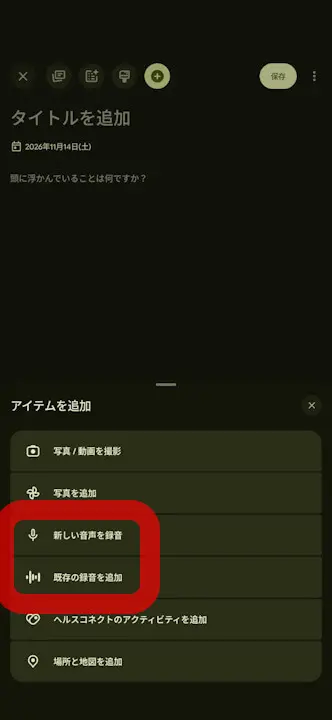
“Add existing recording”
Recording itself is not done within the “Journal” app alone, but rather through the “Recorder” app. Selecting “Record new audio” lets you start a brand new recording on the spot, while selecting “Add existing recording” allows you to import audio data already saved in the “Recorder” app.
Once the import is complete, the transcribed text is reflected in the entry, and the recorded audio file itself is also attached, allowing you to play back the audio anytime within the “Journal” app. With the integration of the “Recorder” app into the “Journal” app, it should become even easier than before to record your daily logs using your voice.
“Journal” App Link