




- Google announces the November 2026 Pixel Drop featuring new updates for Google Pixel devices.
- Expansion of “Gemini Intelligence” to the Pixel 10 series (excluding Pixel 10a), hands-free automatic response for “Take a Message” in Transit Mode (useful during train commutes in Japan), Japanese language support for “Notification Organizer,” and more.
- Massive scale of new features and function expansions.
On Tuesday, November 10, 2026 (local time), Google began rolling out the monthly software update for November 2026, which includes routine security vulnerability fixes and feature enhancements for Google Pixel devices, alongside the announcement of the November 2026 Pixel Drop.
The November 2026 Pixel Drop introduces a massive wave of new features and expansions. Highlights include bringing “Gemini Intelligence” to the Pixel 10 series (excluding Pixel 10a), hands-free automatic response for “Take a Message” in Transit Mode (ideal for train commutes in Japan), and Japanese language support for “Notification Organizer.” The update begins rolling out sequentially today and will expand over the coming weeks.


Pixel 10 Support for “Gemini Intelligence”
The integrated AI feature “Gemini Intelligence,” previously featured on the “Pixel 11” series, is now expanding to the “Pixel 10” lineup, including the Pixel 10, Pixel 10 Pro, Pixel 10 Pro XL, and Pixel 10 Pro Fold (excluding the Pixel 10a).
Gboard Voice Typing Feature “Rambler (AI Voice Typing)”
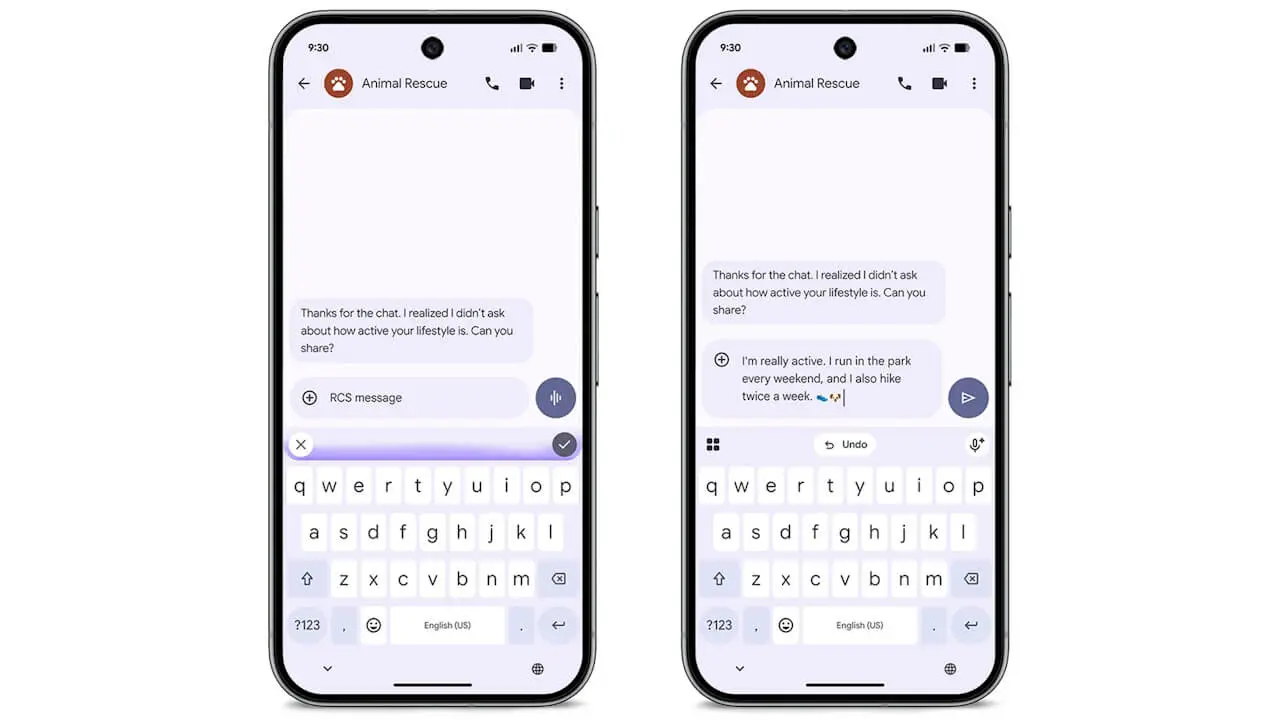
With “Gemini Intelligence,” voice typing on the Gboard keyboard app receives a major upgrade, introducing the new “Rambler (AI Voice Typing)” feature.
“AI Voice Typing” automatically removes filler words like “um” as you speak naturally, and intelligently reframes self-corrections—such as changing “actually, make that Wednesday instead of Thursday”—into clean, context-aware text. Furthermore, it dynamically follows along even if you switch languages mid-sentence.
“Gboard” App Link

Gemini Multi-Step Task Automation
A feature allowing Gemini to handle multi-step everyday routine tasks in the background—such as ordering groceries, booking rides, reordering takeout, and searching for reservations at your favorite restaurants—is rolling out in the US, UK, India, and Japan.
While Gemini operates apps in the background, users can check progress at any time or cancel tasks midway.
“Gemini” App Link
“Anticipatory Assist”
Based on screen context, “Anticipatory Assist” steps in to offer one-tap sharing of your Estimated Time of Arrival (ETA) when someone asks when you’ll arrive, or helps you find dinner spots.
“Anticipatory Assist” is also scheduled to come to the Google Pixel Watch 4 soon.
“Custom Widget” Creation
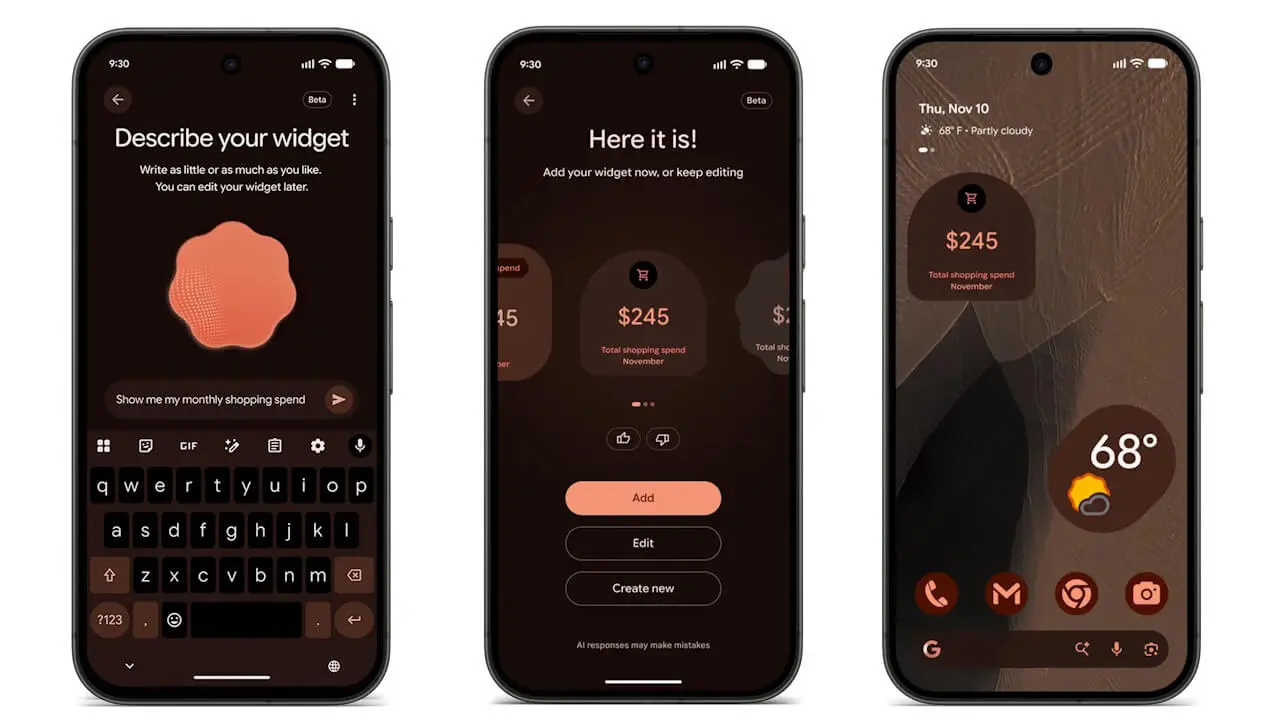
You can now generate and place personalized “Custom Widgets” on your home screen, such as a monthly expense tracker, game-day widgets in your favorite team’s colors, or travel countdowns that automatically pull in flight and reservation details.
These “Custom Widgets” are supported on the Pixel 10 and Pixel 11 series (excluding Pixel 10a) and will soon expand to the Google Pixel Watch 4 and Google Pixel Watch 5.
Automatic “Transit Mode” Activation
A new feature for Google Pixel devices (Pixel 6a and newer) automatically turns on “Transit Mode” when it detects that you are riding a train.
“Transit Mode” automatically adjusts sound settings, turns on Bluetooth, and enables “Motion Assist” to reduce motion sickness for smoother browsing.
Hands-Free Auto-Response for “Take a Message” (Japan Only)
Exclusive to Japan on Pixel 6a and newer devices, the “Take a Message” feature during “Transit Mode” now operates completely hands-free.
When you receive a call while riding a train, the ringtone is silenced and the call is routed directly to the assistant, which generates a transcript and summary so you can review the details calmly after getting off and call back.
Expansion of “Notification Summaries” Languages
“Notification summaries,” which let you grasp long message conversations at a glance on Pixel 9 series and newer devices (excluding Pixel 9a / Pixel 10a), are adding support for German, French, Spanish, Italian, Hindi, and Traditional Chinese in Germany, Canada, France, Spain, Italy, India, and Taiwan. Japanese language support was already rolled out in March 2026.
Additionally, “Notification summaries” will soon roll out to Google Pixel Watch 3, Google Pixel Watch 4, and Google Pixel Watch 5 running Wear OS 7.1 or later.
Japanese Language Support for “Notification Organizer”
“Notification Organizer,” a notification management feature for Pixel 9 series and newer (excluding Pixel 9a / Pixel 10a) that automatically groups and silences low-priority notifications like promotions and news, is now rolling out in Japan (Japanese) and Germany (German).
Pixel 11 “Call Screen” Enhancements
“Call Screen,” which answers calls from unknown numbers, is getting an upgrade for the Pixel 11 series in the US.
Gemini will ask callers for the reason for their call in a more natural, conversational tone, allowing users to jump into the conversation or end the call at any time while viewing real-time transcriptions on screen. It is scheduled to integrate seamlessly with the Google Pixel Watch 4 and Google Pixel Watch 5 within the coming weeks.
Expansion of “Gemini” Proxy Calling Public Beta
The public beta test for proxy calling—where Gemini makes everyday phone calls on your behalf, such as checking inventory at local stores or rescheduling appointments, handling hold times, voice menus, and conversations—is expanding to Gemini users on the Pixel 10 and Pixel 11 series.
You can check the status via real-time live transcription during the call and seamlessly take over the conversation yourself whenever needed.
New “Custom Icons” Styles Added
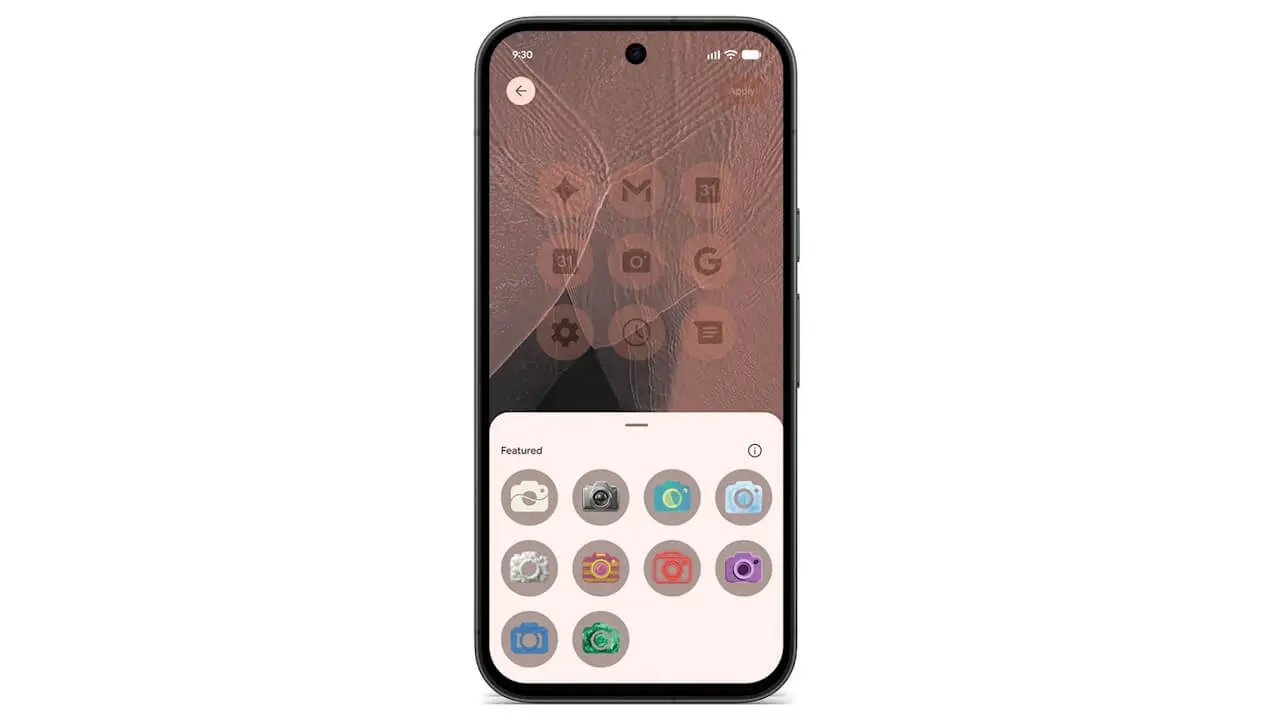
New styles are being added to “Custom Icons” for Google Pixel devices (Pixel 6a and newer), allowing you to theme all your home screen app icons in a consistent design.
Expansion of “Pixel Search” Supported Devices
“Pixel search,” which lets you cross-search on-device photos, recent emails, messages, calendar events, and device settings, is expanding to all Google Pixel devices from the Pixel 6a onward.
“Google Pixel All-in-One Search” App Link
“Calculator” App Enhancements
The “Calculator” app is integrating “Ask math,” which provides step-by-step math problem-solving in natural language and custom tools, alongside a “Unit Conversion” module that instantly handles unit conversions and real-time currency conversions inline.
“Calculator” App Link
Google Messages “HiLight” Support
The “HiLight” rear lighting notification feature found on the Pixel 11 Pro, Pixel 11 Pro XL, and Pixel 11 Pro Fold now supports the “Google Messages” app.
When your Google Pixel device is placed face down, it will gently glow in a custom color assigned to favorite contacts whenever you receive a message or call from them.
“Google Messages” App Link
Expansion of Pixel 10 “Extreme Charging Mode”
“Extreme Charging Mode,” which temporarily pauses background processing like app updates to maximize charging performance, is expanding to the Pixel 10 series (excluding Pixel 10a). You can charge rapidly and efficiently without missing important calls, messages, or notifications.
“Pixel VIPs” Update
“Pixel VIPs,” which helps you manage connections with your closest contacts, is receiving an update for Google Pixel devices from the Pixel 6 onward.
Directly from the “VIP” hub, you can now request and share real-time location, view complete addresses, check how many miles away someone is, and see your contact’s smartphone battery percentage (%) as well.
“Pixel VIPs” App Link
New “Family” Hub
A dedicated family space, the “Family” hub, is being newly established within the settings of Google Pixel devices from the Pixel 6 onward.
It allows you to manage everything in one place—checking real-time location sharing, passwords, calendars, and sharing Google One and other subscription perks among family members.
Google Pixel Watch Automatic Unlock
For combinations of UWB-equipped Google Pixel Watches (Pixel Watch 3, Pixel Watch 4, Pixel Watch 5) and UWB-compatible smartphones from the Pixel 8 series onward (including Pro, Pro XL, Pro Fold, etc., excluding a-series), a feature will roll out over the coming weeks to automatically unlock your nearby smartphone when worn on your wrist, skipping the Google Pixel Watch PIN or pattern entry.
Google Pixel Watch “Workout” Enhancements
The “Step-by-step Workouts” feature is rolling out to the Google Pixel Watch 3 and newer models.
You can now check routines created by your Google Health Coach or custom workouts created in the Google Health app, log reps and weights, and track various metrics directly from your wrist on your Google Pixel Watch.
Launch of “Google Pixel Tag” Item Tracker
On the hardware front, the “Google Pixel Tag”—a slim UWB-enabled Bluetooth tracker designed to fit in a wallet with a battery life of over a year—will be released on Wednesday, November 11, 2026 (local time).
The Google Pixel Tag is priced at $29.99 for a single pack and $99.99 for a 4-pack, supporting the “Find Hub” network comprised of over 1 billion Android devices and visual direction/distance guidance via UWB.
Launch of Google Fi Wireless “Super Network”
In the US, Google Fi Wireless has begun offering a new “Super Network” for Pixel 9 and newer devices. It utilizes MEP (Multiple Enabled Profiles) technology to automatically switch between two major US 5G networks and millions of secure Wi-Fi networks.
Source: Google (https://blog.google/products-and-platforms/devices/pixel/november-2026-pixel-drop/)