- Google Photos is expected to roll out a new feature called “Group camera,” designed to easily capture memories at multi-person events and parties such as family/friend trips, weddings, and birthday parties.
- Analysis of the APK files from the Android version of the “Google Photos” app v7.98.0.1007591100 update revealed that resource codes related to the new “Group camera” feature have been added.
- “Group camera” is a convenient feature where photos taken by pre-invited users in a group are automatically gathered into a single “shared album.”
The online photo library service “Google Photos” is expected to introduce a new feature called “Group camera,” which is ideal for creating memories at group events and parties, such as trips with family and friends, weddings, and birthday parties.
Here are the details from our app file analysis report content, “App Analysis,” brought to you exclusively by our site, “Jetstream.”
「アプリ解析」
当サイトの「アプリ解析」カテゴリで公開している記事では、最新 Android アプリを逆コンパイルして独自に解析し、今後実装される可能性のある新機能や変更点などをお届けします。正式リリース前の新機能や変更となるため開発段階の未確定な情報も含まれますが、Android アプリの今後のアップデート動向をいち早くキャッチできる、ほかにはない当サイトオリジナルコンテンツです。
当サイトオリジナルの「アプリ解析」コンテンツを見逃さないよう、ぜひ Google の「優先ソース」に当サイト「Jetstream 」を登録してください。

An analysis of the app files from the Android “Google Photos” app v7.98.0.1007591100 update, released on Wednesday, October 28, 2026, confirmed that resource codes related to the new “Group camera” feature have been added. UI image layouts dedicated to the “Group camera” have also been discovered.
Please note that the actual rollout of the “Group camera” has not yet been confirmed, and the launch timeframe remains unknown at this time.
<string name="photos_flowers_collab_cam_promo_title">Create a group camera</string>
<string name="photos_flowers_collab_cam_promo_photos_save_to_album">Everyone’s photos save to one album</string>
<string name="photos_flowers_collab_cam_promo_group_notified">Group is notified when camera starts</string>
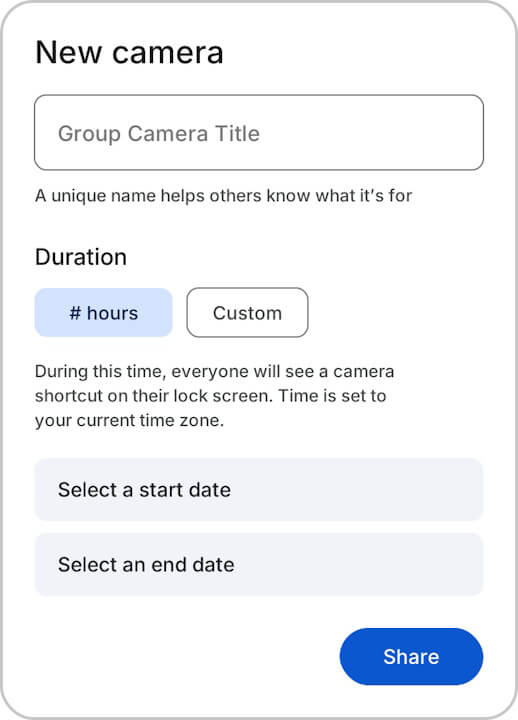
<string name="photos_flowers_collab_cam_setup_title">New camera</string>
<string name="photos_flowers_collab_cam_setup_expiration_title">Duration</string>
<string name="photos_flowers_collab_cam_setup_expiration_description">During this time, everyone will see a camera shortcut on their lock screen. Time is set to your current time zone.</string>
<string name="photos_flowers_collab_cam_join_album_title">%1$s invited you to join “%2$s”</string>
<string name="photos_flowers_collab_cam_join_album_subtext">Use this camera to share photos automatically with the group. You’ll get a notification when it’s time to use it.</string>
<string name="photos_flowers_notification_subtitle">Snap with the group camera now</string>
<activity android:theme="@7F151042" android:name="com.google.android.apps.photos.flowers.FlowersActivity" android:exported="false" android:launchMode="1" android:screenOrientation="5"/>
The newly added internal feature in “Google Photos,” “Group camera,” is a convenient tool that automatically collects photos taken by pre-invited group members into a single “shared album.” Previously, creating a “shared album” required users to manually add photos and videos to the album after the fact.
However, with the new “Group camera” feature, once the creator sets a name and duration (start/end date and time) and invites users, a “Group camera” shortcut will appear on the lock screens of the invited users’ smart devices during that specified period. When photos or videos are taken by launching the camera through that “Group camera” shortcut, they are automatically added to the “Group camera” shared album.
By utilizing the “Group camera,” users can save a significant amount of hassle since there is no need to manually add photos and videos to a “shared album” after taking them. However, whether it will actually see widespread use is another question, especially since a “group camera” workflow is not yet a common cultural habit.
Google Photos App Links