






- Android 用「Google メッセージ」アプリにおける「強化保護モード」の設定仕様が明らかに。
- Android 用「Google メッセージ」アプリ v20261013_00_RC00 アップデートのアプリファイルを解析した結果、従来の「保護と安全」設定の仕様変更に関するリソースコードが追加されていることを確認。
- 「Enhanced protection(強化保護モード)」「Standard protection(標準保護)」「No protection (not recommended)(保護なし・非推奨)」の 3 段階選択仕様となる模様。
Google は先日 2026 年 10 月 14 日(水)、Android デバイス向けの SMS / MMS / RCS クライアントアプリ「Google メッセージ」に展開する、高性能 AI モデル活用プライバシー保護基盤「Private AI Compute」を用いる詐欺検出機能強化モード「強化保護モード(Enhanced protection)」を発表しました。
この、Android 用「Google メッセージ」アプリの「強化保護モード(Enhanced protection)」は、今のところまだ展開は確認されていませんが、当サイト「Jetstream」オリジナルのアプリファイル解析報告コンテンツ「アプリ解析」にて設定仕様が明らかとなりました。

 jetstream.blog
「アプリ解析」
当サイトの「アプリ解析」カテゴリで公開している記事では、最新 Android アプリを逆コンパイルして独自に解析し、今後実装される可能性のある新機能や変更点などをお届けします。正式リリース前の新機能や変更となるため開発段階の未確定な情報も含まれますが、Android アプリの今後のアップデート動向をいち早くキャッチできる、ほかにはない当サイトオリジナルコンテンツです。
当サイトオリジナルの「アプリ解析」コンテンツを見逃さないよう、ぜひ Google の「優先ソース」に当サイト「Jetstream 」を登録してください。

2026 年 10 月 16 日(金)に配信された Android 用「Google メッセージ」アプリ v20261013_00_RC00 アップデートのアプリファイルを解析した結果、従来の「保護と安全」設定の仕様変更に関するリソースコードが追加されていることを確認しました。現状の「Google メッセージ」アプリにおける「保護と安全」設定は、「スパム対策(Spam protection)」ON / OFF 設定のみですが、今後「Spam & scam protection(スパムと詐欺の保護)」へと変更され、さらに、「Enhanced protection(強化保護モード)」「Standard protection(標準保護)」「No protection (not recommended)(保護なし・非推奨)」の 3 段階選択仕様となる模様です。
また、今回確認されたリソースコードから、「Spam & scam protection(スパムと詐欺の保護)」設定の UI イメージも判明しています。
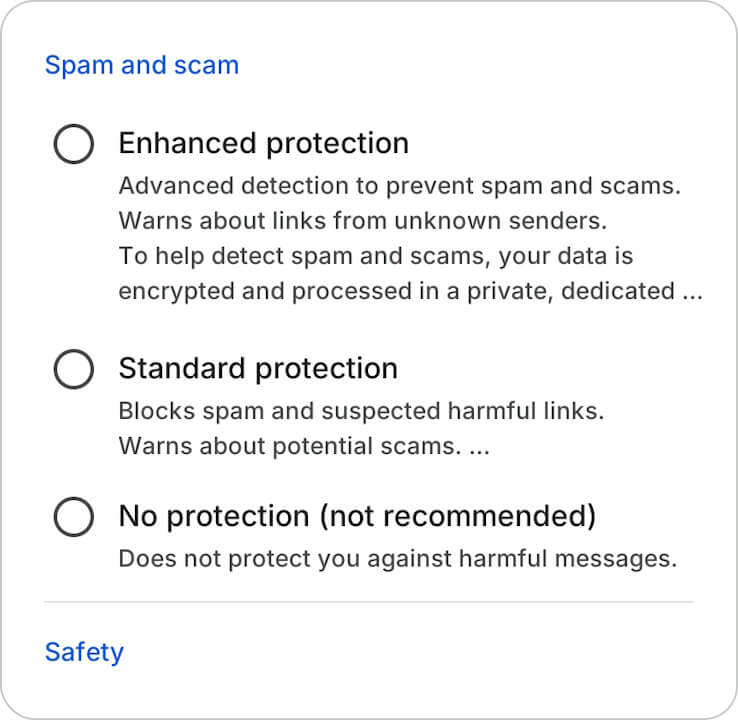
<string name="spam_detection_pref_title_2026_04_16">Spam & scam protection</string>
<string name="protection_safety_section_title_spam_and_scam">Spam and scam</string>
<string name="protection_safety_section_title_safety">Safety</string>
<string name="spam_protection_enhanced_title">Enhanced protection</string>
<string name="spam_protection_enhanced_description_normal">Advanced detection to prevent spam and scams. Warns about links from unknown senders.\n\nTo help detect spam and scams, your data is encrypted and processed in a private, dedicated space on your device and in the cloud. %1$s</string>
<string name="spam_protection_enhanced_description_v2">Advanced detection to prevent spam and scams.\n\nTo help detect spam and scams, your data is encrypted and processed in a private, dedicated space on your device and in the cloud. %1$s</string>
<string name="spam_protection_standard_title">Standard protection</string>
<string name="spam_protection_standard_description">Blocks spam and suspected harmful links. Warns about potential scams and links from unknown senders. %1$s</string>
<string name="spam_protection_standard_description_normal">Blocks spam and suspected harmful links. Warns about potential scams. %1$s</string>
<string name="spam_protection_off_title">No protection (not recommended)</string>
<string name="spam_protection_off_description">Does not protect you against harmful messages.</string>つまり、「Enhanced protection(強化保護モード)」が展開されると、現状の「保護と安全」設定が「Spam & scam protection(スパムと詐欺の保護)」設定へと変更されます。
「Google メッセージ」アプリリンク






コメントを残す