





- Google Pixel smartwatch companion app “Google Pixel Watch” watch face selection screen has been updated to a two-tab layout featuring “Featured” and “Gallery”.
- Makes finding watch faces more intuitive.
- Configured watch faces can be accessed via “Manage” at the top of the screen.
In the app version v5.0.0 update released in October 2026, the “Watch faces” selection screen in the “Google Pixel Watch” companion app for Google Pixel smartwatches—including the Google Pixel Watch, Google Pixel Watch 2, Google Pixel Watch 3, Google Pixel Watch 4, and the new-generation Google Pixel Watch 5—has been redesigned into a two-tab layout featuring “Featured” and “Gallery”.
Previously, the watch face selection screen in the “Google Pixel Watch” app only featured a “Gallery” view that listed watch faces by type. However, a new “Featured” tab has been added, displaying watch faces categorized by themes such as “At a Glance,” “Health & Fitness,” and “Playful,” allowing users to discover watch faces more intuitively.
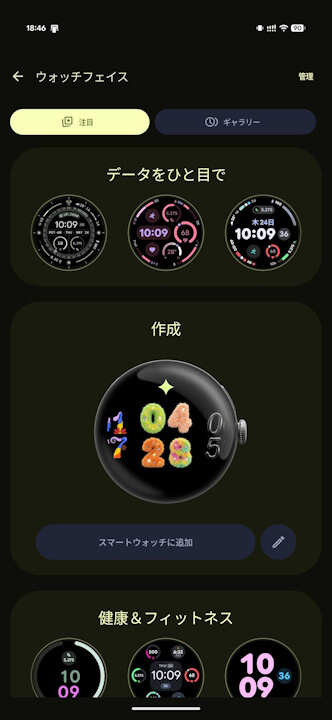
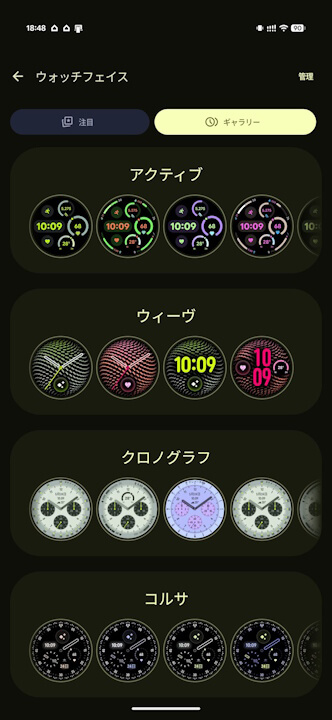
Additionally, already configured watch faces can be accessed via “Manage” at the top of the screen.
“Google Pixel Watch” App Link
