






この記事のポイント
- Google Pixel スマートウォッチコンパニオンアプリ「Google Pixel Watch」の「ウォッチフェイス」選択画面が、「注目」「ギャラリー」の 2 タブ仕様に。
- より直感的に「ウォッチフェイス」を探せるように。
- 設定済みの「ウォッチフェイス」は、画面上部の「管理」からアクセス可能。
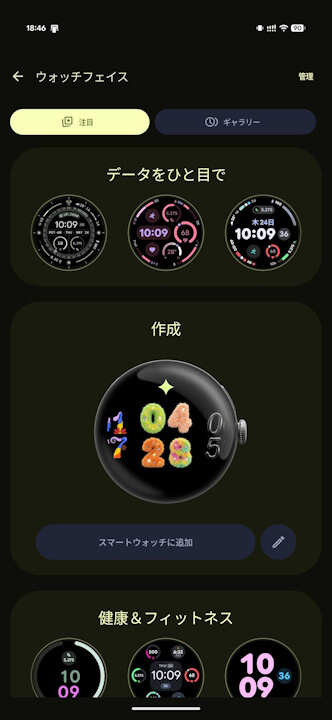
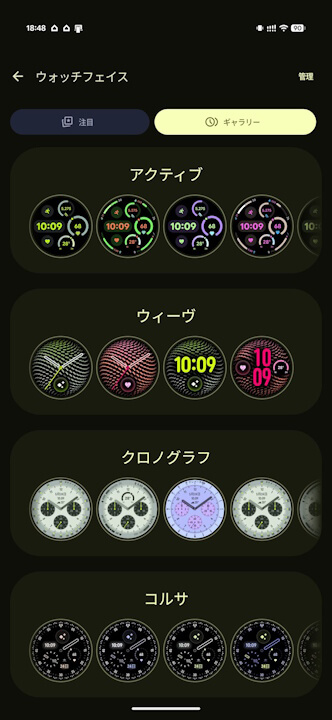
Google Pixel スマートウォッチ「Google Pixel Watch」「Google Pixel Watch 2」「Google Pixel Watch 3」「Google Pixel Watch 4」そして新世代「Google Pixel Watch 5」用のコンパニオンアプリ「Google Pixel Watch」の「ウォッチフェイス」選択画面が、2026 年 10 月に配信されたアプリバージョン v5.0.0 アップデートにて、「注目」「ギャラリー」の 2 タブ仕様になりました。
「Google Pixel Watch」アプリの「ウォッチフェイス」選択画面はこれまで、「ウォッチフェイス」の種類ごとに一覧表示される「ギャラリー」のみの仕様だったのですが、「データをひと目で」「健康 & フィットネス」「遊び心たっぷり」など、カテゴリごとの「ウォッチフェイス」が表示される「注目」タブが新設され、より直感的に「ウォッチフェイス」を探せるようになっています。
<string name="watch_faces_gallery_title">Watch faces</string>
<string name="title_featured">Featured</string>
<string name="title_gallery">Gallery</string>
<string name="category_classic">Classic</string>
<string name="category_playful">Playful</string>
<string name="category_data_dense">Data dense</string>
<string name="category_health_fitness">Health & Fitness</string>
<string name="category_accessible">Accessible</string>
<string name="add_to_watch">Add to watch</string>
<string name="add_button_label">Add</string>
<string name="update_watch_face_button_label">Update</string>
<string name="edit_watch_face">Edit</string>
<string name="manage_button_text">Manage</string>
<string name="watch_faces_in_google_play">Watch faces in Google Play</string><string name="watch_faces_gallery_title">ウォッチフェイス</string>
<string name="title_featured">注目</string>
<string name="title_gallery">ギャラリー</string>
<string name="category_classic">クラシック</string>
<string name="category_playful">遊び心たっぷり</string>
<string name="category_data_dense">データをひと目で</string>
<string name="category_health_fitness">健康&フィットネス</string>
<string name="category_accessible">ユーザー補助</string>
<string name="add_to_watch">スマートウォッチに追加</string>
<string name="add_button_label">追加</string>
<string name="update_watch_face_button_label">更新</string>
<string name="edit_watch_face">編集</string>
<string name="manage_button_text">管理</string>
<string name="watch_faces_in_google_play">Google Play でウォッチフェイスを見る</string>なお、設定済みの「ウォッチフェイス」は、画面上部の「管理」からアクセス可能です。
「Google Pixel Watch」アプリリンク




コメントを残す