



- Specific instructions on how to use the “Reverse Ringing” feature implemented in the “Google Pixel Tag” have been revealed.
- An analysis of the app files from the Android version of the “Find Hub” app v3.1.763-04 update confirmed the addition of resource code and animations related to a dedicated setup completion screen that appears after finishing the initial setup of the “Google Pixel Tag.”
- It notifies users that the tag is ready for use, while also guiding them that pressing the “Google Pixel Tag” button once stops the tag’s sound, and pressing it twice rings the Android device.
At the “Made by Google (Made by Google 2026)” hardware launch event, the “Google Pixel Tag,” a Bluetooth tracker tag compatible with Google’s device location and sharing service “Find Hub,” was officially announced alongside the new-generation Google Pixel devices, the “Pixel 11” series.
As a “Find Hub”-compatible Bluetooth tracker tag, the “Google Pixel Tag” can be attached to keychains or slipped into bags just like other compatible tags like the “Moto Tag,” allowing users to pinpoint and locate items in the unlikely event of loss or theft. Its scheduled release date is Wednesday, November 11, 2026.


Because the release of the “Google Pixel Tag” is still some time away, many details remain unannounced officially. Previously, in our “App Teardown” content—an original app file analysis report by our site “Jetstream”—we reported on the “Reverse Ringing” feature, which lets you ring your smartphone by pressing the button on the tag. Now, the specific operations for that button have come to light.

We are once again bringing you the details through our original app file analysis feature, “App Teardown” here on “Jetstream.”
「アプリ解析」
当サイトの「アプリ解析」カテゴリで公開している記事では、最新 Android アプリを逆コンパイルして独自に解析し、今後実装される可能性のある新機能や変更点などをお届けします。正式リリース前の新機能や変更となるため開発段階の未確定な情報も含まれますが、Android アプリの今後のアップデート動向をいち早くキャッチできる、ほかにはない当サイトオリジナルコンテンツです。
当サイトオリジナルの「アプリ解析」コンテンツを見逃さないよう、ぜひ Google の「優先ソース」に当サイト「Jetstream 」を登録してください。

An analysis of the app files from the Android version of the “Find Hub” app v3.1.763-04 update, released on Thursday, October 8, 2026, confirmed that resource code and animations related to a dedicated setup completion screen—displayed upon finishing the initial setup of the “Google Pixel Tag”—have been added.
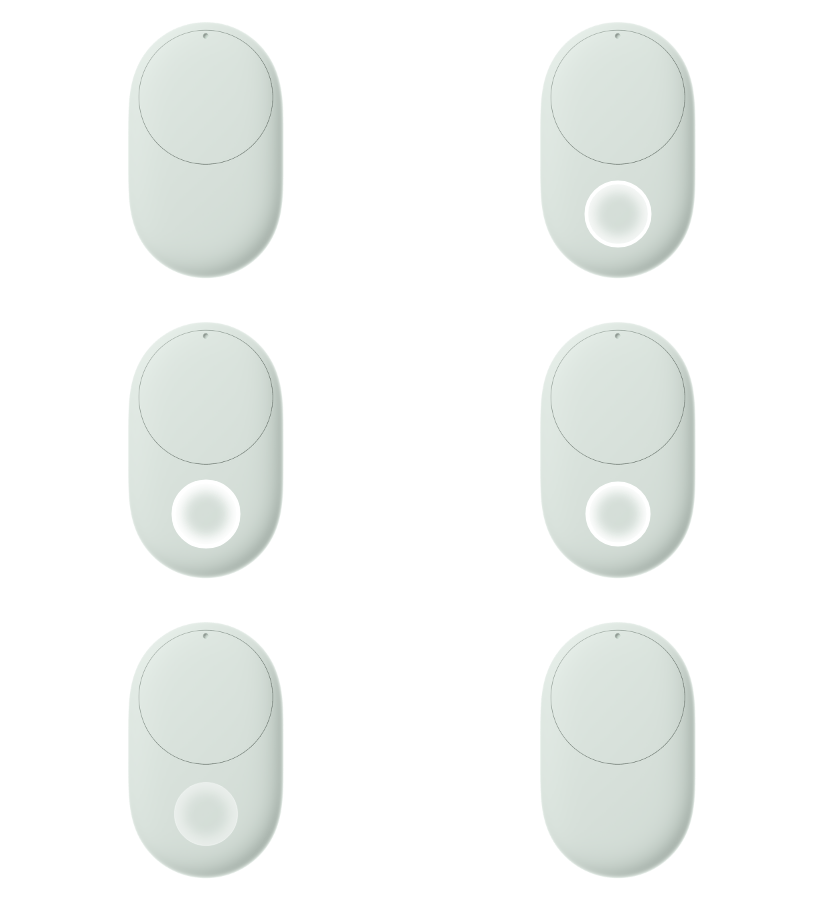
Furthermore, based on this resource code, a screenshot of the “Google Pixel Tag” setup completion screen has also been discovered.
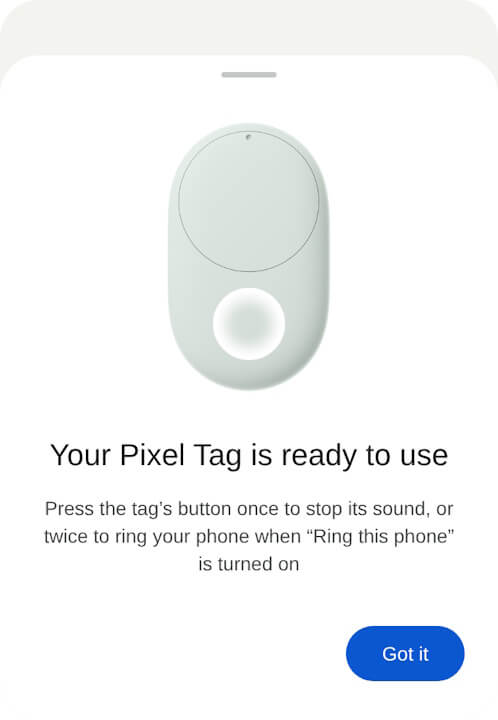
<string name="spot_pixel_tag_anatomy_education_title">Your Pixel Tag is ready to use</string>
<string name="spot_pixel_tag_anatomy_education_body">Press the tag’s button once to stop its sound, or twice to ring your phone when “Ring this phone” is turned on</string>
<string name="spot_pixel_tag_anatomy_education_button">Got it</string>
<string name="spot_pixel_tag_anatomy_education_animation_a11y">Animated image showing how to press the button near the base of a Pixel Tag, under the circular battery compartment</string>
The “Google Pixel Tag” setup completion screen notifies the user that the device is ready for use, while also instructing that pressing the “Google Pixel Tag” button once stops the tag’s sound, and pressing it twice rings the Android device. Note that ringing the Android device requires “Ring this phone” to be turned on.
This “Ring this phone” feature is believed to refer to the “Reverse Ringing” settings (Ring this phone with your tag) within the “Google Play services” app reported previously. While official explanations simply stated that “you can ring your smartphone by pressing the tag’s button,” it has now been revealed that different functions are assigned depending on the number of presses.
Additionally, an animation demonstrating how to press the button has been added. It features a repeating motion where the button area lights up over the front image of the tag. Combined with the screen-reader description, it appears the button is located near the bottom of the tag, positioned beneath the circular battery cover.
<public type="raw" name="pixel_tag_anatomy_education" id="0x7f14003d" />The “Google Pixel Tag” will be priced at 5,010 yen (tax included) and is scheduled for release on Wednesday, November 11, 2026. Can’t wait.
“Find Hub” App Link
