




- Key Points of This Article
- The “∧ (Return to Top)” button in the Android version of “Google Discover” was changed to a “↻ (Refresh)” button around late September 2026.
- With the change to “↻,” the design now returns you to the top while simultaneously refreshing the content list.
- Currently, this is displayed in “Google Discover,” which appears when swiping right on the home screen in launchers like “Pixel Launcher.”
Around August of last year (2025), a new “∧ (Return to Top)” button was added to the Android version of “Google Discover,” a news curation service tailored for Google users.
That “∧ (Return to Top)” button in the Android version of “Google Discover” was changed to a “↻ (Refresh)” button around late September 2026. In other words, while previously tapping “∧” simply returned you to the top of “Google Discover,” the change to “↻” now returns you to the top while also refreshing the list of content at the same time.

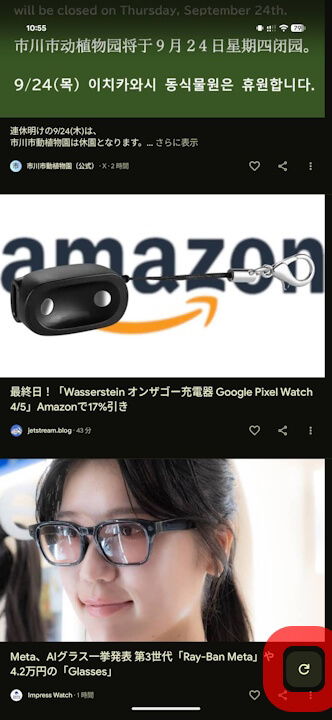
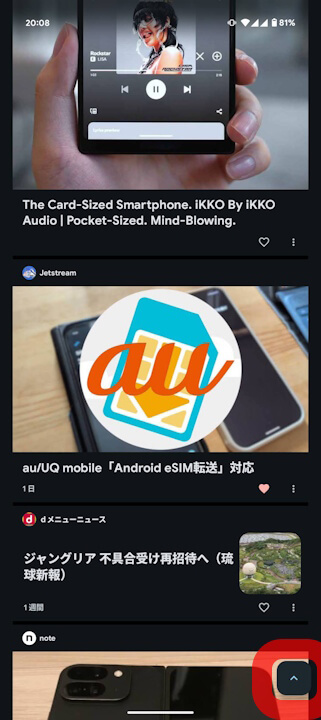
The “↻” button in “Google Discover” currently appears in the Android version of “Google Discover,” specifically within the “Google Discover” feed that is displayed by swiping right on the home screen of launchers like “Pixel Launcher.” It does not appear in “Google Discover” within the Android “Google” app.
Additionally, the “↻” button has not yet been confirmed to appear in the Android version of the “Google Go” app or the iOS version of the “Google” app.
Google App Links

