




- In the Android version of the “Google Photos” app update rolled out from early to mid-September 2026, a new “Copy (Copy photo)” feature has been added by long-pressing an image.
- Along with “Copy sticker,” “Copy photo” is now also displayed.
- The iOS version of the “Google Photos” app does not yet support this feature.
Early April 2026, five months ago, the Android version of the online photo library service “Google Photos” finally added support for “Copy” when sharing images.
The “Copy” feature in the “Google Photos” app allows you to copy images to the clipboard and paste them onto social media and other platforms. While the iOS version of the “Google Photos” app has supported this for some time, it has finally arrived on the Android version.
By the way, copying an image in the “Google Photos” app can be done by selecting “Copy” from the image sharing menu.
 jetstream.blog
Now, in the Android “Google Photos” app update rolled out from early to mid-September 2026, a new “Copy (Copy photo)” option has been added when long-pressing an image. Normally, long-pressing an image in the Android version of “Google Photos” displays the “Copy sticker” menu, which automatically crops subjects recognized by Google Photos as a “sticker.” Alongside this, “Copy photo” is now also displayed.
By selecting “Copy photo,” the image itself is copied to the clipboard.
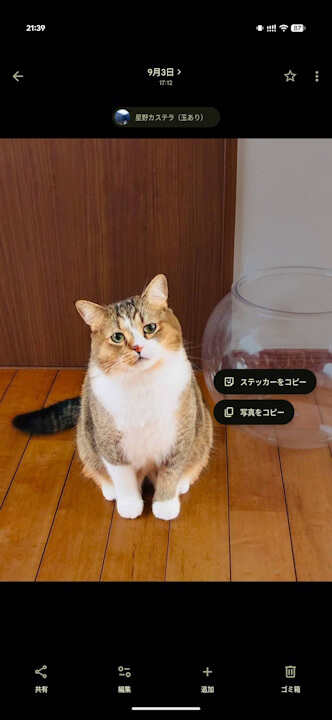
“Copy photo”
Please note that copying photos via a long-press is not yet supported in the iOS version of the “Google Photos” app.
“Google Photos” App Links

