





- Rumored for about a year to be coming to Android devices, the motion sickness reduction feature formerly known as “Motion Cues” has finally started rolling out as “Motion Assist” from mid-to-late August 2026.
- So far, the rollout has been confirmed on the next-generation Google Pixel “Pixel 11” series, “Pixel 10 Pro XL,” and “Pixel 10.”
- “Motion Assist” displays animated shapes on the edges of the screen that move in sync with the device’s movement, helping to reduce motion sickness when you look at them.
That long-awaited feature, rumored to arrive on Android devices for about a year, has finally started rolling out between mid and late August 2026.
The feature in question is the motion sickness reduction feature, originally known as “Motion Cues” and later renamed to “Motion Assist”. So far, its rollout has been confirmed on the new-generation Google Pixel “Pixel 11” series, “Pixel 10 Pro XL,” and “Pixel 10.”
On the other hand, rollout on the “Pixel 10 Pro Fold” has not yet been confirmed, though it is available on the “Pixel 11 Pro Fold.” The exact availability criteria remain a mystery.

“Motion Assist” displays animated shapes on the edges of the screen that move in sync with the device’s movement, helping to reduce motion sickness when you look at them. Initially rumored to be coming to Android devices back in the autumn of 2025, reports of its potential release continued as it transitioned from rumor to in-app code implementation, and it has finally begun rolling out starting in mid-August 2026.
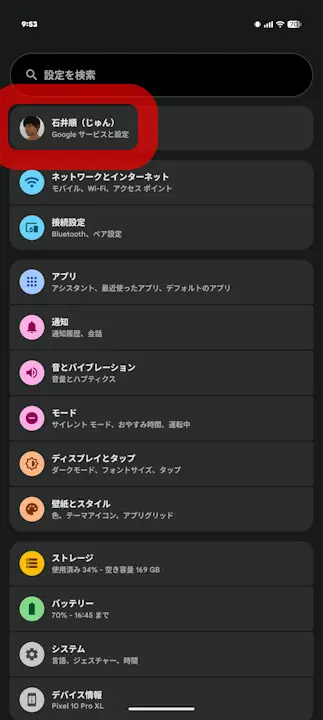
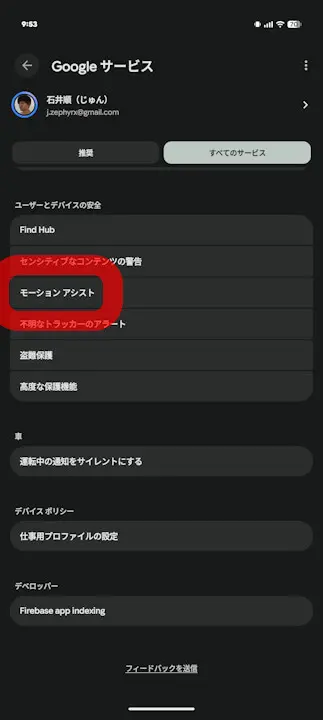
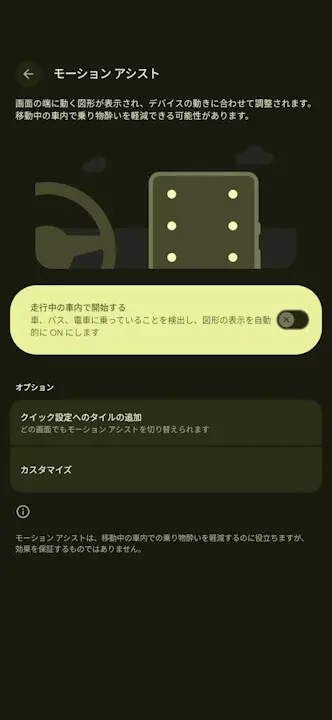
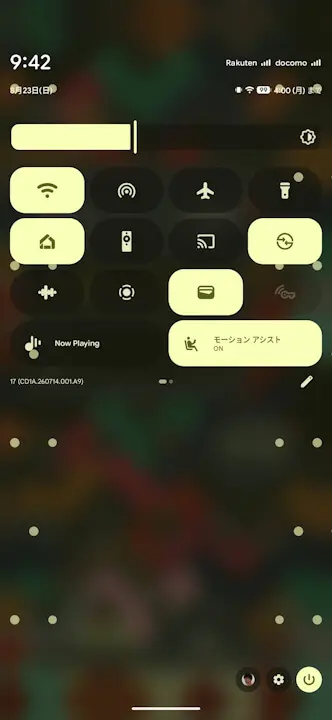
“Motion Assist” is located within “Google Services” in the Android settings. By turning on the “Start while in a moving vehicle” setting, the feature will automatically display animated shapes on the edges of the screen when it detects that you are riding in a vehicle such as a car, bus, or train, helping to reduce motion sickness. A “Quick Settings tile” is also available, allowing you to turn it on and off manually.
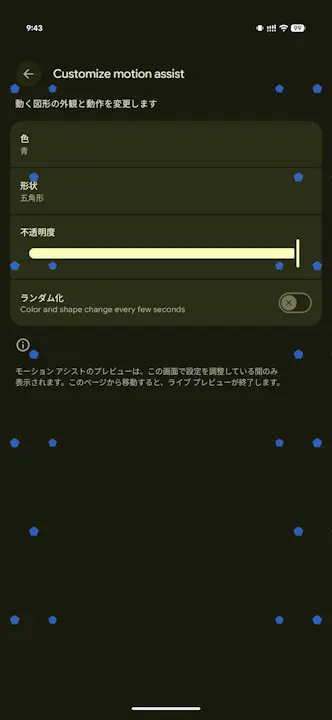
The animated shapes displayed on the edges of the screen can be customized in terms of color, shape, and opacity, and you can also select “Randomize.” When “Randomize” is selected, the color and shape of the automatically moving figures in “Motion Assist” will periodically change.
While the full rollout range of “Motion Assist” is unclear, having the new-generation Android OS “Android 17” installed is likely a minimum requirement. Additionally, since the “Google Play services” app powers the feature, updating the Android version of the “Google Play services” app to the latest version is also required.
Google Play Services App Link
