





- On Tuesday, August 18, 2026, Google released app version v2026.07.27.963237177 for the “Journal” app, a mindful journaling application for Google Pixel devices.
- This is a minor update to app version v2026.07.27.959360430, which was recently released with a total of four new features: an auto-formatting feature, sleep data retrieval via integration with the “Health Connect” health data management app, “Reminder” settings, and the addition of location information.
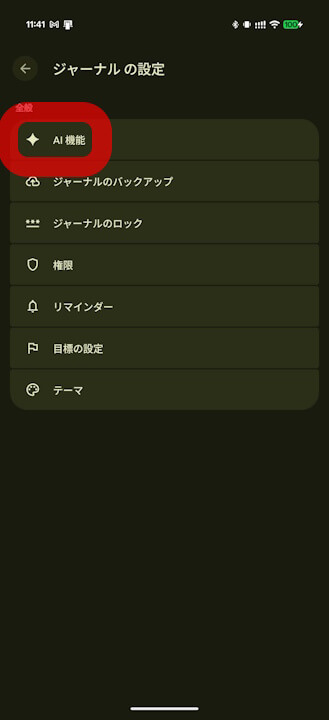
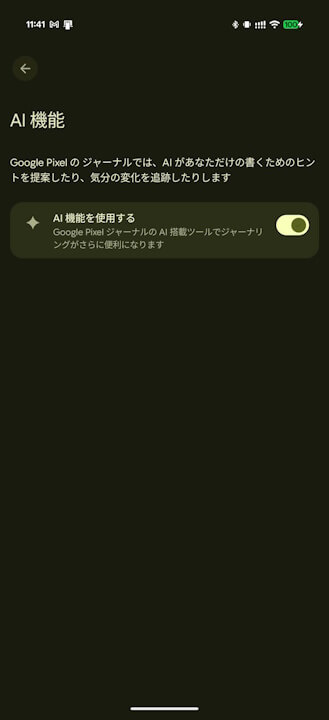
- The “Use AI features” setting is now automatically turned ON.
An update for the “Journal” app—a mindful journaling application for noting down your thoughts, emotions, and daily events, which was initially released exclusively for the Google Pixel 10 series and later rolled out to the Pixel 8 series and newer—began rolling out on Tuesday, August 18, 2026, bringing the app to version v2026.07.27.963237177.
The newly released “Journal” app version v2026.07.27.963237177 is a minor update to app version v2026.07.27.959360430, which was recently released with a total of four new features: an auto-formatting feature, sleep data retrieval via integration with the “Health Connect” health data management app, “Reminder” settings, and the addition of location information. While the previous app version (v2026.07.27.959360430) had an issue where the “Use AI features” setting for the auto-formatting tool (which uses AI to automatically organize entered content) could not be turned ON, this setting is now automatically enabled following the v2026.07.27.963237177 update.
Furthermore, our original content section, “App Teardown,” has revealed that the AI-powered auto-formatting feature is designed with privacy in mind, operating through integration with the “Private Compute Services” app.
<string name="_0_resource_name_obfuscated_res_0x7f14038d">Pixel Journal is now powered by Google's Private AI Compute, allowing you to enjoy AI experiences with industry-leading privacy safeguards. To ensure your data stays private to you, Pixel Journal works in a secure, isolated environment on your device and in the cloud. You can turn off AI features in Journal settings.</string>
<string name="_0_resource_name_obfuscated_res_0x7f14038e">More power, same protection</string>
<string name="_0_resource_name_obfuscated_res_0x7f14038f">AI features are now available to help you write. Use of AI tools is subject to the Generative AI Prohibited Use Policy. AI responses may also display inaccurate or offensive information that doesn't represent Google's views. Pixel Journal is now powered by Google's Private AI Compute, allowing you to enjoy AI experiences with industry-leading privacy safeguards. To ensure your data stays private to you, Pixel Journal works in a secure, isolated environment on your device and in the cloud. You can turn off AI features in Journal settings.</string>
<string name="_0_resource_name_obfuscated_res_0x7f140390">Private, powerful writing tools</string>
For more details on the four new features rolled out to the “Journal” app—the auto-formatting feature, sleep data retrieval via “Health Connect” integration, “Reminder” settings, and the addition of location information—please check this article.


新機能
ジャーナルの 2026 年 8 月のアップデート:
ジャーナル アプリで考えを書き留めて気付きを得る – Google Pixel ヘルプ
- テキストを整理するための自動フォーマット機能
- ヘルスコネクトからの睡眠データ
- 毎日のカスタム ルーティンのリマインダー
- インタラクティブな公開中の地図の検索
Journal App Link
