




- In early August 2026, a new “Notifications” setting was added to the Android version of the “Gemini” app.
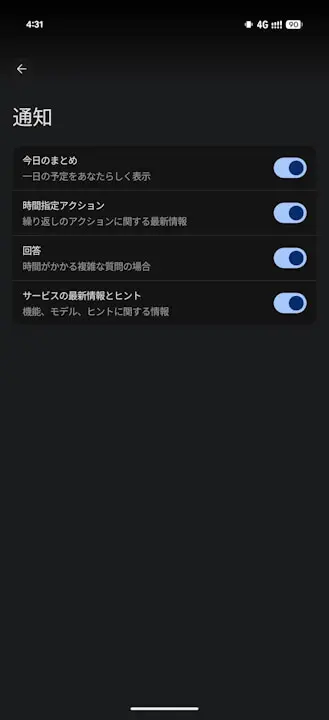
- Users can now use toggle switches to turn notifications ON or OFF for four specific categories: “Daily summary,” “Scheduled actions,” “Responses,” and “Service updates and tips.”
- Previously, notifications were sent automatically by default, so this new setting finally allows users to disable notifications individually.
In early August 2026, a new “Notifications” setting was introduced to the Android app for Google’s AI, “Gemini.”
With this newly added “Notifications” setting in the Android “Gemini” app, users can now toggle notifications ON or OFF for four items: “Daily summary,” “Scheduled actions,” “Responses,” and “Service updates and tips.” Note that “Responses” refers to notifications sent when Gemini replies to complex questions that take time to process.
Previously, notifications for these four categories were sent automatically without user control. The addition of this new setting basically means users can now turn off unwanted notifications individually.
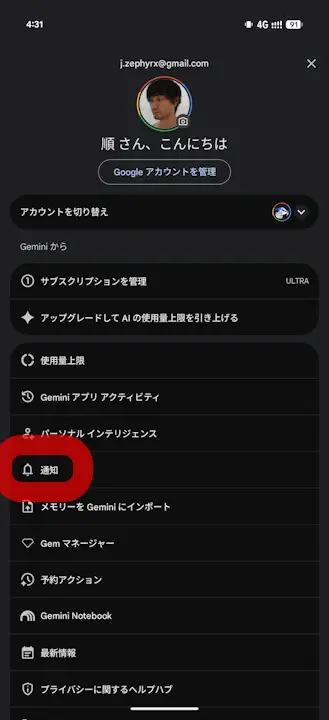
While the “Notifications” setting has now been added to the Android version of the “Gemini” app, it has not yet been rolled out to the web or iOS versions of “Gemini” at this time.
Source: Gemini