




- From mid-to-late July 2026, the “Custom Sticker” creation feature in the Android “Gboard” app has been revived as a “Gemini”-based feature.
- Although it is “Gemini”-based, tapping the prompt input bar simply launches the Android “Gemini” app.
- In other words, the specification appears to have been changed so that “Custom Stickers” created in the Android “Gemini” app can be used within the Android “Gboard” app.
The “Custom Sticker” creation feature for the Android “Gboard” app was initially rolled out to Google Pixel devices as a feature utilizing the AI image generation app, “Pixel Studio.”
Following the discontinuation of the “Pixel Studio” app in early June 2026, the “Custom Sticker” creation feature in the Android “Gboard” app was quietly removed. However, I have confirmed that between mid-to-late July 2026, the feature was revived in the Android “Gboard” app as a “Gemini”-based tool.
Currently, I have only been able to confirm the revival of the “Custom Sticker” creation feature on my “Pixel 10 Pro Fold” among the Android devices I own. Also, despite being “Gemini”-based, tapping the prompt input bar simply launches the Android “Gemini” app.
In short, it appears that the system has been changed so that “Custom Stickers” created via the Android “Gemini” app can now be used within the Android “Gboard” app.
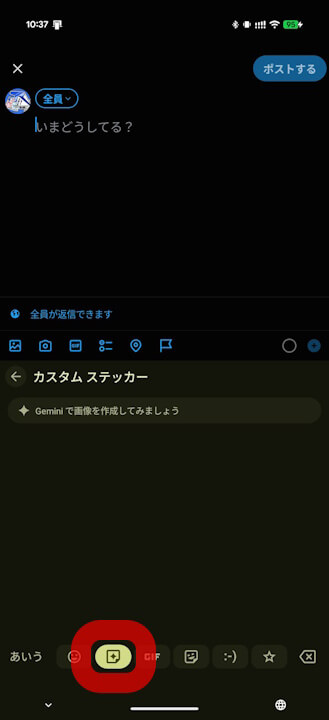
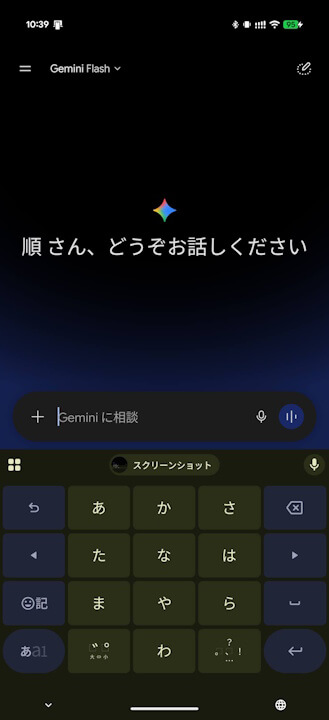
The potential for this Gemini-based “Custom Sticker” creation feature was previously revealed following the update to Android “Gboard” app version 17.8.3.939743344, released on Thursday, July 16, 2026. Consistent with those earlier reports, the “Custom Sticker” creation feature has indeed been revived based on Gemini integration.
That said, as it is currently only available for select Android devices, a gradual rollout is expected.


“Gboard” App Link
