





- The “Google Messages” app for Android now quietly supports direct copying of verification codes from message notifications.
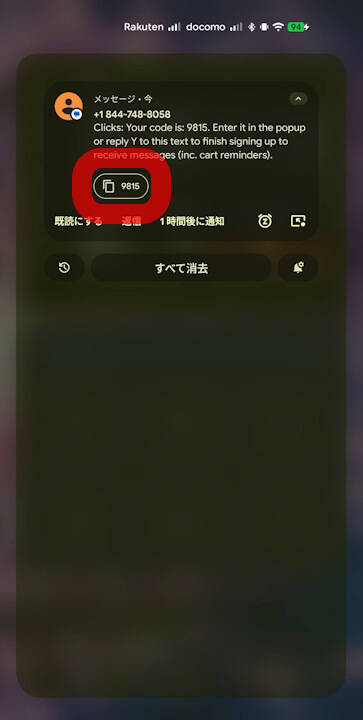
- When an SMS containing a verification code is received, a copy button appears directly in the notification.
- You can now copy the code instantly and paste it into the input field without needing to memorize it or highlight and copy it manually.
The “Google Messages” app, the SMS/MMS/RCS client for Android, has quietly added support for directly copying verification codes from message notifications.
Verification codes are one-time passwords typically used for two-step verification. They are often sent to the phone number registered with a service and generally consist of a 4 to 7-digit number.
Now, you can copy these verification codes directly from your Google Messages notifications. When you receive an SMS containing a verification code, a copy button will appear within the notification, allowing you to copy the code to your clipboard with a single tap.
This improvement means you no longer need to memorize the code or manually highlight and copy it; you can simply copy it directly and paste it into the required verification code field.
Google Messages App Link
