





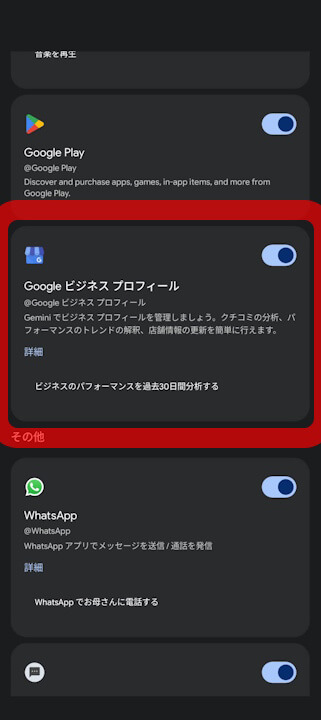
- Between early and mid-July 2026, a new “Google Business Profile” integration setting was added to the Android and iOS versions of the Gemini app.
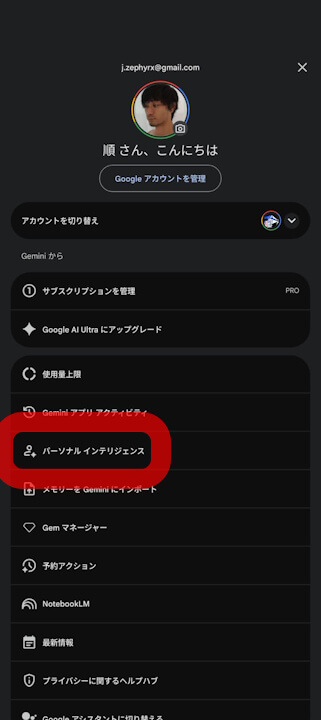
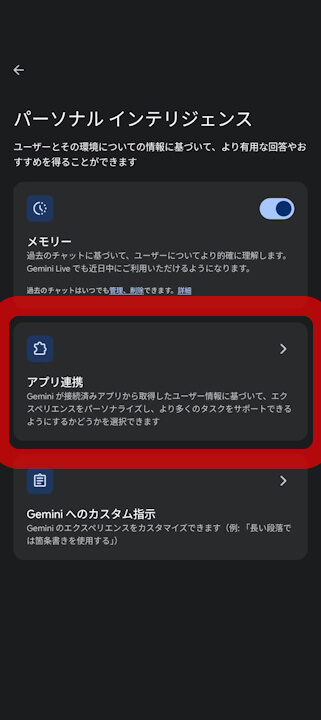
- The “Google Business Profile” integration setting is located within the “Extensions” menu under “Personal Intelligence.”
- By enabling access to Google Business Profile data—such as customer reviews, customer questions, and performance metrics—users can now ask Gemini questions related to their business profile, generate draft responses to reviews, and identify areas for improvement within their Google Business Profile directly through the Gemini app.
In early June 2026, Google announced the integration of its Google AI “Gemini” into “Google Business Profile,” a tool for managing information for stores and businesses.
The introduction of Gemini to Google Business Profile is managed through the “Extensions” setting in the Gemini app; enabling this toggle activates the integration. By linking Gemini with Google Business Profile, users can grant Gemini access to data including customer reviews, questions from customers, and performance analytics. This allows users to perform tasks such as asking questions about their business profile, drafting responses to customer reviews, and identifying potential issues with their Google Business Profile directly within the Gemini app.
Subsequently, in late June 2026, the “Google Business Profile” integration setting was newly added to the “Extensions” menu of the web version of the Gemini app.

 jetstream.blog
Furthermore, between early and mid-July 2026, the “Google Business Profile” integration setting was rolled out to the Android and iOS versions of the Gemini app as well. This setting is located under the “Extensions” menu within “Personal Intelligence.”
Source: Gemini