Google has released the major “Android 17” OS update for Google Pixel devices, starting from the Pixel 6 and later, which are currently running Android 16.
The “Android 17” major update is packed with new features, the June 2026 “Pixel Drop,” updated Android security patch levels, and a total of 38 bug fixes and improvements.
The build number after the “Android 17” update is standardized across all models to “CP2A.260605.012,” with the Android security patch level updated to June 5, 2026.
On Tuesday, June 16, 2026 (local time), Google began rolling out the new-generation “Android 17” OS major update for 21 Google Pixel models running Android 16, including: Pixel 6, Pixel 6 Pro, Pixel 6a, Pixel 7, Pixel 7 Pro, Pixel 7a, Pixel Tablet, Pixel Fold, Pixel 8, Pixel 8 Pro, Pixel 8a, Pixel 9, Pixel 9 Pro, Pixel 9 Pro XL, Pixel 9 Pro Fold, Pixel 9a, Pixel 10, Pixel 10 Pro, Pixel 10 Pro XL, Pixel 10 Pro Fold, and Pixel 10a.
The “Android 17” major update released for Google Pixel devices is truly comprehensive, featuring new “Android 17” features, the June 2026 “Pixel Drop,” updated Android security patches, and a total of 38 bug fixes and improvements.
Fixed a bug where “Pixel Launcher” would crash when using the “AI Icon” under certain conditions.
■ “Pixel 9,” “Pixel 9 Pro,” “Pixel 9 Pro XL,” “Pixel 9 Pro Fold,” “Pixel 9a,” “Pixel 10,” “Pixel 10 Pro,” “Pixel 10 Pro XL,” “Pixel 10 Pro Fold,” “Pixel 10a”
〇 Battery and Charging
Fixed a bug where wireless and wired charging drivers would not initialize properly when booting the device under certain conditions.
〇 Camera
Fixed camera stability issues causing system crashes under certain conditions.
〇 Framework
Fixed a bug where location services would crash and restart unexpectedly under certain conditions.
〇 System
Fixed stability issues causing the device to restart unexpectedly during normal operation.
■ “Pixel 10,” “Pixel 10 Pro,” “Pixel 10 Pro XL,” “Pixel 10 Pro Fold,” “Pixel 10a”
〇 Apps
Fixed a bug where the “Backup” item in Settings would appear in search results but fail to open when selected.
〇 Camera
Fixed a bug where the camera app would freeze when adjusting the zoom level during video recording.
〇 Display and Graphics
Fixed a bug where a blinking white dot would appear at the top of the display under certain conditions.
Fixed a bug causing display or graphics errors on specific device models during standard operations.
〇 Framework
Fixed camera stability issues where apps might crash unexpectedly during use under certain conditions.
〇 Location and GPS
Fixed a bug affecting GPS location accuracy and measurement reliability during voice calls under specific network configurations.
〇 User Interface
Fixed a bug where the home screen would crash when connected to an external display under certain conditions.
■ “Pixel 10 Pro Fold”
〇 User Interface
Fixed a bug where the taskbar could not be hidden during specific user operations.
“Android 17” Major Update Bug Fixes and Improvements
Following the “Android 17” major update, the build number for all devices is standardized to “CP2A.260605.012,” and the Android security patch level is updated to June 5, 2026.
■ Android Security Patch Level
“June 5, 2026”
■ Build Number
“Pixel 6”: CP2A.260605.012
“Pixel 6 Pro”: CP2A.260605.012
“Pixel 6a”: CP2A.260605.012
“Pixel 7”: CP2A.260605.012
“Pixel 7 Pro”: CP2A.260605.012
“Pixel 7a”: CP2A.260605.012
“Pixel Tablet”: CP2A.260605.012
“Pixel Fold”: CP2A.260605.012
“Pixel 8”: CP2A.260605.012
“Pixel 8 Pro”: CP2A.260605.012
“Pixel 8a”: CP2A.260605.012
“Pixel 9”: CP2A.260605.012
“Pixel 9 Pro”: CP2A.260605.012
“Pixel 9 Pro XL”: CP2A.260605.012
“Pixel 9 Pro Fold”: CP2A.260605.012
“Pixel 9a”: CP2A.260605.012
“Pixel 10”: CP2A.260605.012
“Pixel 10 Pro”: CP2A.260605.012
“Pixel 10 Pro XL”: CP2A.260605.012
“Pixel 10 Pro Fold”: CP2A.260605.012
“Pixel 10a”: CP2A.260605.012
“Android 17” Major Update
“Android 17” Major Update Build Number
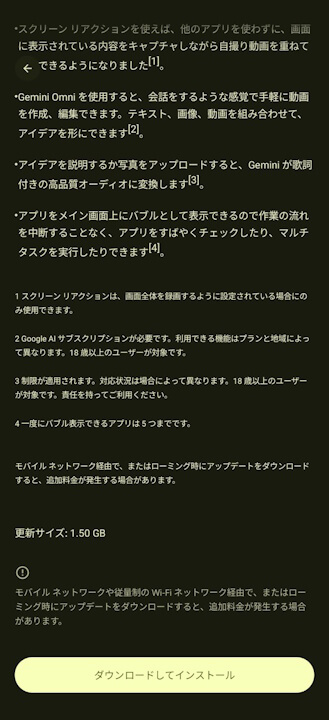
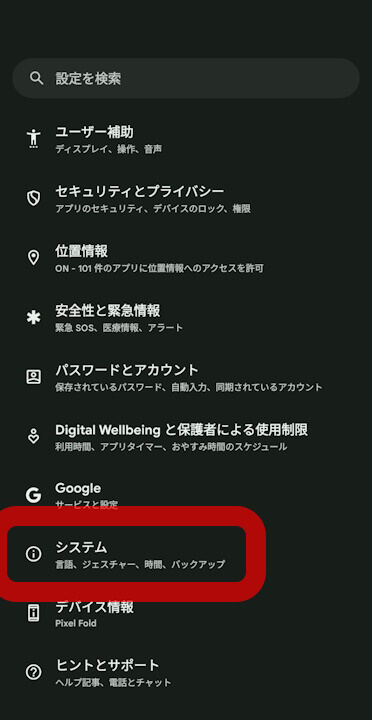
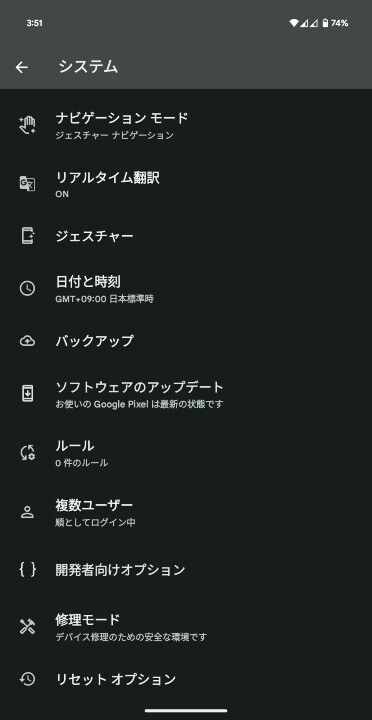
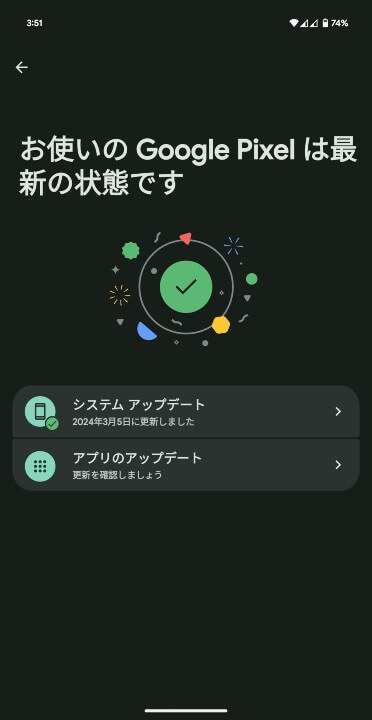
The software update for Google Pixel devices is being delivered via “Over the Air (OTA)” in stages, starting today and continuing through next week. You can check if the update is available by navigating to Android Settings > [System] > [Software updates] and tapping [System update].
[システム]→「ソフトウェアのアップデート」→[システム アップデート]
①Android 設定の[システム]をタップ
Android 設定内の[システム]をタップします。
②[システム アップデート]をタップ
表示されるメニュー内の[システム アップデート]をタップします。
③[システム アップデート]をタップ
画面右下の[アップデートをチェック]をタップします。
ソフトウェアアップデート確認方法
Google Pixel users should apply the software update as soon as it becomes available.
Android 17 is here 📲 New features include:
🫧 Bubbles, which allows you to turn any app into a compact, floating window so you can stay in the flow 🤳 Screen Reactions, so you can record yourself using your device’s selfie camera and capture your phone screen at the same time… pic.twitter.com/9ECosW1hJr