





- Google Messages, the SMS/MMS/RCS messaging client for Android, has introduced a “Switch SIM” feature that allows users to change the sending SIM directly from the chat screen during dual-SIM operation.
- “Switch SIM” is a feature that enables quick SIM switching within a chat thread.
- By long-pressing the message input field, a “Switch SIM” pop-up will appear.
The “Google Messages” app, a messaging client for SMS/MMS/RCS on Android, has begun rolling out a “Switch SIM” feature, which allows users to change the sending SIM directly from the chat screen when using a dual-SIM setup.
The Google Messages app has long supported dual SIMs, allowing users to select which SIM to use when composing a new message. This newly introduced “Switch SIM” feature now enables you to change the active SIM directly from within a specific chat conversation.
By long-pressing the message input field, a “Switch SIM” pop-up will appear. From there, you can tap “Switch” on the displayed screen to select a different SIM for sending your message. Notably, this works across SMS, MMS, and RCS chats.
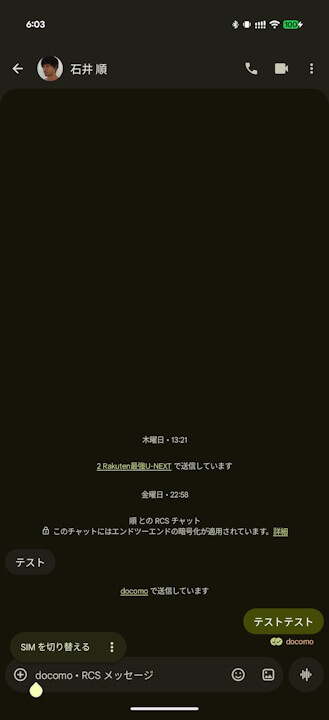
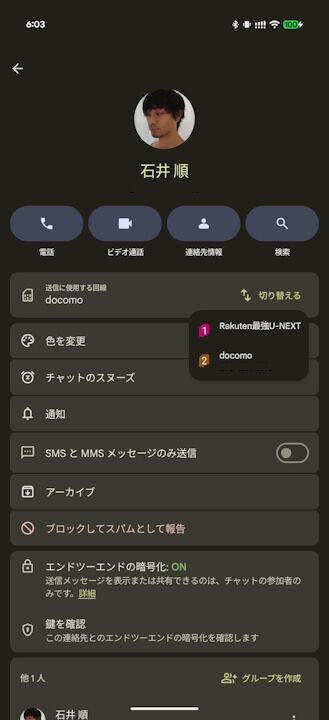
Please note that the “Switch SIM” feature currently rolling out to the Google Messages app is expected to be a beta release, likely available only to those registered as “beta testers” for the Google Messages app at this time.
Google Messages App Link
