




- A setting to easily toggle “Ask Photos” is now rolling out to the iOS version of the “Google Photos” app.
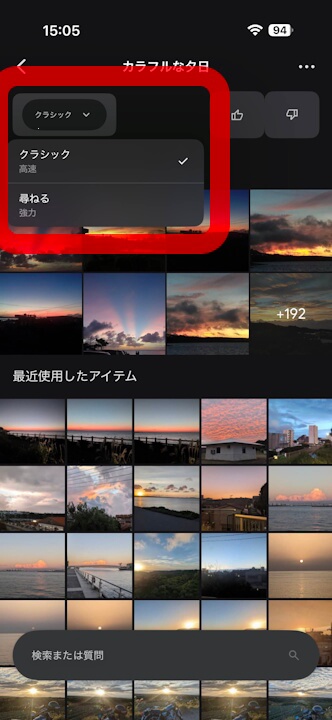
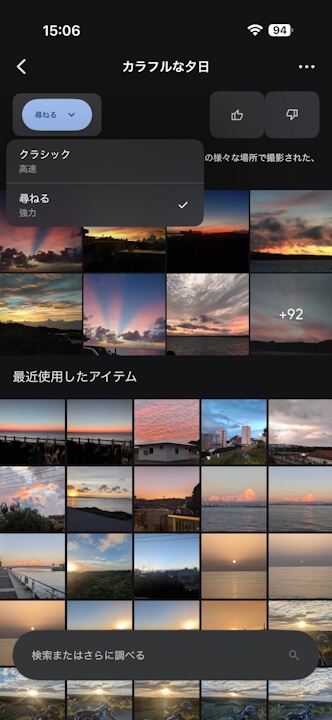
- The feature allows users to choose between “Classic (Fast)” and “Ask (Powerful).”
- The rollout of the “Ask Photos” toggle setting for the Android version of the “Google Photos” app has not yet been confirmed.
In mid-March 2026, Shimrit Ben-Yair (@shimritby), the head of the online photo library service “Google Photos,” announced the introduction of a toggle switch to easily turn the Google AI “Gemini” integrated search feature, “Ask Photos,” on or off within the app.
Although there had been no significant updates for several months, we have now confirmed that a setting to switch “Ask Photos” has begun rolling out to the iOS version of the Google Photos app. However, rather than the toggle switch originally announced by Shimrit Ben-Yair, the interface offers a selection between “Classic (Fast)” and “Ask (Powerful).”
“Classic (Fast)” refers to traditional machine-based search, while “Ask (Powerful)” utilizes the “Ask Photos” AI search.
Please note that the rollout of the “Ask Photos” toggle setting for the Android version of the Google Photos app has not yet been confirmed.
“Google Photos” App Links

