





- A new “Change colors” chat theme customization feature is rolling out for the Android SMS/MMS/RCS client app, “Google Messages.”
- The feature allows users to change the theme color of their chats, with 9 themes available including the default.
- An interesting aspect is that the changed theme is applied to all members participating in the chat.
A new chat theme customization feature called “Change colors” has begun rolling out for the Android SMS/MMS/RCS client app, “Google Messages.”
The new “Change colors” feature in Google Messages allows you to customize the theme color of your chats. There are 9 variations available to choose from, including the default theme.
Note that this “Change colors” feature is being rolled out starting with the Google Messages for Android app v20260515_00_RC00 (messages.android_20260515_00_RC00.phone.openbeta_dynamic) update, released on Monday, May 18, 2026. Additionally, it is only applicable to “RCS (Rich Communication Services)” chats and cannot be used for SMS/MMS chats.


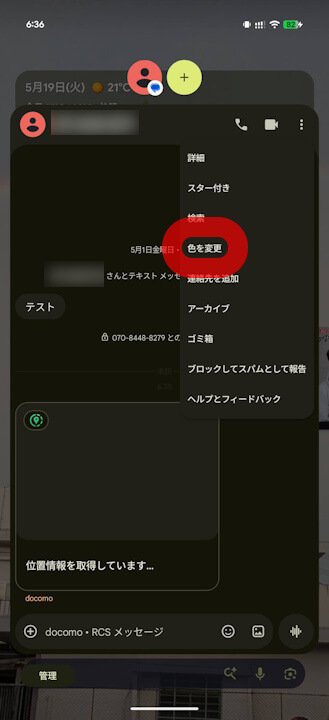
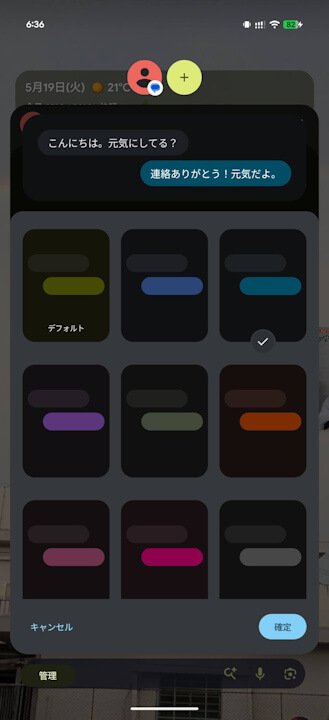
What makes the new “Change colors” feature in Google Messages interesting is that the theme you select is applied to everyone in the chat. It doesn’t just change the theme for your own view; it updates it for all participants in the conversation.
When the theme is changed, a notification is displayed within the chat to inform all members of the update.
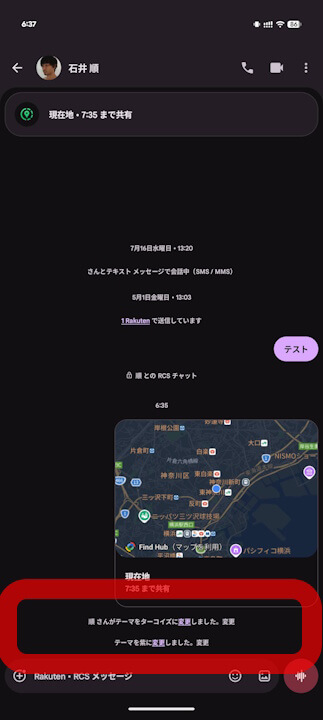
The new “Change colors” feature in Google Messages is currently likely being rolled out as a beta feature for those registered as “Beta Testers.”
Google Messages App Link
