




- In mid-May 2026, the “Save parking location automatically” feature for the iOS version of Google Maps began rolling out in Japan.
- This feature automatically saves where you parked your car.
- A new “Save parking location automatically” setting has been added within the navigation settings of the iOS Google Maps app.
In mid-May 2026, the “Save parking location automatically” feature began rolling out in Japan for the iOS version of the Google Maps app.
This “Save parking location automatically” feature was first revealed in December of last year by Rio Akasaka (@Rio), a product manager for Google Maps and Gemini, via a post on the business-focused social network LinkedIn. As the name suggests, it is a long-awaited feature that automatically saves your car’s parking spot, helping users avoid the frustration of wondering, “Wait, where did I park?” in large parking lots.
Initially, however, details regarding the rollout regions and supported languages were not announced, leaving the scope of the feature unclear. The official Google Maps Help page, “Find and save your parking location,” previously stated that it was available in “select cities in the US,” suggesting it was limited to an initial rollout in the United States.
駐車位置を探して保存する
重要: 目的地付近の駐車場の検索は、米国の一部の都市が対象です。
車を運転する前に、駐車する場所を見つけることができます。目的地に到着したら、駐車位置を保存しておくと後で車を見つけるのに役立ちます。
駐車位置を探して保存する – iPhone と iPad – マップ ヘルプ
This “Save parking location automatically” feature for the iOS version of Google Maps finally arrived in Japan in mid-May 2026. When you start car navigation in the iOS Google Maps app, a card-style menu will appear recommending that you enable “Save parking location automatically.”
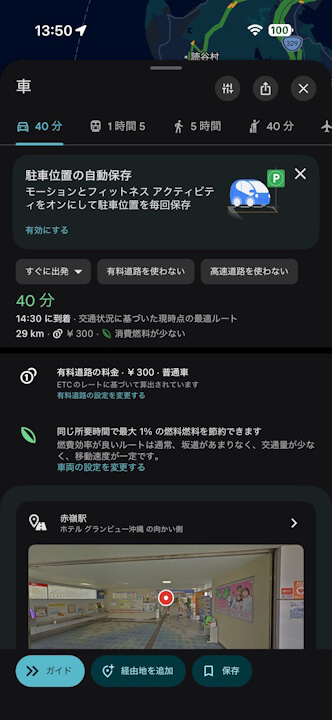
Additionally, a new setting for “Save parking location automatically” has been added within the “Navigation” settings of the iOS Google Maps app. Once you toggle this setting to ON, your parking location will be automatically saved whenever you park your car after driving.
When you are ready to return to your vehicle, simply start walking navigation in the iOS Google Maps app to head toward the saved parking location.
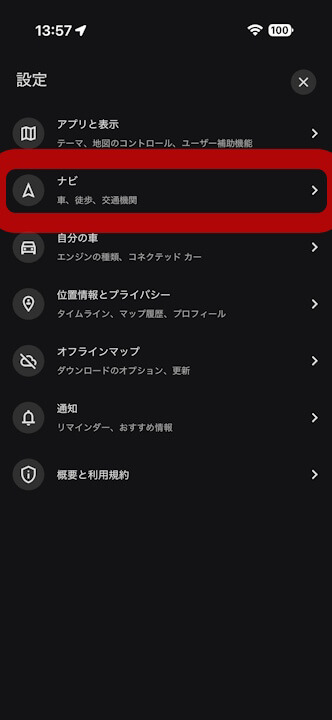
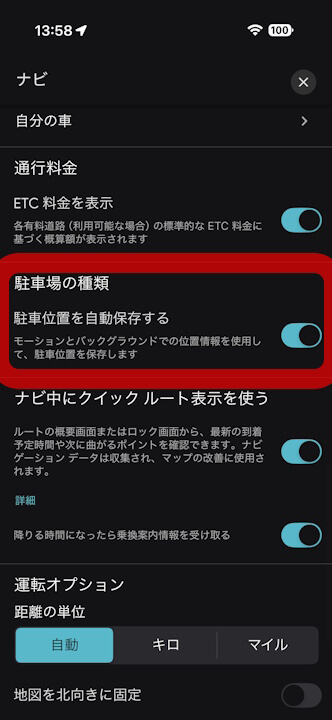
This newly available feature in the Japanese version of the iOS Google Maps app uses sensors on your iOS device, detects USB or Bluetooth connections with your car navigation/audio system, or recognizes the start/stop of “CarPlay” to determine when you have parked and automatically saves that location on Google Maps. The saved location is stored for 48 hours, though it will be deleted once you return to the car and resume driving.
Please note that the “Save parking location automatically” feature is not currently available for the Android version of the Google Maps app. Users with Android devices must still save their parking location manually.
Source:Google