




- Google has reported a bug occurring in the Android version of the “Google Photos” app.
- The issue involves “Google Photos” sometimes failing to appear in the “Photo Picker” when trying to post photos or videos saved in “Google Photos” to social media or other platforms.
- Users are advised to check and review their Android “Cloud media settings.”
On Tuesday, May 12, 2026, Google reported a bug currently affecting the Android version of its online photo library service, “Google Photos.”
The reported issue is that “Google Photos” may not appear in the “Photo Picker” when users attempt to upload photos or videos stored in “Google Photos” to social media or other apps. While the exact cause and details regarding a fix or update have not yet been announced, it is recommended that users review their Android “Cloud media settings.”
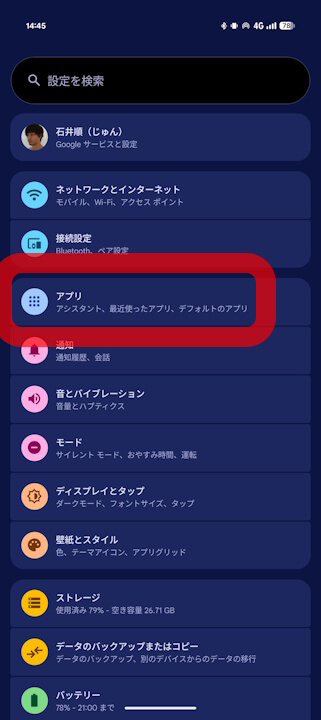
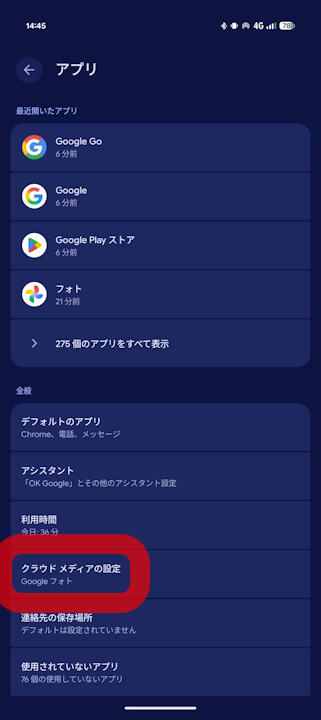
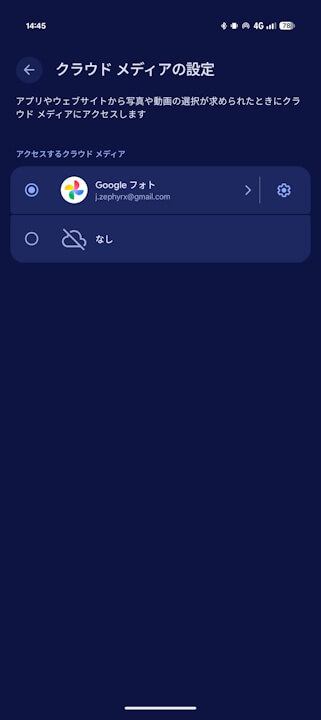
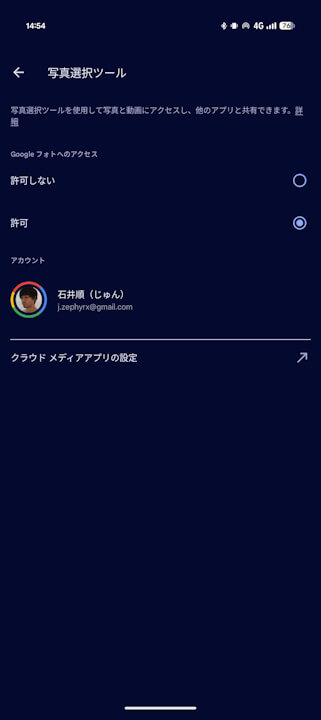
The “Cloud media” setting on Android can be accessed by going to Android Settings, tapping “Apps,” and then selecting “Cloud media settings” found under the “General” section. In addition to ensuring that “Google Photos” is selected in the “Cloud media settings,” you should also tap the “⚙” icon to verify that the Android “Google Photos” app is set to “Allow” within the “Photo picker” settings.
“Google Photos” App Link

Source: Google (https://support.google.com/photos/thread/433102353/how-to-set-google-photos-as-your-cloud-media-provider-on-android)