



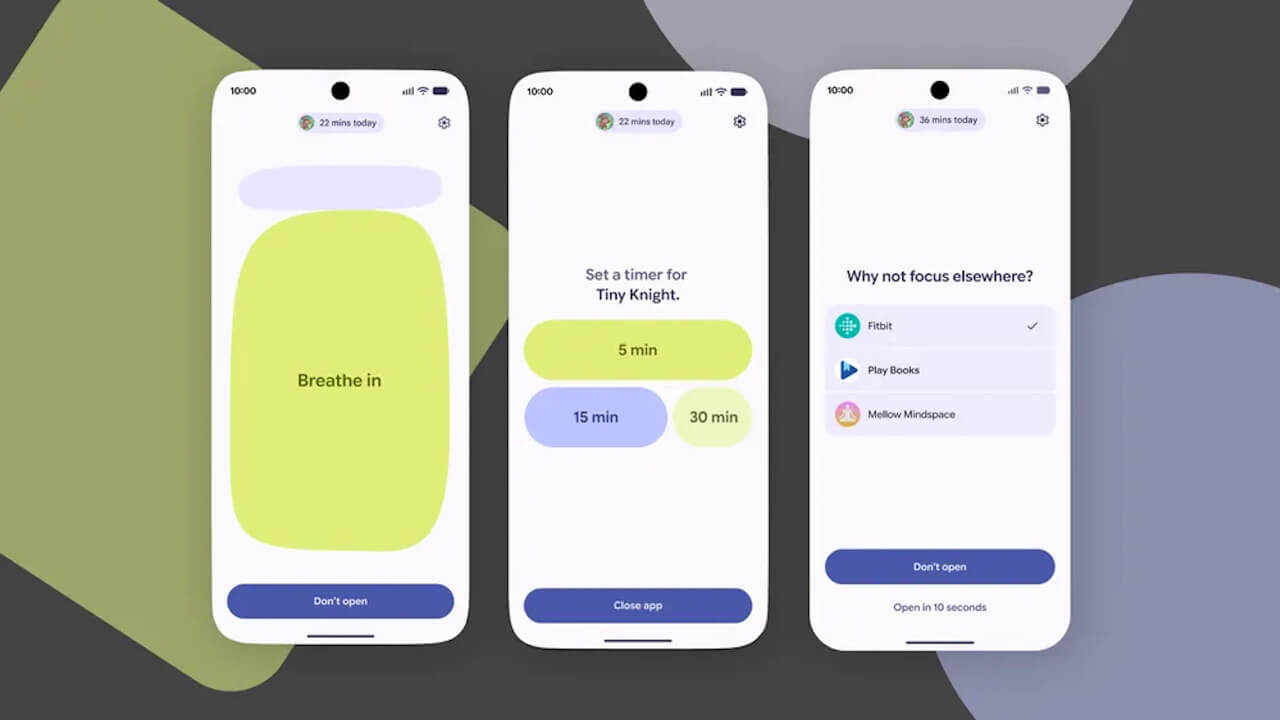

- Google has officially announced “Pause Point,” a new feature for its Android “Digital Wellbeing” program.
- The feature is designed to prevent excessive Android device usage and encourage more intentional app interaction.
- It will be introduced as part of the next-generation Android 17 OS update and additional “Digital Wellbeing” features coming in late 2026.
On Tuesday, May 12, 2026 (local time), Google officially announced “Pause Point,” a new feature to be integrated into its digital wellbeing program for Android, “Digital Wellbeing.”
The new “Pause Point” feature is designed to help users avoid excessive device usage and foster more intentional app habits. It will be rolled out as part of updates for the next-generation Android 17 OS and other “Digital Wellbeing” enhancements arriving in late 2026.
“Pause Point”
“Pause Point” is a feature added to Android’s “Digital Wellbeing” suite, aimed at curbing overuse of Android devices and encouraging more deliberate app usage.
Many users struggle with the habit of opening apps unconsciously, often finding themselves mindlessly scrolling and wasting time. To address this, “Digital Wellbeing” originally introduced features like “App Timers” and “Usage Reminders.”
However, because these timers and reminders are easily snoozed, their effectiveness is limited, and total lockout features that completely disable the device can be overly inconvenient. This is where “Pause Point” comes in.
With “Pause Point,” when you open an app that has been pre-configured as a time-consuming app, a 10-second pause screen appears. This 10-second interval serves as a moment for self-reflection: “Why am I trying to open this app right now?”
During the pause, you can also display photos that remind you of what you really want or need to be doing—such as a picture of your dog that encourages a walk—helping to keep your daily goals in mind. Additionally, it is possible to configure the pause screen to suggest healthier alternatives, such as exercise apps or audiobooks.
To prevent users from easily disabling the feature, “Pause Point” offers a robust option that requires a device restart to turn it off. By leveraging these “Pause Point” features, users can curb the habit of mindlessly opening apps, thereby reducing wasted time and making more effective use of their day.
Source:Google(https://blog.google/products-and-platforms/platforms/android/pause-point/)