




- A new feature similar to “Circle to Search,” called “Circle to ask,” has suddenly been rolled out in the Android version of the Gemini app.
- When the floating Gemini overlay is triggered by long-pressing the power button, “Circle to ask” allows users to circle any area on the screen. The selected part is then attached to the prompt bar as an image.
- Unlike “Circle to Search,” which performs an instant search on the circled area, this feature allows users to circle an area, enter a prompt, and then send the question to Gemini.
As of late April 2026, a new feature similar to “Circle to Search,” called “Circle to ask,” has suddenly been rolled out for the Google AI “Gemini” app on Android.
While Android devices already feature “Circle to Search”—a gesture-based search triggered by long-pressing the home button—the “Circle to ask” feature spotted in the Android Gemini app works differently. When the floating Gemini overlay is launched (typically by long-pressing the power button), you can circle any area of the screen just like you would with “Circle to Search.” The selected area is then captured and attached to the prompt bar as an image. From there, you can enter a prompt and send both the image and your question to Gemini.
Although “Circle to ask” in the Gemini app is very similar to “Circle to Search,” the key difference is that instead of triggering an instant search, it allows you to combine a circled selection with a text prompt to ask Gemini a specific question.
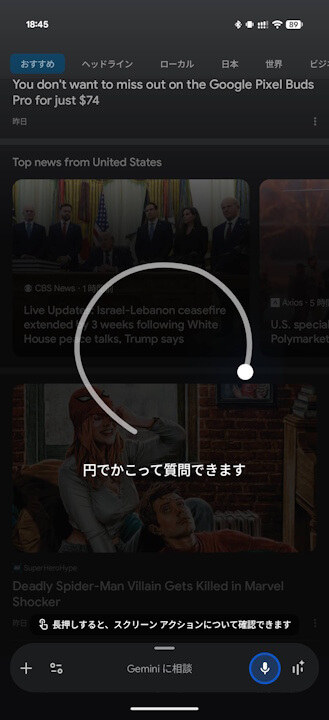
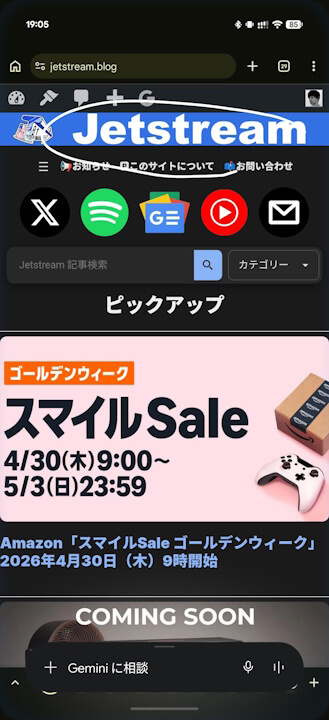
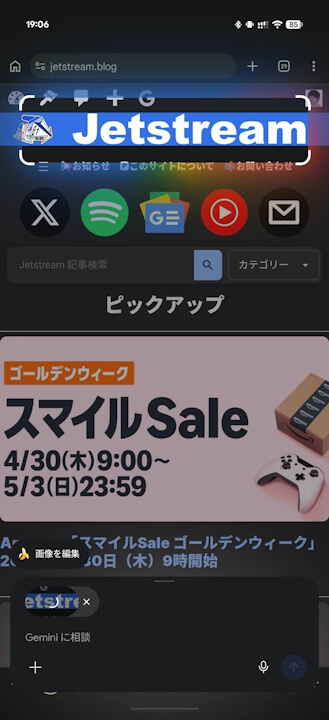
“Circle to ask” should be available on any Android device that supports the Gemini app. While I have only tested it on the “Pixel 10 Pro Fold,” “Pixel 10 Pro XL,” and “Pixel 9a,” I have confirmed that it works on all my Google Pixel devices running version v17.16.21 of the Google app, which powers the functionality of the Android Gemini app.
That said, since this was released suddenly without any prior announcement from Google, I was personally quite surprised.
Google App Link
