




- A new support feature has been implemented in the “Alarm” section of the default Android “Clock” app.
- App teardown of the Android “Clock” app v8.8 update revealed the addition of “low_volume” resources, which warn users via a banner when the alarm volume is set too low and allow them to adjust it to an appropriate level with a single tap.
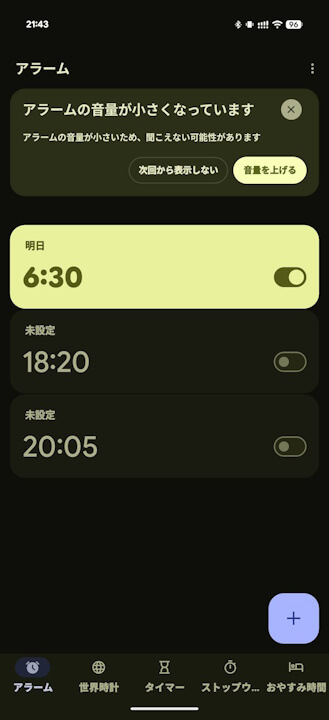
- Testing this in the Android “Clock” app v8.8 or later shows that if the alarm volume is lowered while setting an alarm, a warning banner reading “Alarm volume is low” appears, and tapping “Turn up volume” within the banner instantly sets it to an optimal level.
An app teardown has revealed that a new support feature has been implemented in the “Alarm” section of the default Android “Clock” app, commonly used on Google Pixel and other Android devices.
「アプリ解析」
当サイトの「アプリ解析」カテゴリで公開している記事では、最新 Android アプリを逆コンパイルして独自に解析し、今後実装される可能性のある新機能や変更点などをお届けします。正式リリース前の新機能や変更となるため開発段階の未確定な情報も含まれますが、Android アプリの今後のアップデート動向をいち早くキャッチできる、ほかにはない当サイトオリジナルコンテンツです。
当サイトオリジナルの「アプリ解析」コンテンツを見逃さないよう、ぜひ Google の「優先ソース」に当サイト「Jetstream 」を登録してください。

By analyzing the app files from the Android “Clock” app v8.8 update released on Thursday, April 9, 2026, we confirmed the addition of “low_volume” related resource code. This feature warns users with a banner when their alarm volume is set too low and provides a one-tap solution to increase it to a suitable level.
<string name="low_volume">Low alarm volume</string>
<string name="low_volume_banner_body">Your alarm volume is low, so you may not hear it</string>
<string name="low_volume_banner_cta_button_text">Turn up volume</string>
<string name="low_volume_banner_title">Alarm volume is low</string>
<string name="low_volume">アラームの音量が小さいです</string>
<string name="low_volume_banner_body">アラームの音量が小さいため、聞こえない可能性があります</string>
<string name="low_volume_banner_cta_button_text">音量を上げる</string>
<string name="low_volume_banner_title">アラームの音量が小さくなっています</string>In practice, if you lower the volume while setting an alarm in the Android “Clock” app version 8.8 or later, an “Alarm volume is low” warning banner appears. Tapping “Turn up volume” within that banner instantly sets the volume to an appropriate level. This helpful feature should prevent you from oversleeping due to the alarm volume being set too low.
Clock App Link
