




- “Now Playing” has been added to the lock screen “Shortcuts.”
- You can now use music recognition by long-pressing the “Now Playing” icon without unlocking your device.
- While the feature is currently referred to as both “Now Playing” and its Japanese equivalent “Kono Kyoku Nani?,” it is expected to be unified in the future.
On Tuesday, March 3, 2026, Google began rolling out the monthly software update for March 2026, “Android 16 QPR3,” for a total of 21 Google Pixel devices equipped with the new-generation Android 16 OS. These include the Pixel 6, 6 Pro, 6a, 7, 7 Pro, 7a, Tablet, Fold, 8, 8 Pro, 8a, 9, 9 Pro, 9 Pro XL, 9 Pro Fold, 9a, 10, 10 Pro, 10 Pro XL, 10 Pro Fold, and 10a. Alongside the security patches and performance enhancements, Google also released a wide array of new features as part of the March 2026 “Pixel Drop.”
The March 2026 Pixel Drop consists of 21 new features in total, one of which is the release of “Now Playing” as a standalone app, moving it away from its previous form as a purely OS-based music recognition function. Previously, the “Now Playing” feature was managed by “Android System Intelligence,” a system component app that enhances advanced control functions across Android. Now that it has become a standalone app, the system functions through the coordination of both the “Android System Intelligence” and “Now Playing” apps.
While the transition to a standalone “Now Playing” app makes the feature more transparent and easier to use for the end user, it has introduced a more complex underlying technical architecture.
 jetstream.blog
Following this shift, “Now Playing” has become more deeply integrated with the default home app, “Pixel Launcher,” including the introduction of a new Quick Settings tile. Furthermore, it has been confirmed that “Now Playing” is now available as a shortcut option on the lock screen.
By adding “Now Playing” to your lock screen shortcuts, you can trigger music recognition directly from the lock screen. A key feature here is that you can initiate the recognition by long-pressing the icon without having to unlock your phone. While the “Now Playing” tile in the Quick Settings menu requires the device to be unlocked, the lock screen shortcut does not.
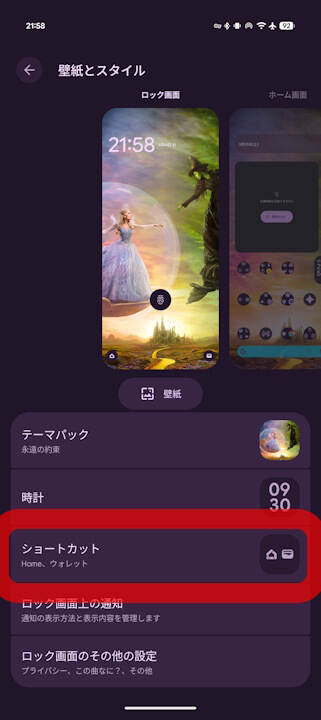
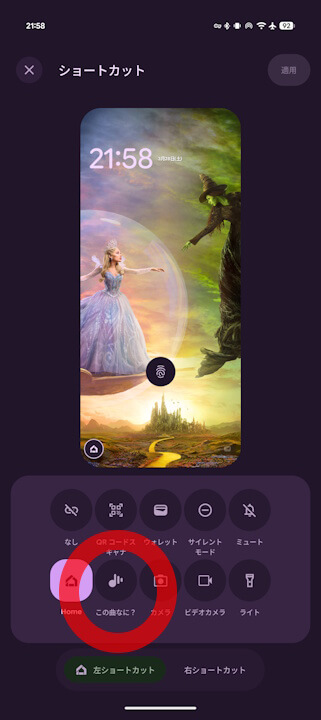
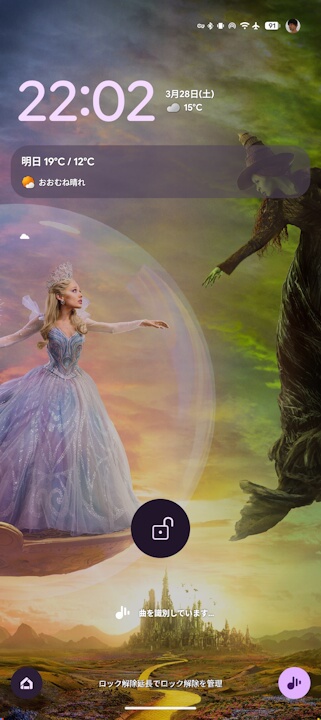
Although the feature is currently referred to by various names, including the English “Now Playing” and its Japanese designation, it is expected that the branding will be unified in the near future.
“Now Playing” App Link
