



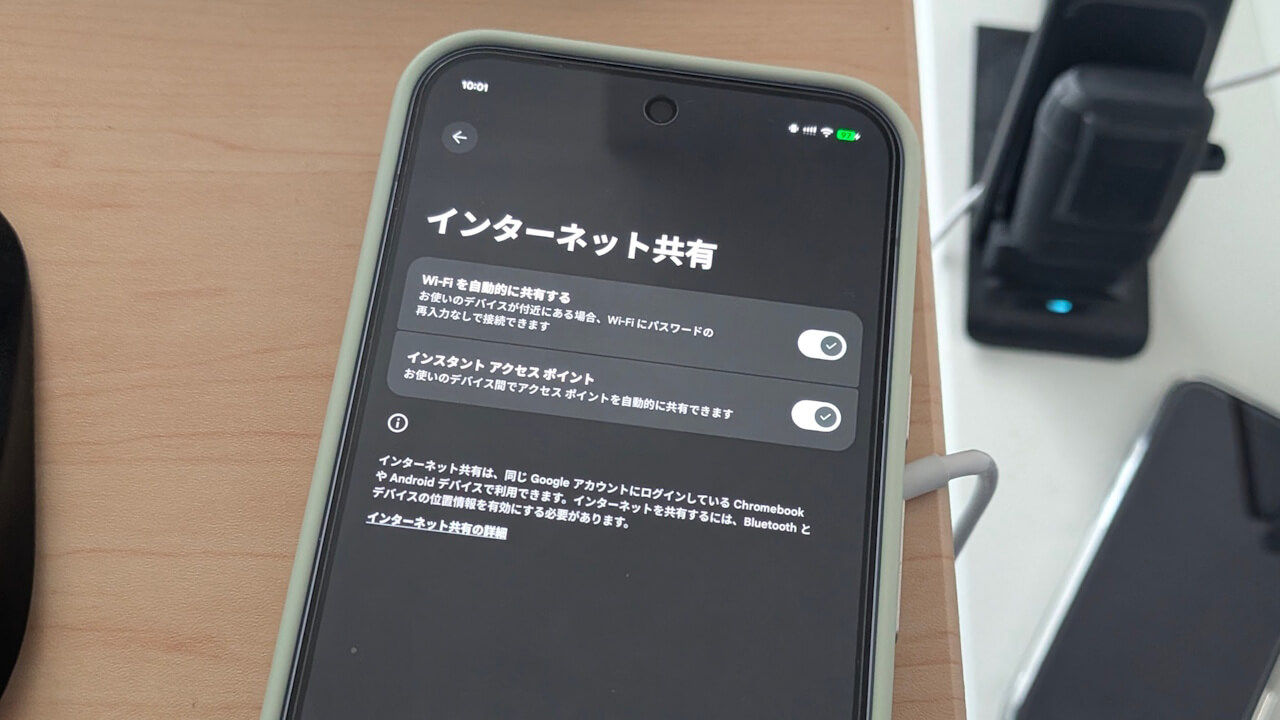

- Google has begun rolling out the new “Wi-Fi Sync” feature for “Google Play services” on Android and ChromeOS.
- “Wi-Fi Sync” is a derivative feature of “Instant Hotspot.”
- When an Android device or Chromebook without a Wi-Fi connection is near another one that is connected to Wi-Fi, the connection is automatically shared, allowing the disconnected device to join the Wi-Fi network automatically.
In the March 2026 Google System Release Notes, published on Monday, March 16, 2026, which summarize updates aimed at improving the security and reliability of Android-related devices, Google announced “Wi-Fi Sync,” a new feature arriving in “Google Play services” version 26.10 and later for Android and ChromeOS.
I have confirmed the rollout of the new “Wi-Fi Sync” feature within the “Google Play services” app on my own Android devices. While it was previously known that “Wi-Fi Sync” would allow users to easily share and sync trusted Wi-Fi networks across their own devices, the start of the rollout has now clarified the specific details of how it works.
 jetstream.blog
Android has long included a “Cross-device services” setting (formerly known as “Cross-device services”), which contains features like “Call casting” for seamlessly switching devices during Google Meet calls, and “Instant Hotspot” (part of “Internet sharing”) for remotely initiating tethering. The newly launched “Wi-Fi Sync” is a derivative of this “Internet sharing” functionality.
Up until now, “Internet sharing” has primarily functioned as “Instant Hotspot,” allowing devices like Wi-Fi-only tablets or Chromebooks to remotely turn on tethering for an Android device with cellular connectivity. This enables these tablets or Chromebooks to connect to the internet via the cellular device’s hotspot, even in outdoor areas without available Wi-Fi.
The newly launched “Wi-Fi Sync” is a variation of “Instant Hotspot.” If an Android device or Chromebook without a Wi-Fi connection is near another device that is already connected to Wi-Fi, the Wi-Fi connection is shared automatically, allowing the offline device to join the network. While the traditional “Instant Hotspot” remotely enables cellular tethering, “Wi-Fi Sync” provides a more logical approach by sharing the existing Wi-Fi signal when one device is already connected.
This is a very useful feature when setting up a new home Wi-Fi network or entering a new Wi-Fi environment.
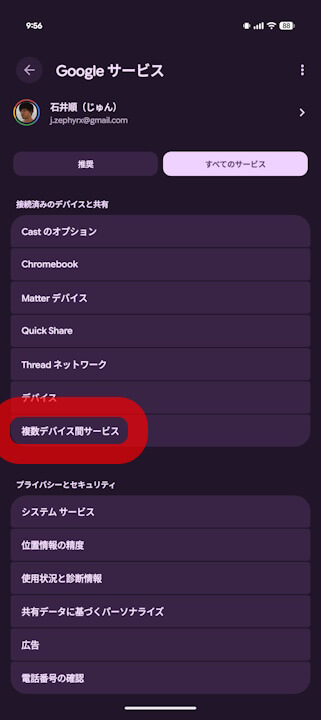
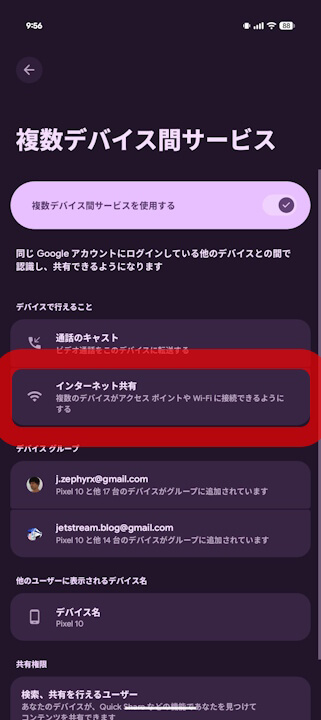

With the rollout of “Wi-Fi Sync,” the settings within “Internet sharing” have been split into two options: “Automatically share Wi-Fi (Wi-Fi Sync)” and “Instant Hotspot.” Both can be toggled on or off individually.
Note that “Automatically share Wi-Fi (Wi-Fi Sync)” within the “Internet sharing” menu is enabled by default.
Wi-Fi ネットワークに自動で接続する
重要: Wi-Fi ネットワークに接続するには、Wi-Fi をオンにする必要があります。
Android デバイスがインターネットに接続されていない場合は、所有している他の付近のデバイスを検索して、そのデバイスがインターネット アクセスを提供できるかどうかを確認します。それらのデバイスの中に Wi-Fi ネットワークに接続されているデバイスがある場合は、その Wi-Fi ネットワークへのアクセスを自動的に共有することで、インターネット アクセスを提供できます。この場合、接続するかどうかを尋ねる通知が表示されます。接続を選択すると、Android デバイスは自動的に接続されます。その際、パスワードの入力は一切必要ありません。
個人のデバイスを Wi-Fi とインスタント アクセス ポイントに自動的に接続する – Android ヘルプ
“Google Play services” App Link

Source:Google