




- Immediately after the rollout of “Ask Photos” in the Android version of the Google Photos app, a new UI was introduced that many long-time users considered a step backward.
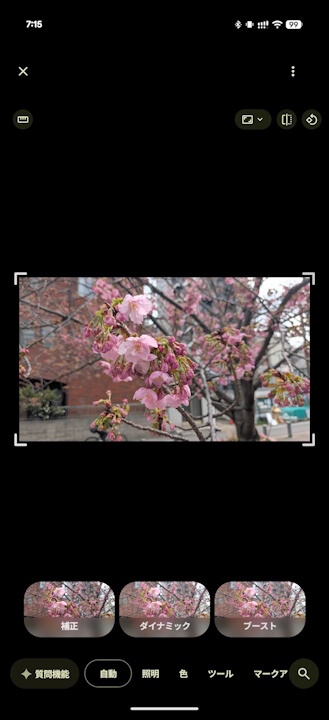
- As of version v7.67 and later of the Android Google Photos app, the initial photo editing screen has been improved: traditional editing tools are displayed by default, and “Ask Photos” is now accessible via an “Ask Photos” button.
- The traditional editing tools have largely been restored to their original layout.
The AI-powered photo editing feature, “Ask Photos,” began rolling out to the Android version of the Google Photos online photo library in mid-February 2026 in Japan.
Immediately following the rollout of “Ask Photos” in the Android Google Photos app, a new UI was introduced that many users accustomed to the traditional Google Photos experience found to be a regression. However, this appears to have been improved in app version v7.67, which was released in mid-March 2026.
 jetstream.blog
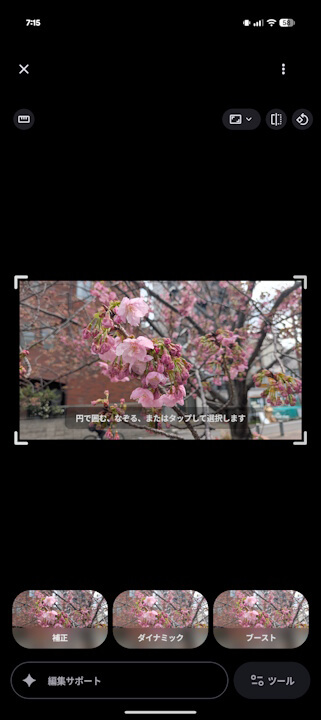
Initially, after the “Ask Photos” feature was launched, the photo editing screen was redesigned to prioritize “Ask Photos.” A large prompt input box for “Ask Photos” occupied the main area of the initial editing screen, and traditional editing tools were tucked away, requiring users to tap a “Tools” button to access them—a change that was widely viewed as a downgrade.
This regressive UI persisted up through version v7.66 of the Android Google Photos app. However, starting with version v7.67, the interface has been improved: the initial editing screen now displays the traditional editing tools, and “Ask Photos” has been moved to a dedicated “Ask Photos” button.
In short, the traditional editing tools have essentially been restored to their original prominence.
It seems there was a significant amount of user feedback expressing a desire to continue using the traditional photo editing tools as the primary method, with AI editing as an auxiliary feature.
Google Photos App Link
