




- “Automatic screen operation” settings are now rolling out to the “Pixel 10” series.
- The “Automatic screen operation” settings can be accessed via the “Gemini” app settings, even in Japan / Japanese environments.
- The actual configuration involves granting “Automatic screen operation” permissions to the Android “Google” app that powers Gemini.
In late February 2026, Google announced “Automatic screen operation” (Multi-step tasks / codename: Bonobo) as a new feature for the Google AI “Gemini” app beta, specifically for the “Pixel 10,” “Pixel 10 Pro,” “Pixel 10 Pro XL,” and Samsung “Galaxy S26” series in the US and South Korea.
Settings for this “Automatic screen operation” have now begun rolling out to the “Pixel 10” series. It is possible to access these settings through the “Gemini” app even in Japan / Japanese environments.
Additionally, although it was not initially listed as a supported device, the settings can also be configured on the “Pixel 10 Pro Fold.”
 jetstream.blog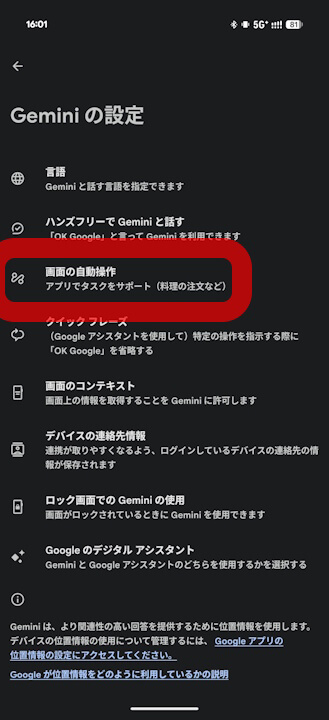
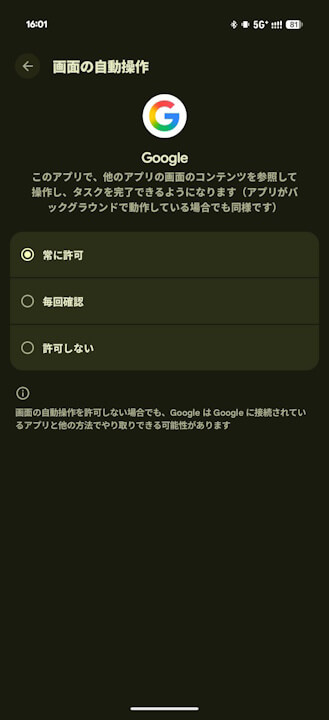
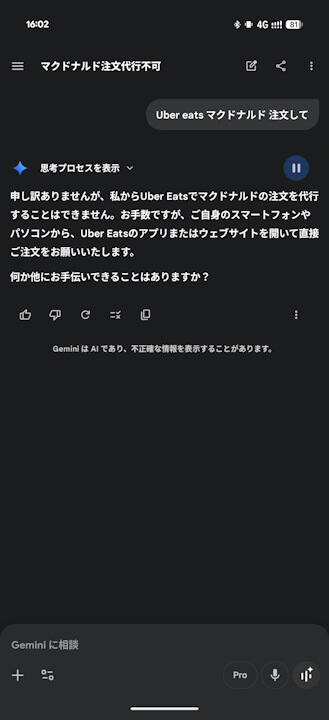
The actual configuration for “Automatic screen operation” involves granting permission to the Android “Google” app that serves as the engine for Gemini. However, it is important to note that the feature cannot yet be used in Japan / Japanese environments.
By setting “Automatic screen operation” to “Always allow” or “Ask every time” on your “Pixel 10” series device, it is expected that you will be able to use it as soon as the service rolls out for the Japanese region.
“Google” App Link
