







- Google Pixel デバイス専用診断アプリ「Pixel Troubleshooting」に、5 つめの診断機能として、Bluetooth デバイスとの接続診断「Bluetooth 診断(Bluetooth Diagnostic)」が実装される模様。
- 「Pixel Troubleshooting」アプリ v1.0.881271863.release アップデートのアプリファイルを解析した結果、「Bluetooth 診断(Bluetoot Diagnostic)」に関する権限やリソースコードなどを含む XML コードが追加されていることを確認。
- Google Pixel Bluetooth イヤホン「Pixel Buds Pro 2」「Pixel Buds 2a」や Google Pixel スマートウォッチ「Google Pixel Watch 3」「Google Pixel Watch 4」といった Google Pixel デバイス専用のトラブルシューティングも用意。
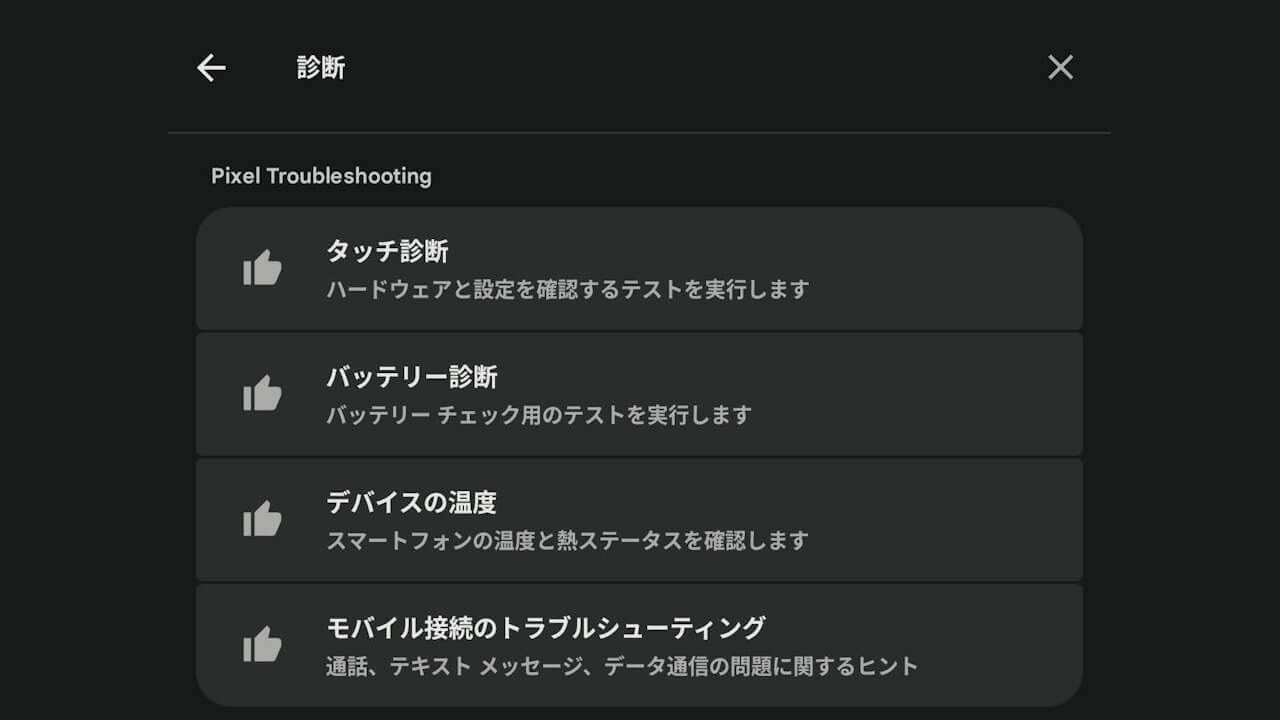
Google Pixel デバイスには、ディスプレイの「タッチ診断」、バッテリー状態確認「バッテリー診断」、デバイスの発熱診断「デバイスの温度」、通話 / 通信診断「モバイル接続のトラブルシューティング」といった 4 つの診断機能を司るアプリ「Pixel Troubleshooting」がインストールされています。
そして今後、5 つめの診断機能として、Bluetooth デバイスとの接続診断「Bluetooth 診断(Bluetooth Diagnostic)」が実装される模様です。「アプリ解析」にて、その可能性が判明しました。
「アプリ解析」
当サイトの「アプリ解析」カテゴリで公開している記事では、最新 Android アプリを逆コンパイルして独自に解析し、今後実装される可能性のある新機能や変更点などをお届けします。正式リリース前の新機能や変更となるため開発段階の未確定な情報も含まれますが、Android アプリの今後のアップデート動向をいち早くキャッチできる、ほかにはない当サイトオリジナルコンテンツです。
当サイトオリジナルの「アプリ解析」コンテンツを見逃さないよう、ぜひ Google の「優先ソース」に当サイト「Jetstream 」を登録してください。

2026 年 3 月 16 日(月)に配信された、「Pixel Troubleshooting」アプリ v1.0.881271863.release アップデートのアプリファイルを解析した結果、「Bluetooth 診断(Bluetooth Diagnostic)」に関する権限やリソースコードなどを含む XML コードが追加されていることを確認しました。
<uses-permission android:name="android.permission.BLUETOOTH_ADMIN"/>
    <uses-permission android:name="android.permission.BLUETOOTH"/>
    <uses-permission
        android:name="android.permission.BLUETOOTH_SCAN"
        android:usesPermissionFlags="neverForLocation"/>
    <uses-permission android:name="android.permission.RECORD_AUDIO"/>
    <uses-permission android:name="android.permission.READ_MEDIA_AUDIO"/>
    <uses-permission android:name="android.permission.LOCAL_MAC_ADDRESS"/>
    <activity
            android:theme="@style/CavalrySettingsTheme"
            android:label="@string/bluetooth_diagnostic_entry_name"
            android:name="com.google.android.apps.pixel.support.bluetooth.navigationroot.BluetoothNavigationRootActivity"
            android:exported="false"
            android:configChanges="screenSize|screenLayout|orientation|keyboardHidden">
            <intent-filter>
                <action android:name="com.android.settings.action.IA_SETTINGS"/>
                <category android:name="android.intent.category.DEFAULT"/>
            </intent-filter>
            <meta-data
                android:name="com.android.settings.category"
                android:value="com.android.settings.category.ia.connect"/>
            <meta-data
                android:name="com.android.settings.group_key"
                android:value="bluetooth_diagnostics_category"/>
            <meta-data
                android:name="com.android.settings.title"
                android:resource="@string/bluetooth_diagnostic_entry_name"/>
            <meta-data
                android:name="com.android.settings.summary"
                android:resource="@string/bluetooth_diagnostic_entry_summary"/>
            <meta-data
                android:name="com.android.settings.profile"
                android:value="primary_profile_only"/>
            <meta-data
                android:name="com.android.settings.order"
                android:value="1000"/>
        </activity>
        <provider
            android:name="com.google.android.apps.pixel.support.bluetooth.navigationroot.BluetoothDiagnosticsSearchProvider"
            android:permission="android.permission.READ_SEARCH_INDEXABLES"
            android:exported="true"
            android:process=":projection"
            android:multiprocess="false"
            android:authorities="com.google.android.apps.pixel.support.bluetooth.navigationroot.bluetoothdiagnosticssearchprovider"
            android:grantUriPermissions="true">
            <intent-filter>
                <action android:name="android.content.action.SEARCH_INDEXABLES_PROVIDER"/>
            </intent-filter>
        </provider>
        <receiver
            android:name="com.google.android.apps.pixel.support.bluetooth.receiver.BluetoothPhenotypeActionReceiver_Receiver"
            android:permission="com.google.android.gms.permission.PHENOTYPE_UPDATE_BROADCAST"
            android:exported="true">
            <intent-filter>
                <action android:name="com.google.android.gms.phenotype.UPDATE"/>
            </intent-filter>
        </receiver>
        <receiver
            android:name="com.google.android.apps.pixel.support.bluetooth.receiver.BluetoothActionReceiver_Receiver"
            android:enabled="true"
            android:exported="false">
            <intent-filter>
                <action android:name="android.intent.action.MY_PACKAGE_REPLACED"/>
            </intent-filter>
            <intent-filter>
                <action android:name="android.intent.action.BOOT_COMPLETED"/>
            </intent-filter>
            <intent-filter>
                <action android:name="com.google.android.setupwizard.SETUP_WIZARD_FINISHED"/>
            </intent-filter>
        </receiver>
        <service
            android:name="com.google.android.apps.pixel.support.bluetooth.settingsprovider.CavalryBluetoothDeviceSettingsProviderService"
            android:permission="android.permission.BLUETOOTH_PRIVILEGED"
            android:exported="true">
            <intent-filter>
                <action android:name="com.google.android.apps.pixel.support.bluetooth.settingsprovider.BIND_SERVICE"/>
                <category android:name="android.intent.category.DEFAULT"/>
            </intent-filter>
        </service>
また「Pixel Troubleshooting」アプリの「Bluetooth 診断」には、Google Pixel Bluetooth イヤホン「Pixel Buds Pro 2」「Pixel Buds 2a」や Google Pixel スマートウォッチ「Google Pixel Watch 3」「Google Pixel Watch 4」といった Google Pixel デバイス専用のトラブルシューティングも用意される模様です。つまり「Bluetooth 診断」は、Bluetooth デバイスとの接続診断をベースに、Google Pixel デバイスとのペアリングではディスプレイやボタンの動作確認といった、より詳細な診断を行えるようになる可能性があります。
<string name="bluetooth_model_pixel_buds_2_a_entry">Pixel Buds 2a</string>
    <string name="bluetooth_model_pixel_buds_pro_2_entry">Pixel Buds Pro 2</string>
    <string name="bluetooth_model_pixel_watch_3_entry">Pixel Watch 3</string>
    <string name="bluetooth_model_pixel_watch_4_entry">Pixel Watch 4</string>
「Pixel Troubleshooting」アプリリンク




コメントを残す