




- A new “Tap to send (Tap to draft)” setting has begun rolling out for the “Google Messages” app on Android.
- This setting applies to “Smart Reply,” which suggests replies for received messages, and can be found within the “Show suggestions” menu.
- When “Tap to send” is enabled, the label changes to “Tap to draft,” and tapping a suggested message will insert it into the text box as a draft instead of sending it immediately.
A new setting called “Tap to send (Tap to draft)” has begun rolling out for “Google Messages,” the SMS/MMS/RCS client app provided by Google for Android.
The new “Tap to send (Tap to draft)” setting in the Google Messages app is designed to modify the behavior of the “Smart Reply” feature, which suggests responses to incoming messages. You can find this option within the “Show suggestions” menu in the app’s settings.
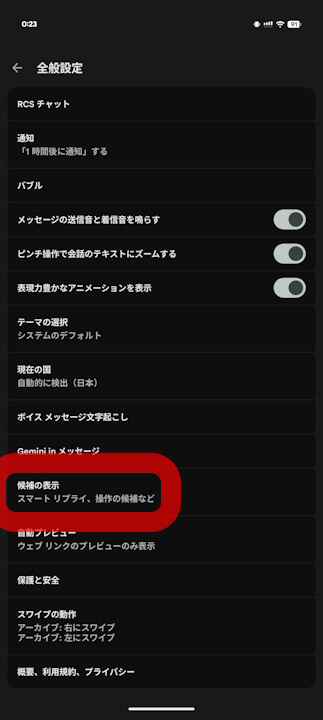
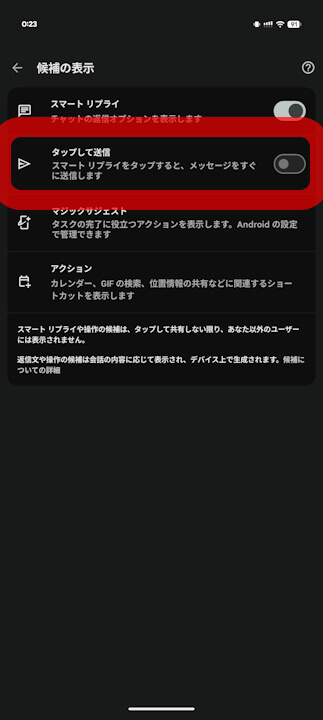
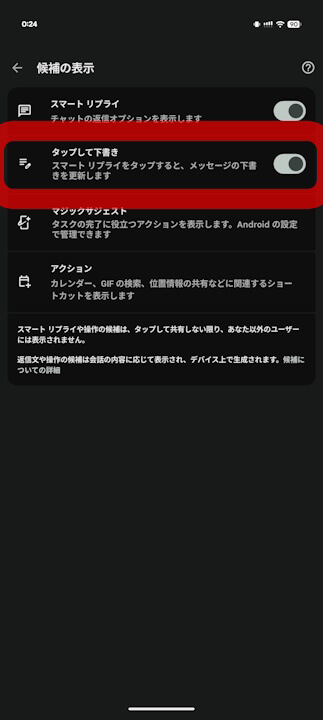
Previously, tapping a suggested reply in “Smart Reply” would send the message immediately. However, once this new “Tap to send” setting is enabled, the label changes to “Tap to draft.” With this enabled, tapping a suggestion will simply insert the text into the draft area rather than sending it, effectively acting as a safeguard against accidental messages.
At this time, the new “Tap to send (Tap to draft)” setting is available in app version v20260303_00_RC00.phone.openbeta, which is distributed to those enrolled in the Beta Program. Furthermore, it appears to be rolling out to only a subset of Android devices and is not yet widely available.
“Google Messages” App Link
