







- 「Pixel 9」「Pixel 10」シリーズ向け「連携カメラ」が、いつの間にか USB カメラの接続に対応。
- 「UVC(USB Video Class)」インターフェースに対応する USB カメラをセカンドカメラとして利用できるように。
- 「Pixel Camera Services」アプリに対して 2026 年 3 月 3 日(火)に配信されたアプリバージョン v3.2.877452834.08 アップデートで解禁。
Google が昨年、Google Pixel デバイス向け新機能の 2025 年 3 月版「Pixel Drop」として発表し、当初 Google Pixel デバイス「Pixel 9」シリーズ向けに展開を開始した「連携カメラ」。
「連携カメラ」は、母艦側 Google Pixel デバイスと「Pixel 6」以降の Google Pixel デバイスや「GoPro 10」以降の GoPro カメラをセカンドカメラとしてワイヤレスで接続することで、動画撮影やストリーミング配信時にシームレスにカメラを切り替えられる機能です。現在は、新世代 Google Pixel デバイス「Pixel 10」シリーズも、母艦側 Google Pixel デバイスとして利用できるようになっています。

 jetstream.blog
そんな「Pixel 9」「Pixel 10」シリーズ向け「連携カメラ」ですが、いつの間にか USB カメラの接続にも対応した模様です。当初は「Pixel 9」「Pixel 10」シリーズを母艦側として、「Pixel 6」以降の Google Pixel デバイスか「GoPro HERO10」以降の GoPro カメラをセカンドカメラとしてワイヤレスで接続する仕様でしたが、対応する USB カメラもセカンドカメラとして利用できるようになりました。
なお「連携カメラ」に対応するのは、「UVC(USB Video Class)」規格に対応する USB カメラです。
Pair a compatible GoPro or plug-in a compatible USB camera.
Compatible devices: GoPro Hero 10, 11, 12, 13, and USB cameras that support USB Video Class (UVC) specification.
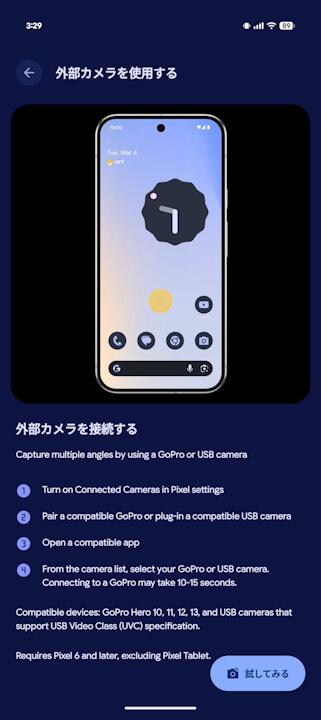
なお「連携カメラ」の USB カメラ対応は、「Pixel Camera Services」アプリに対して 2026 年 3 月 3 日(火)に配信されたアプリバージョン v3.2.877452834.08 アップデートで解禁されたことが、アプリファイルを解析した結果明らかとなっています。
<uses-permission android:name="android.permission.MANAGE_USB"/>
<uses-permission android:name="android.permission.MODIFY_AUDIO_SETTINGS"/>
<uses-feature android:name="android.hardware.usb.host"/>
...
<receiver
    android:name="com.google.android.apps.camera.services.connectivity.plugin.uvc.data.UvcCameraBroadcast_Receiver"
    android:exported="false">
    <intent-filter>
        <action android:name="android.hardware.usb.action.USB_DEVICE_ATTACHED"/>
        <action android:name="android.hardware.usb.action.USB_DEVICE_DETACHED"/>
    </intent-filter>
</receiver>
<string name="error_unsupported_uvc_device">%1$s is not supported yet. Try with a different USB camera.</string>
<string name="error_usb_connection_failed">Couldn’t connect to %1$s. Re-attach the camera and try again.</string>
<string name="error_usb_permission_denied">Allow Pixel Camera Services to access %1$s</string>
<string name="usb_authorization_dialog_body_text">To connect to USB cameras, you need to allow access</string>
<string name="usb_authorization_dialog_title">Allow access to USB cameras?</string>
<string name="usb_authorization_negative_action">Cancel</string>
<string name="usb_authorization_positive_action">Allow</string>
<string name="usb_camera">USB Camera</string><string name="error_unsupported_uvc_device">%1$s はまだサポートされていません。別の USB カメラでお試しください。</string>
<string name="error_usb_connection_failed">%1$s に接続できませんでした。カメラを再接続して、もう一度お試しください。</string>
<string name="error_usb_permission_denied">Pixel カメラサービスに %1$s へのアクセスを許可してください</string>
<string name="usb_authorization_dialog_body_text">USB カメラに接続するには、アクセスを許可する必要があります</string>
<string name="usb_authorization_dialog_title">USB カメラへのアクセスを許可しますか?</string>
<string name="usb_authorization_negative_action">キャンセル</string>
<string name="usb_authorization_positive_action">許可</string>
<string name="usb_camera">USB カメラ</string>「Pixel Camera Services」アプリリンク





コメントを残す