




- Google has announced three new features for the desktop version of “Chrome” to enhance productivity in work and daily life.
- The features include “Split View,” PDF Direct Annotations, and direct saving of PDF files to “Google Drive.”
- These new features are already being rolled out for the Windows and Mac versions of “Chrome.”
On Thursday, February 19, 2026, Google announced three new features for the desktop version of its “Chrome” browser service, designed to improve productivity in both professional and personal tasks.
A total of three features were introduced: “Split View,” PDF Direct Annotations, and Direct Saving of PDFs to Google Drive. These new features have already begun rolling out to the Windows and Mac versions of “Chrome.”
“Split View”
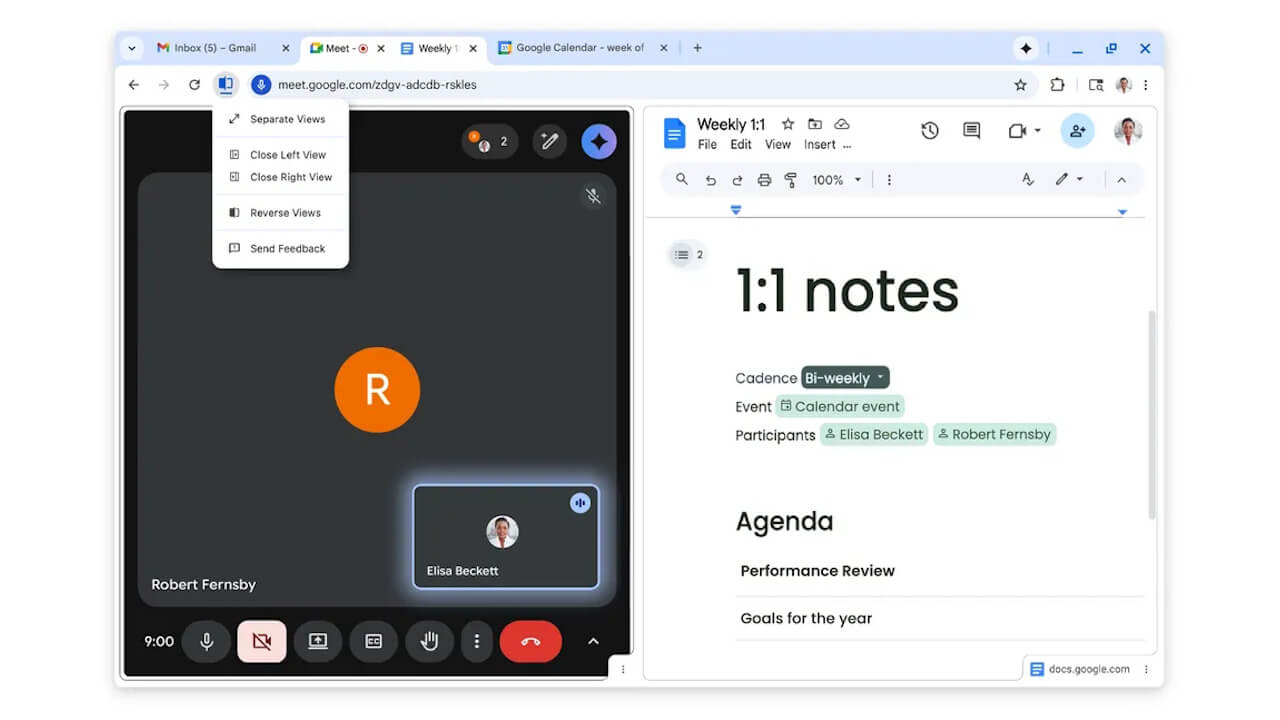
“Split View” in the desktop version of “Chrome” is a feature that allows you to display two web pages side-by-side within a single tab.
It is easy to use: simply right-click while hovering over a link, and select “Open link in split view” from the context menu. Additionally, you can perform the same action by right-clicking any active tab in “Chrome” and selecting “Add tab to new split view.”
This is useful in various scenarios, such as comparing pages or products, or working while a video is playing.
 jetstream.blog
PDF Direct Annotations
PDF Direct Annotations is a new feature in the desktop version of “Chrome” that allows you to add notes directly to a PDF file opened in the browser using markup (drawing) tools.
Without the need to download the PDF and upload it to editing software, you can write notes or highlight important sections directly within the browser.
 jetstream.blog
Save PDFs Directly to “Google Drive”
The new “Directly Save PDF files to Google Drive” feature in the desktop version of “Chrome” allows you to save a PDF file displayed in the browser directly to “Google Drive” via the “Google Drive” icon.
You can now save PDFs directly to “Google Drive” without the need to first download them to your local storage.
 jetstream.blog
Source: Google