




- The Android version of the “Uber Eats” app appears to have quietly gained support for Android 16’s “Live Updates.”
- Order progress can now be checked directly from the notification area and the lock screen.
- There does not seem to be a specific ON/OFF toggle available in the notification settings yet.
The Android app for the online delivery service “Uber Eats” seems to have added support for Android 16’s “Live Updates” feature without much fanfare.
“Live Updates” is a flagship feature of the next-generation “Android 16” OS. It allows users to check real-time information—such as car navigation progress from Google Maps, travel itineraries in Google Wallet, and order status from food delivery apps—directly from the notification area or lock screen. The rollout of navigation progress for Google Maps and itinerary displays for Google Wallet has already been confirmed.
While order progress tracking for food delivery apps had not been observed until now, the Android version of the “Uber Eats” app has finally supported “Live Updates” in Android 16 environments, making it possible to track orders from the notification area and lock screen.
We have confirmed “Live Updates” support in version v6.308.10000 of the Uber Eats app for Android.
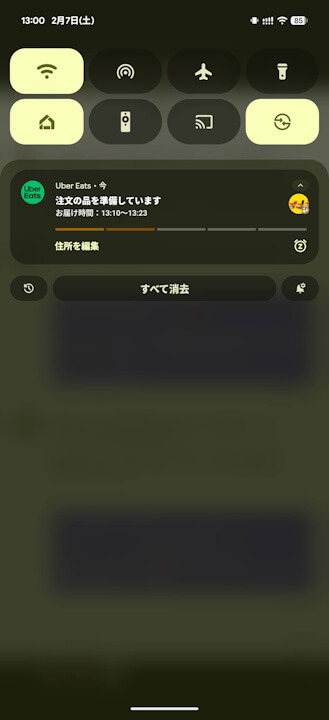
However, it appears that the Android version of the “Uber Eats” app does not yet provide a dedicated ON/OFF toggle for “Live Updates” within its notification settings.
“Uber Eats” App Link
