




- Google has announced a major update to “Gemini in Chrome,” its integrated AI browser service for Windows, macOS, and Chromebook Plus.
- The most intelligent AI model, “Gemini 3,” has been introduced.
- New features rolling out include a new side panel, AI image generation via “Nano Banana,” support for Google app connections, the introduction of “Personal Intelligence,” the launch of the autonomous agent “Auto browse,” and new defensive security features.
On Wednesday, January 28, 2026, Google announced a major update to “Gemini in Chrome,” its integrated Google AI browser service for Windows, macOS, and Chromebook Plus.
This major update to “Gemini in Chrome” introduces “Gemini 3,” Google’s most intelligent AI model, along with several new features powered by it. These new “Gemini in Chrome” features include the rollout of a new side panel, AI image generation via “Nano Banana,” support for Google app connections, the introduction of “Personal Intelligence,” the deployment of the autonomous agent “Auto browse,” and the implementation of new defensive security functions.
However, “Gemini in Chrome” for Windows, macOS, and Chromebook Plus is currently being rolled out specifically for the United States. A release in Japan has not been announced at this time.
New Side Panel Rollout
A new side panel is being rolled out to “Gemini in Chrome,” allowing users to access “Gemini” at any time while browsing.
This new side panel is a convenient feature that enables users to perform tasks utilizing “Gemini” while browsing within a single tab. You will be able to execute tasks—such as summarizing product reviews from multiple sites or giving Gemini specific questions and instructions—without having to switch screens.
 jetstream.blog
AI Image Generation with “Nano Banana”
In the new side panel that keeps “Gemini” available during browsing, users will now be able to use AI image generation powered by the “Nano Banana” image generation AI model.
With this new side panel, you can simply view an image on a web page while browsing and enter image editing prompts into the side panel to execute AI image generation directly within that panel.
 jetstream.blog
Google App Connection Support
The new side panel for “Gemini in Chrome” now supports connections to Google apps such as Gmail, Google Calendar, YouTube, Google Maps, Google Shopping, and Google Flights.
This allows you to use the side panel to instruct Gemini to perform tasks like finding past emails in Gmail, displaying an address found on a web page in Google Maps, or scheduling event details from a page into Google Calendar. These Google app connections in the side panel can be toggled on or off individually within the “Connected Apps” section of the Gemini settings.
 jetstream.blog
Introduction of “Personal Intelligence”
“Personal Intelligence” will be introduced to “Gemini in Chrome” within the next few months.
Similar to the “Personal Intelligence” feature already introduced in the “Gemini” app and the AI search service “AI Mode,” users will be able to configure whether to link specific Google services, including Gmail, Google Photos, YouTube, and Google Search.
 jetstream.blog
Deployment of Autonomous Agent “Auto browse”
The autonomous agent feature “Auto browse” is being rolled out to “Gemini in Chrome” as a preview for Google One “Google AI Pro” and “Google AI Ultra” members in the United States.
“Auto browse” is an evolution of “Google Autofill”—which automatically enters IDs, passwords, addresses, and credit card information—and acts as an autonomous agent that automatically executes complex web tasks involving multiple steps. For example, it can complete Google Form surveys that previously required manual user input by using data from files like PDFs to fill them out on your behalf.
 jetstream.blog
Introduction of New Defensive Features
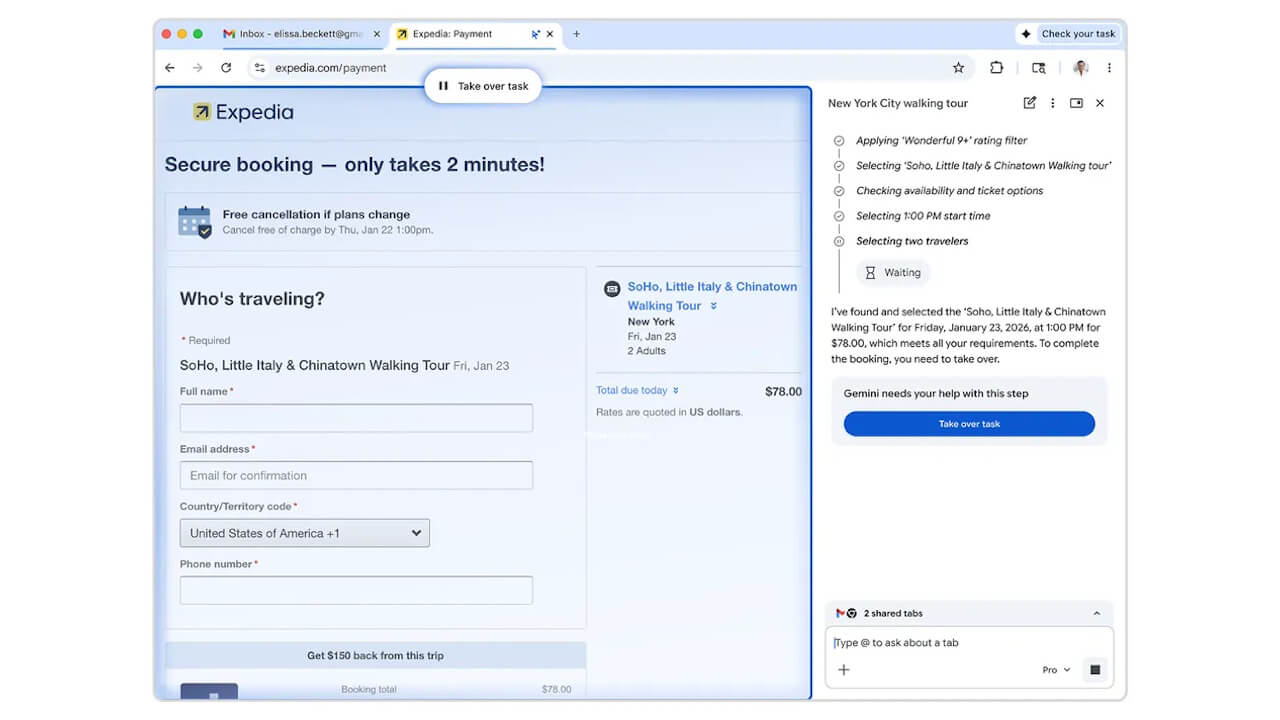
“Gemini in Chrome” is introducing entirely new defensive features built on rigorous security standards to protect users from emerging threats.
These new defensive features will provide advanced control, such as in the autonomous agent “Auto browse” preview for Google AI Pro/Ultra members. The system can pause to seek user confirmation or permission, or prompt for the execution of social media posting tasks. This ensures protection against new threats while preventing the execution of unintended or incorrect operations.
 jetstream.blog
Source: Google