




- A new [+] button has been added to the Google web homepage, allowing you to upload images/files without first activating the “AI Mode” search feature.
- You can now directly upload an image/file, enter a prompt, and immediately get an answer from “AI Mode.”
- To perform an image search with Google Lens, continue to upload your image via the Google Lens icon as before.
On the web version of the Google homepage, a new [+] button has been added that allows you to upload images or files without needing to activate the AI search feature, “AI Mode.”
Previously, to upload an image or file in “AI Mode,” you had to first activate “AI Mode” and then click the [+] button. However, with the addition of the [+] button to the Google web homepage, you can now directly upload an image or file, enter a prompt, and immediately get an answer from “AI Mode.”
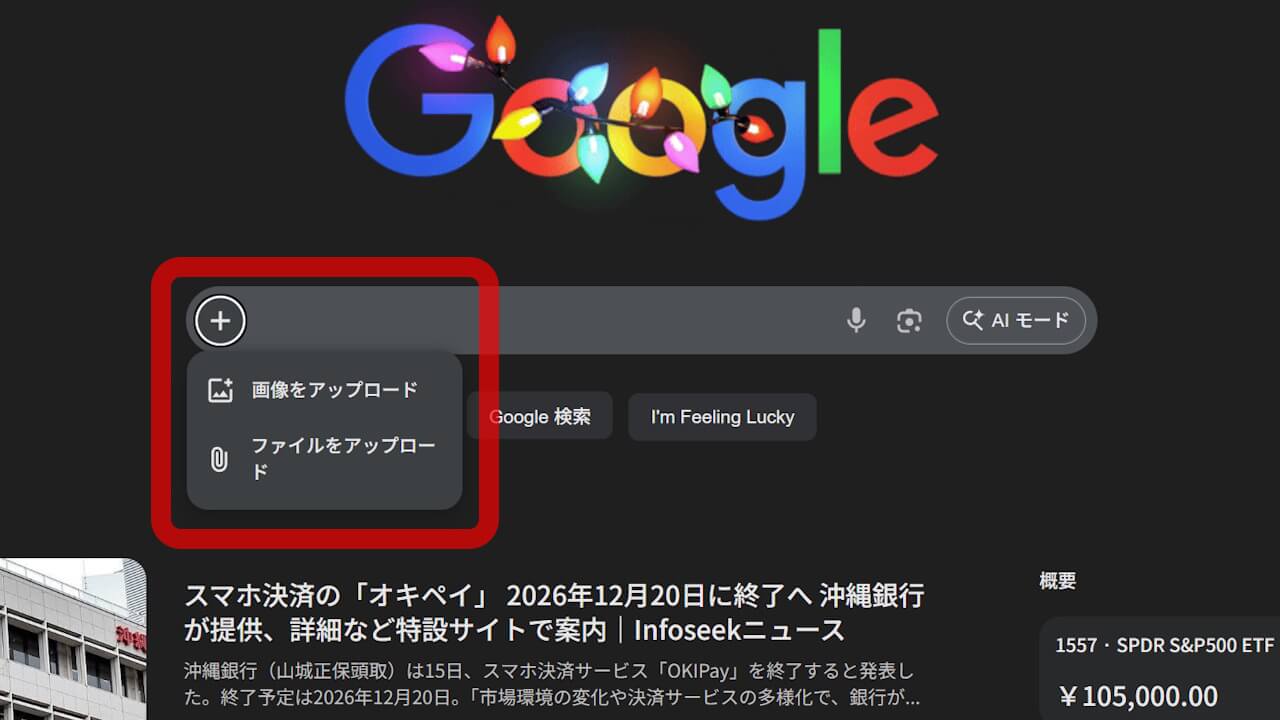
Please note that when you upload an image using the [+] button on the Google web homepage, it initiates image recognition through “AI Mode,” not an image search with Google Lens. To perform an image search with Google Lens, continue to upload your image via the Google Lens icon as before.
Source: Google