




- The v143 (v143.0.7499.52) update for the Android “Chrome” app was rolled out around Friday, December 5, 2025.
- “Reading Mode,” previously available on the desktop version of “Chrome,” has been implemented.
- “Reading Mode” is a feature that simplifies the view of a web page by removing elements like images and videos, leaving only the essentials, making it easier to focus on the text.
The v143 (v143.0.7499.52) update for the Android app of Google’s browser service, “Chrome,” began rolling out around Friday, December 5, 2025.
This v143 update to the Android “Chrome” app introduces “Reading Mode,” a feature previously available on the desktop version of “Chrome.” “Chrome’s” “Reading Mode” simplifies the display of a web page by removing most elements like images and videos, leaving only the essentials, which makes it easier to focus on the text.
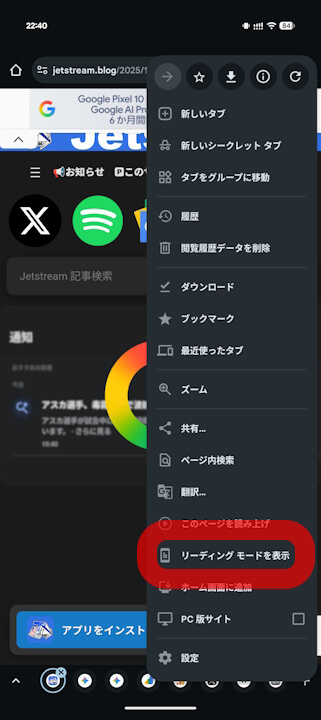
“Reading Mode” was previously only available on the desktop version of “Chrome,” but it is now also available on the Android “Chrome” app. To use “Reading Mode” in the Android “Chrome” app, tap the three-dot menu [︙] in the upper right corner of a web page and then tap “View in Reading Mode” from the context menu that appears.
By the way, it seems that “Reading Mode” is not available for all pages. Also, please note that “Reading Mode” is different from the “Reading list” for offline viewing.
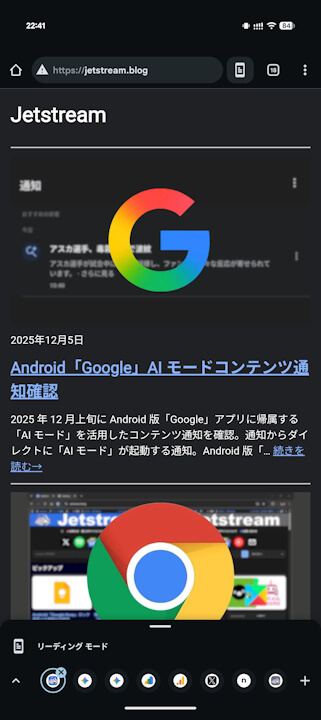
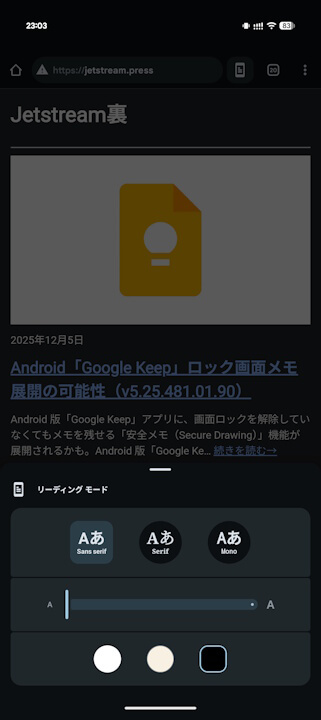
In “Reading Mode,” you can also change the font and font size to make it even easier to read.

However, while the “Reading Mode” on the desktop version of “Chrome” also supports text-to-speech, this feature does not seem to be implemented in the “Reading Mode” of the Android “Chrome” app.
“Chrome” App Links

