




- Google is rolling out the December 2025 monthly software update, including the usual security vulnerability patches and feature enhancements, for the new generation of Google Pixel devices: “Pixel 10,” “Pixel 10 Pro,” “Pixel 10 Pro XL,” and “Pixel 10 Pro Fold.”
- This release is the “Android 16 QPR2” minor update to the “Android 16” major update, which was released on Tuesday, June 10, 2025.
- It includes an Android security patch update, bug fixes/improvements, and several new features.
On Tuesday, December 2, 2025, Google began rolling out the December 2025 monthly software update, which includes the usual security vulnerability patches and feature enhancements, for its new generation of Google Pixel devices running the new Android OS “Android 16”: “Pixel 10,” “Pixel 10 Pro,” “Pixel 10 Pro XL,” and “Pixel 10 Pro Fold.”
The December 2025 monthly software update, now rolling out to Google Pixel devices, is the release of the “Android 16 QPR2” OS minor update to the “Android 16” major update released on Tuesday, June 10, 2025. It includes an Android security patch update, bug fixes/improvements, and several new features.
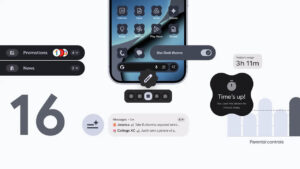

Furthermore, starting with this OS minor update “Android 16 QPR2,” the Android OS will shift from a single major update per year to a more frequent release schedule.
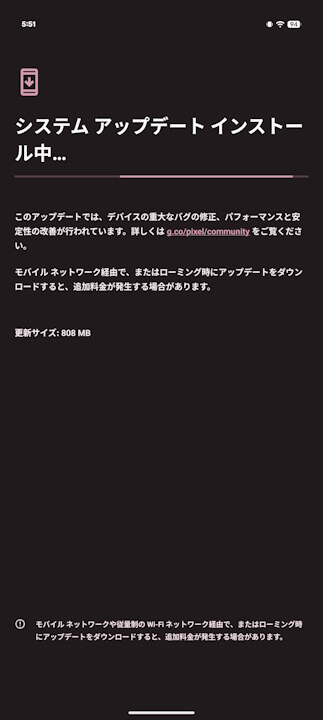
The bug fixes and improvements applied in the December 2025 monthly software update (Android 16 QPR2 update) for Google Pixel devices are as follows.
| ■ Bug Fixes and Improvements for “Pixel 10,” “Pixel 10 Pro,” “Pixel 10 Pro XL,” “Pixel 10 Pro Fold” |
| 〇 Audio ・Fix for an issue causing audio to crash under certain conditions 〇 Battery & Charging ・Fix for an issue where the battery icon in the status bar appeared blank or with a “?” under certain conditions ・Fix for an issue where the 80% battery charge limit setting did not function correctly under certain conditions 〇 Bluetooth ・Fix for an issue that sometimes prevented connection to certain devices or accessories under certain conditions 〇 Camera ・General improvements for camera stability under certain conditions 〇 Display & Graphics ・Fix for an issue where the screen would flash or remain black under certain conditions ・Fix for an issue that sometimes caused the screen to hang or freeze under certain conditions ・Fix for an issue where screen brightness would decrease, requiring a screen on/off toggle to return to normal brightness under certain conditions ・Fix for an issue where the screen was unresponsive immediately after unlocking from the Always-on Display (AOD) ・Fix for an issue causing screen freezes or visual artifacts under certain conditions 〇 Framework ・Fix for an issue with the “Extra dim” toggle in Quick Settings tiles under certain conditions ・Fix for an issue where the splash screen would not close, leading to a low memory state under certain conditions ・Fix for Picture-in-Picture (PiP) instability during screen changes under certain conditions ・General improvements for system stability and performance under certain conditions 〇 Sensors ・Fix for an issue causing instability due to a memory allocation error in sensor-related functions under certain conditions 〇 System ・Improvements for overall system stability and performance under certain conditions 〇 Telephony ・Improvements for network connection stability and performance under certain conditions 〇 Touch ・Fix for an issue causing fingerprint unlock to fail under certain conditions 〇 User Interface ・Fix for an issue where the keyboard would flicker or not appear when searching in the app drawer ・Fix for an issue that sometimes caused Google Home controls to launch with a blank screen under certain conditions ・Fix for an issue causing the screen to freeze during gestures or app switching under certain conditions ・Fix for an issue that sometimes prevented message notification sounds from playing under certain conditions ・Fix for issues with layout and animations during screen transitions under certain conditions ・Fix for an issue causing UI elements to overlap in the notification shade under certain conditions ・Fix for an issue where a translucent background would remain after launching the camera by double-pressing the power button under certain conditions ・Fix for an issue where the swipe-up gesture (to close/view apps) was not working under certain conditions ・Fix for an issue with the Quick Settings tiles shade under certain conditions ・Fix for an issue causing the System UI to crash during notification onboarding under certain conditions ・Fix for an issue where the Quick Settings tiles would appear instead of the notification shade after unlocking ・Performance and stability improvements for certain UI transitions and animations |
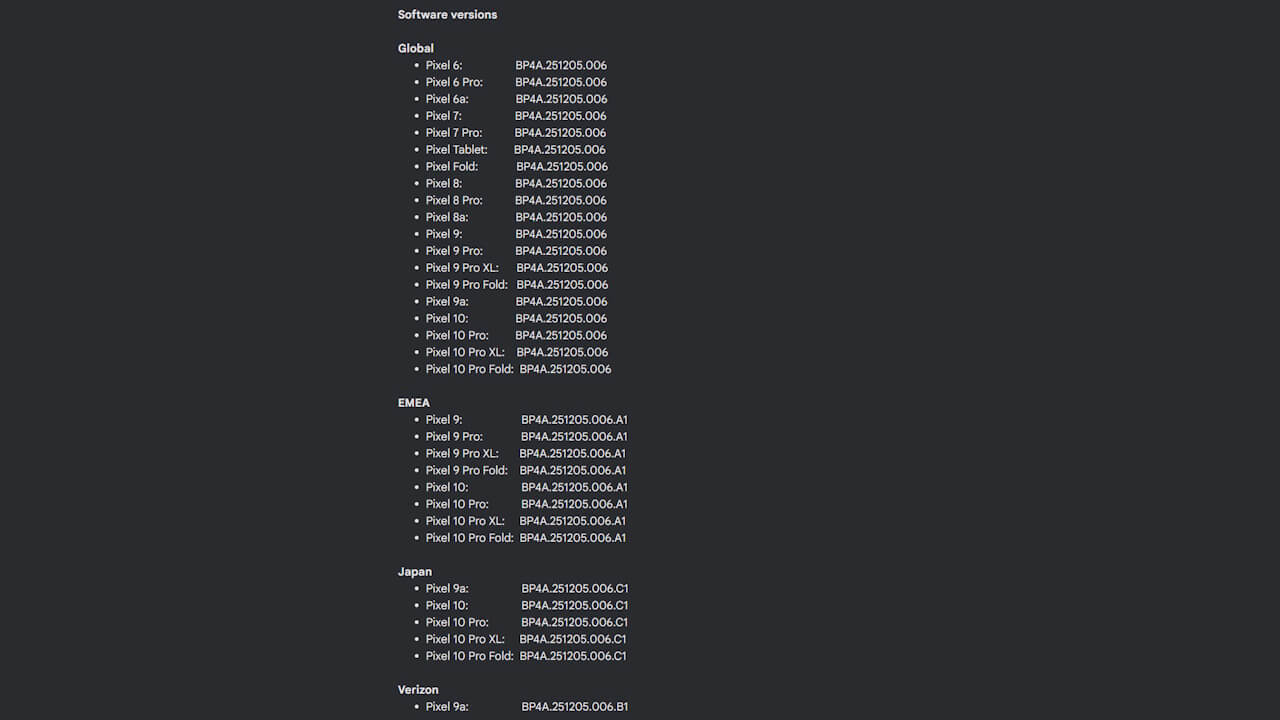
After the December 2025 monthly software update for “Pixel 10,” “Pixel 10 Pro,” “Pixel 10 Pro XL,” and “Pixel 10 Pro Fold,” the build number will be updated to “BP4A.251205.006 (BP4A.251205.006.C1),” and the Android security patch level will be “December 5, 2025.”
| ■ Android Security Patch Level |
| ・”Pixel 10,” “Pixel 10 Pro,” “Pixel 10 Pro XL,” “Pixel 10 Pro Fold”: “December 5, 2025” |
| ■ Build Number |
| ・”Pixel 10,” “Pixel 10 Pro,” “Pixel 10 Pro XL,” “Pixel 10 Pro Fold”: “BP4A.251205.006” ※Japanese models of “Pixel 10,” “Pixel 10 Pro,” “Pixel 10 Pro XL,” “Pixel 10 Pro Fold”: “BP4A.251205.006.C1” |
The software update for Google Pixel devices is being rolled out “Over the Air (OTA)” in stages, starting today and continuing through next week. You can check if the software update is available by going to Android Settings > System > Software update, and then tapping “System update.”
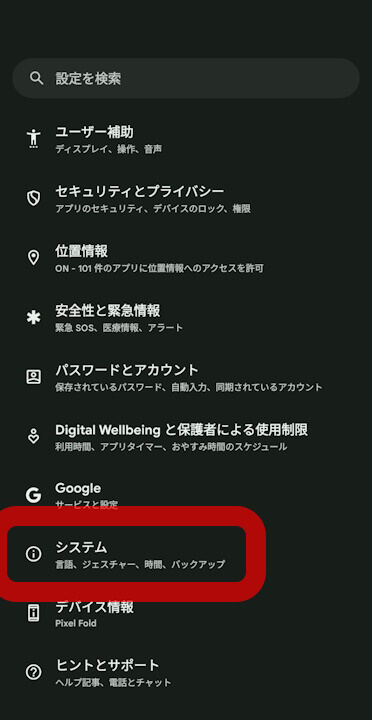
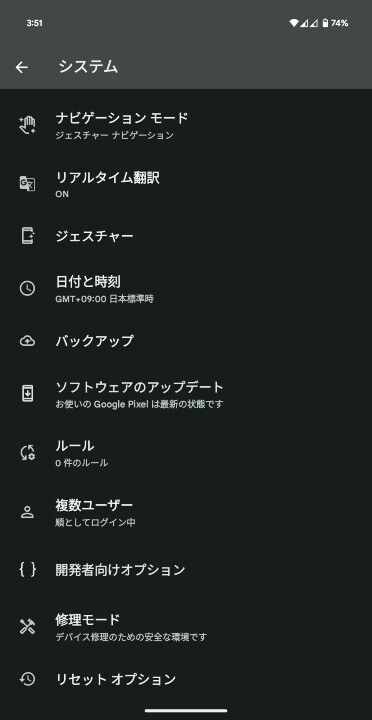
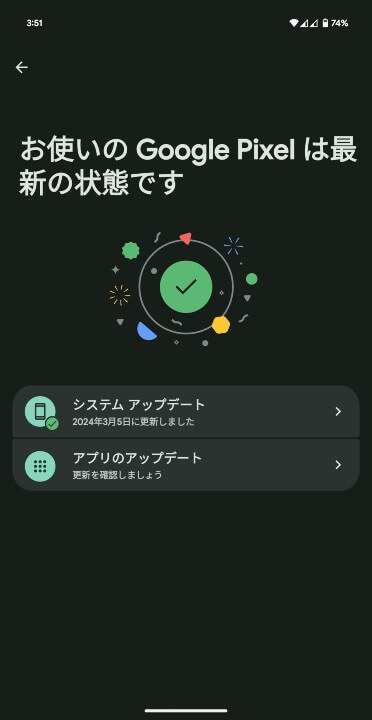
| ①Android 設定の[システム]をタップ |
| Android 設定内の[システム]をタップします。 |
| ②[システム アップデート]をタップ |
| 表示されるメニュー内の[システム アップデート]をタップします。 |
| ③[システム アップデート]をタップ |
| 画面右下の[アップデートをチェック]をタップします。 |
Users of the Japanese models of “Pixel 10,” “Pixel 10 Pro,” “Pixel 10 Pro XL,” and “Pixel 10 Pro Fold” should apply the software update immediately.
Source: Google