







- Android デバイス向けの SMS / MMS / RCS クライアントアプリ「Google メッセージ」の設定画面が、大幅にリニューアルされる模様。
- Android 用「Google メッセージ」アプリ v20261020 アップデートのアプリファイルを解析した結果、大幅リニューアルされる新しい設定画面に関するリソースコードと、新しい設定画面に配置される複数のイラスト画像が追加されていることを確認。
- 大幅リニューアルされる新しい設定画面では、これまでの設定内容自体に変更はないものの、細分化されてしまった設定項目がカテゴリごとにまとめられ、より的確な設定の確認と変更ができるように。
Android デバイス向けの SMS / MMS / RCS クライアントアプリ「Google メッセージ」の設定画面が、大幅にリニューアルされる模様です。
当サイト「Jetstream」オリジナルのアプリファイル解析報告コンテンツ「アプリ解析」にて、その内容をお送りします。

「アプリ解析」
当サイトの「アプリ解析」カテゴリで公開している記事では、最新 Android アプリを逆コンパイルして独自に解析し、今後実装される可能性のある新機能や変更点などをお届けします。正式リリース前の新機能や変更となるため開発段階の未確定な情報も含まれますが、Android アプリの今後のアップデート動向をいち早くキャッチできる、ほかにはない当サイトオリジナルコンテンツです。
当サイトオリジナルの「アプリ解析」コンテンツを見逃さないよう、ぜひ Google の「優先ソース」に当サイト「Jetstream 」を登録してください。

2026 年 10 月 22 日(木)に配信された Android 用「Google メッセージ」アプリ v20261020 アップデートのアプリファイルを解析した結果、大幅リニューアルされる新しい設定画面に関するリソースコードと、新しい設定画面に配置される複数のイラスト画像が追加されていることを確認しました。また、リソースコードを基にした新しい設定画面の UI イメージも明らかとなっています。
ただし、大幅リニューアルされる新しい設定画面の展開は、まだ確認できていません。
<string name="title_screen_settings_main">Settings</string>
<string name="title_preference_messages">Messaging</string>
<string name="description_preference_messages">RCS, SMS/MMS, reliability, auto-downloads</string>
<string name="description_preference_notifications">Sounds, vibration, and style</string>
<string name="title_privacy">Privacy</string>
<string name="description_preference_privacy">Profiles, read receipt, typing indicators</string>
<string name="title_preference_spam_and_safety">Spam & Safety</string>
<string name="description_preference_spam_and_safety">Protection & safety, sensitive content</string>
<string name="title_preference_phone_number_and_region">Phone Number & Region</string>
<string name="description_preference_phone_number_and_region">SIM card phone number, country</string>
<string name="title_screen_reaction_and_effects">Reaction & effects</string>
<string name="description_preference_reaction_and_effects_expressive">Expressive animations, cross-platform emojis</string>
<string name="description_preference_wireless_emergency_alerts">Alert history, warnings, AMBER alerts</string>
<string name="description_preference_about_and_help">App version, terms & policy, and more</string>
<string name="title_screen_version_info_terms_privacy_policy">Version info, terms, Privacy Policy</string><string name="title_section_connectivity">Connectivity</string>
<string name="title_section_rcs_connectivity">RCS connectivity</string>
<string name="title_section_reliability">Reliability</string>
<string name="title_section_rcs_auto_download">Auto-download</string>
<string name="title_section_notification_and_sounds">Notification & sounds</string>
<string name="title_section_privacy_and_security">Privacy & security</string>
<string name="title_section_display_and_gestures">Display & gestures</string>
<string name="title_section_smart_features">Smart features & AI</string>
<string name="title_section_reaction_and_effects">Animations</string>
<string name="title_section_reaction_ios">Cross-platfom</string>
<string name="title_section_inbox_organization">Auto-delete</string>
<string name="title_section_number_and_country">Country & Number</string>
<string name="section_title_protection">Protection</string>
<string name="section_title_content_warnings">Content warnings</string><string name="title_profiles">Profiles</string>
<string name="description_read_receipts_illustration">Let people know when their RCS chat message was read</string>
<string name="title_preference_read_receipts">Who can see you have read their message</string>
<string name="title_typing_indicators_illustration_description">Let people know when someone on RCS chat is typing</string>
<string name="title_preference_typing_indicators">Who can see when you are typing</string>
<string name="description_preference_reaction_ios">Display reactions from iPhone users as emojis instead of text descriptions</string>
<string name="description_birthday_reminders">Get active alerts and friendly reminders for birthdays you have added in contacts</string>
<string name="description_suggest_message_reminders">Messages that may need a reply or a follow up will move to the top of your chat list</string>
<string name="title_suggested_actions">Suggested Actions</string>
<string name="description_smart_reply">Smart reply</string>
<string name="title_magic_compose">Magic compose</string>
<string name="description_preference_gemini">Easily chat with Gemini in messages</string>
<string name="description_gemini_settings_title">Show Gemini Button: On</string>
<string name="description_gemini_settings_title_off">Show Gemini Button: Off</string>
<string name="title_voice_message_transcription">Voice Message Transcription</string>
<string name="title_footer_voice_message_transcription">Transcripts can help when listening is not an option. Voice messages are transcribed on your device and are not sent to Google.</string>
<string name="title_pinch_to_zoom">Pinch to zoom</string>
<string name="description_preference_pinch_to_zoom">Adjust text size by pinching</string>
<string name="description_preference_swipe_actions">Right: %1$s, Left: %2$s</string>
<string name="description_on_galaxy_devices">Use Bixby Voice to send and read messages, and continue texts across your Galaxy devices</string>
<string name="description_inbox_organization_settings_title">Auto delete OTPs</string>
<plurals name="title_switch_inbox_organization">
<item quantity="one">Auto-delete OTP messages after %1$d hour</item>
<item quantity="other">Auto-delete OTP messages after %1$d hours</item>
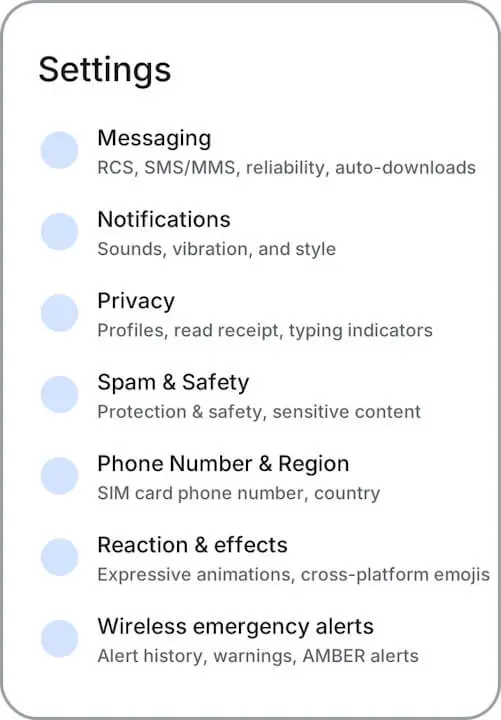
</plurals>大幅リニューアルされる Android 用「Google メッセージ」アプリの新しい設定画面では、これまでの設定内容自体に変更はないものの、細分化されてしまった設定項目がカテゴリごとにまとめられ、より的確な設定の確認と変更ができるようになります。設定のトップ画面には「Messaging」「Notifications」「Privacy」「Spam & Safety」「Phone Number & Region」「Reaction & effects」などのカテゴリが並び、各カテゴリ名の下に、そのカテゴリに含まれる設定の要約が表示される仕様です。
たとえば、「Privacy」の下には「Profiles, read receipt, typing indicators」が、「Messaging」の下には「RCS, SMS/MMS, reliability, auto-downloads」が表示されるため、カテゴリを開く前に、目的の設定がどこにあるのかを把握しやすくなります。カテゴリを開いた先では、個別の設定が「Connectivity」「Display & gestures」「Smart features & AI」などのセクションに分けて並べられ、「Gemini」や「スマート リプライ」といった AI 関連の設定は「Smart features & AI」にまとめられます。
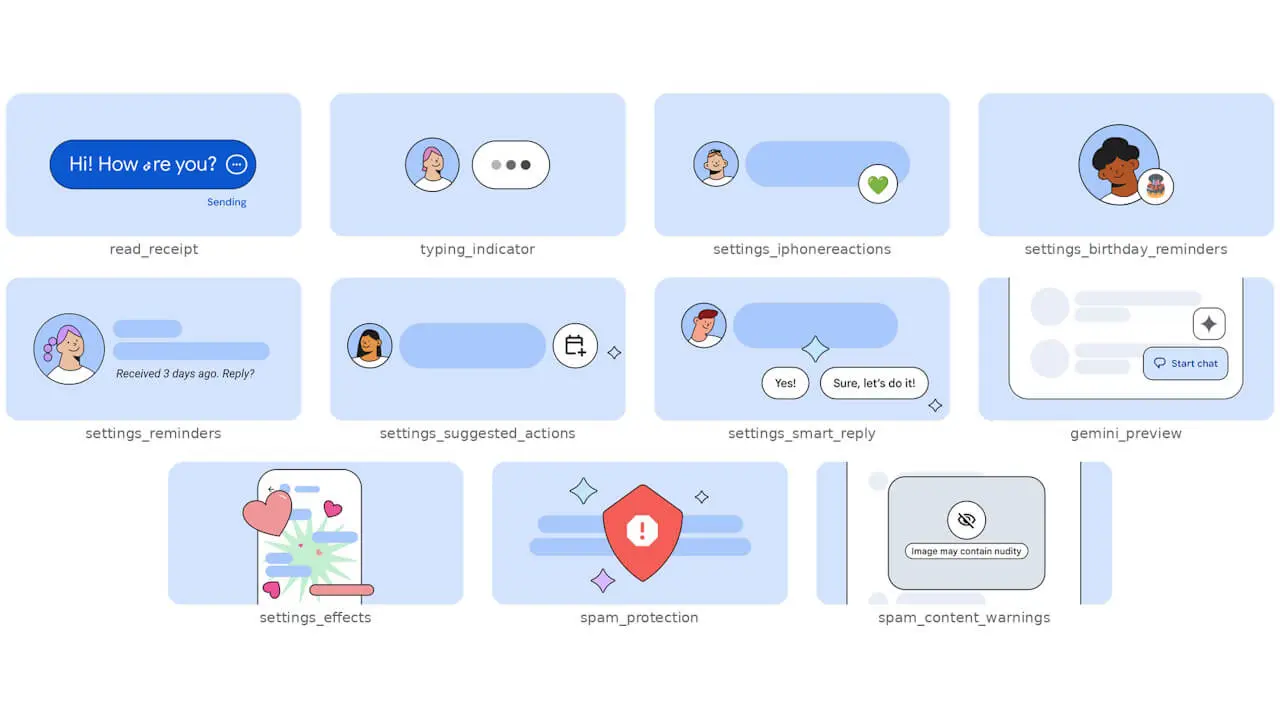
さらに「既読通知」「入力中の表示」「誕生日リマインダー」「スパム対策」などの設定には、上で紹介したイラスト画像がそれぞれの設定内に表示され、その設定の内容をより把握しやすくなる模様です。
「Google メッセージ」アプリリンク







コメントを残す